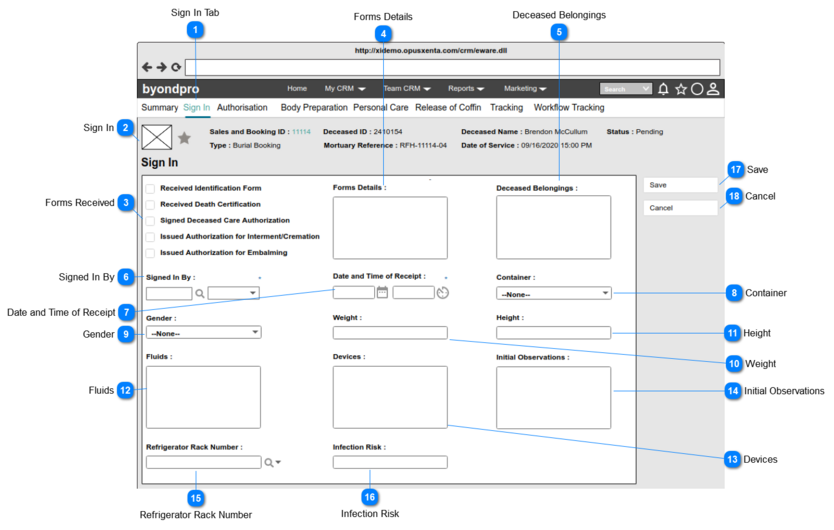
Pre-conditions: 1. There should be at least one person (will be an employee of FH) created underneath the funeral home, in order to list down as the options.
1. By default, the logged in user's name will be set as the value of this field.
2. List the full names of the persons (will be employees of FH) created underneath the funeral home and order by ASC.
3. This element allows the user to search/ filter and select a value from the list.
4. This allows to enter any characters including numbers, letters and special characters.
1. By default, current date and time will be set as the value.
2. Once the user clicks on the calendar icon (placed next to the date text field), it will show a Date Picker and the user will be able to select a date from it.
(Consider
Profile Menu -> Preferences -> Date/ Time Preferences
for the date format)
3. Once the user clicks on the clock icon (placed next to the time text field), it will show a Time Picker and the user will be able to select a time from it.
(Consider
Profile Menu -> Preferences -> Date/ Time Preferences
Pre-conditions: 1. There should be at least one refrigerator / rack record created underneath the funeral home/ mortuary.
Post-conditions:
Upon saving the record
1. The status of the refrigerator rack no. will be changed to occupied.
2. Selected value will be reflected in the Refrigerator Rack No. field of the Refrigerator Movement Tracking screen.
1. List ONLY the rack no which have the status = available created underneath the CSC -> Administration -> byondpro Setup -> Refrigerator Rack No and order by ASC
2. This element allows the user to either input a value directly OR search and select a value from the list (When the user double-clicks on the searched value, it will show the details of the refrigerator rack in a new browser window).
3. The columns displayed as the "View Fields" in the lookup will be,
Refrigerator Rack no
Type
Site/ Location
4. This allows to enter any characters including numbers, letters and special characters.