To properly display this page you need a browser with JavaScript support.
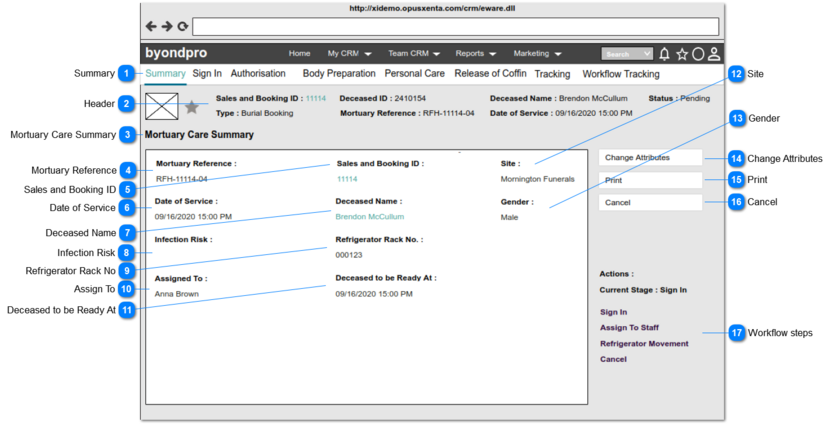
The summary of the mortuary care record can be accessed :
By clicking the Summary Tab of the particular mortuary care record
Summary
Type
Notes
Rules
Compulsory
Placeholder
Format
Edit
Size
Default
Messages
Tab 1 Title
-
-
-
-
Text
-
-
-
-
Header
Type
Notes
Rules
Compulsory
Placeholder
Format
Edit
Size
Default
Messages
Header
-
1. The header section should consist of the following information which is linked with the created sales and booking record.
2. Any information updated on the Sales and Booking record, should be reflected in the header section as well.
3. The header will be repeated across all the tabs of the Mortuary Care record.
-
-
Text
-
-
-
-
Mortuary Care Summary
Type
Notes
Rules
Compulsory
Placeholder
Format
Edit
Size
Default
Messages
Page Title
-
-
-
-
Text
-
-
-
-
Mortuary Reference
Type
Notes
Rules
Compulsory
Placeholder
Format
Edit
Size
Default
Messages
Readonly text
1. Mortuary Reference no generated when saving the the first call record with "Do you need Mortuary Care" check box ticked, will be shown.
2. Refer Save button notes 2b and 3b for more information on generating Mortuary Reference
-
-
Text
-
-
-
-
Sales and Booking ID
Type
Notes
Rules
Compulsory
Placeholder
Format
Edit
Size
Default
Messages
Hyperlink
Sales and Booking No will be shown.
1.The value will be acted as a hyperlink.
2.Upon clicking the hyperlink, user will be navigated to the particular Sales and Booking record.
-
-
Text
-
-
-
-
Date of Service
Type
Notes
Rules
Compulsory
Placeholder
Format
Edit
Size
Default
Messages
Read only text
Date of Service recorded in the sales and booking record will be shown.
1. Any changes done to the Funeral Service Start value of Sales and Booking record should be reflected here. (Sales and Booking> Funeral Arrangement > Funeral Service Start)
-
-
Text
-
-
-
-
Deceased Name
Type
Notes
Rules
Compulsory
Placeholder
Format
Edit
Size
Default
Messages
Hyperlink
Full name of the deceased will be shown.
1.The value will be acted as a hyperlink.
2.Upon clicking the hyperlink, user will be navigated to the particular person record.
-
-
Text
-
-
-
-
Infection Risk
Type
Notes
Rules
Compulsory
Placeholder
Format
Edit
Size
Default
Messages
Readonly text
-
1. If an Infection Risk value has been recorded in the First Call record,
then that value should be reflected.
Else
keep this field empty.
OR
2. Any changes done in Infection Risk value of the Sign In screen should be reflected here.
3. If there is a value,
then both value and the label should be shown in red color.
-
-
Text
-
-
-
-
Refrigerator Rack No
Type
Notes
Rules
Compulsory
Placeholder
Format
Edit
Size
Default
Messages
Readonly text
1. Pre Condition:
Sign In workflow step should be completed
2. Value entered in the Refrigerator Rack No field of the Sign In screen/ Refrigerator Movement Tracking should be reflected here.
1. Any changes done to the Refrigerator rack No value of the Sign In screen/ Refrigerator Movement Tracking screen should be reflected here.
-
-
Text
-
-
-
-
Assign To
Type
Notes
Rules
Compulsory
Placeholder
Format
Edit
Size
Default
Messages
Readonly text
1.Pre Condition:
Assign To workflow step should be completed.
2.Value entered in the Assign To field of the Assign Staff screen should be reflected here.
1. Any changes done to the Staff Assigned field of the Assign to Staff screen should be reflected here.
-
-
Text
-
-
-
-
Deceased to be Ready At
Type
Notes
Rules
Compulsory
Placeholder
Format
Edit
Size
Default
Messages
Readonly text
Value entered in the Deceased to be Ready At field of Edit screen of summary should be reflected here.
1. Any changes done to the Deceased to be Ready At field of Edit screen of summary, should be reflected here.
-
-
Text
-
-
-
-
Site
Type
Notes
Rules
Compulsory
Placeholder
Format
Edit
Size
Default
Messages
Readonly text
Site value recorded in the sales and booking record will be shown.
Any changes done to the Site value of Sales and Booking record should be reflected here.
-
-
Text
-
-
-
-
Gender
Type
Notes
Rules
Compulsory
Placeholder
Format
Edit
Size
Default
Messages
Readonly text
1. Pre Condition:
Sign In workflow step should be completed
2. Value entered in the Gender field of the Sign In screen should be reflected here.
1. Any changes done to the Gender value of the Sign In screen should be reflected here.
-
-
Text
-
-
-
-
Change Attributes
Type
Notes
Rules
Compulsory
Placeholder
Format
Edit
Size
Default
Messages
Button
Upon clicking, the user will be navigated to the Edit mode of the summary screen.
Only the Deceased to be Ready At filed should be editable in the edit mode of Summary screen.
-
-
-
-
-
Enable
-
Print
Type
Notes
Rules
Compulsory
Placeholder
Format
Edit
Size
Default
Messages
Button
-
Upon clicking, the user will be navigated to the Print screen.
-
-
-
-
-
Enable
-
Cancel
Type
Notes
Rules
Compulsory
Placeholder
Format
Edit
Size
Default
Messages
Button
-
Upon clicking, the user will be navigated back to the Home screen of the byondpro
-
-
-
-
-
Enable
-
Workflow steps
Type
Notes
Rules
Compulsory
Placeholder
Format
Edit
Size
Default
Messages
Workflow
This section will consist of:
Available workflow steps for the current status of the Mortuary Care record.
1. The possible workflow steps should be shown according to the status stated in the Workflow Requirement section.
2. Following are the workflow steps for the Mortuary Care.
Sign In : Upon clicking, the user will be navigated to the Sign In screen
Assign to Staff/ Re-assign Staff : Upon clicking, the user will be navigated to the Assign to Staff screen
Authorisation : Upon clicking, the user will be navigated to the Authorisation screen
Body Preparation : Upon clicking, the user will be navigated to the Body Preparation screen
Personal Care : Upon clicking, the user will be navigated to the Personal Care screen
Release of Coffin : Upon clicking, the user will be navigated to the Release of Coffin screen
Completion : Upon clicking, Completion screen will be prompted
Cancel : Upon clicking, Cancellation screen will be prompted
-
-
-
-
-
-
-