Workflow
Mortuary Care records follow a workflow process allowing the mortuary to track and record the following:
-
Sign-in details when the deceased is received into the Mortuary ‘s care.
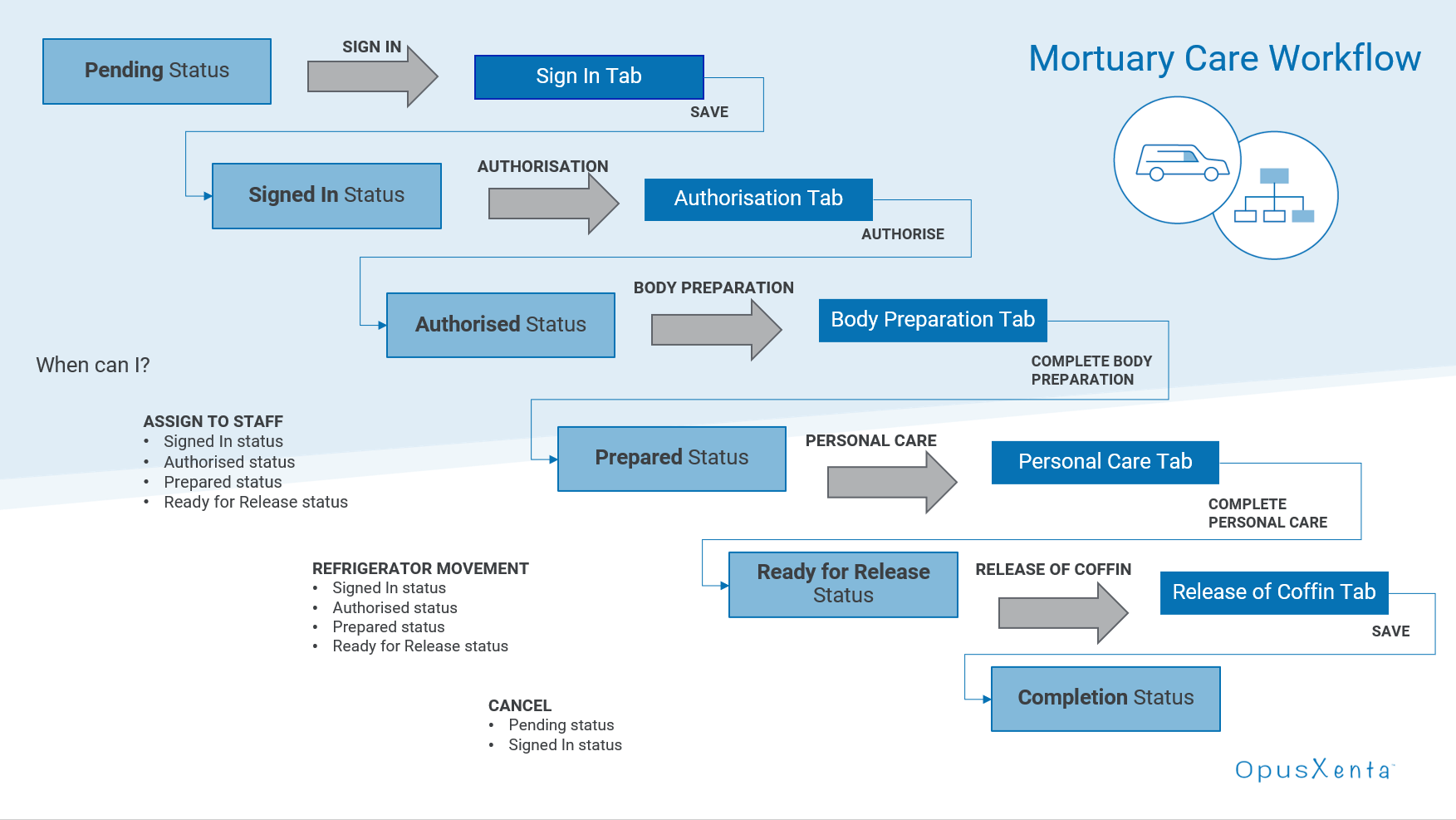
The workflow is designed so users cannot proceed without completing the previous step with the exceptions of:
-
Assigning to Staff to allow staff members to action and record their part of the process. Alternatively, one staff member can be responsible for the record from sign-in to release.
-
Refrigeration Movement to record when the deceased's remains have changed the cooling unit they are stored in and record availability of the previous cooling unit.
-
Cancel, which allows users to cancel the Mortuary record before it has been recorded as Authorised.
While completing the workflow, the status of the record updates to reflect the current stage the record is in.
Users can save changes to a stage without proceeding to the next stage and return to complete the stage when ready.
Once the coffin has been released, the record can be marked as completed, suggesting there is no further action to be taken.
Documents, such as Authorisation forms and Medical Certificates, can be saved on the Documents tab of the record.
Workflow tracking exists to record the time spent in each stage.