byondpro
Functional Specifications
×
Menu
Index

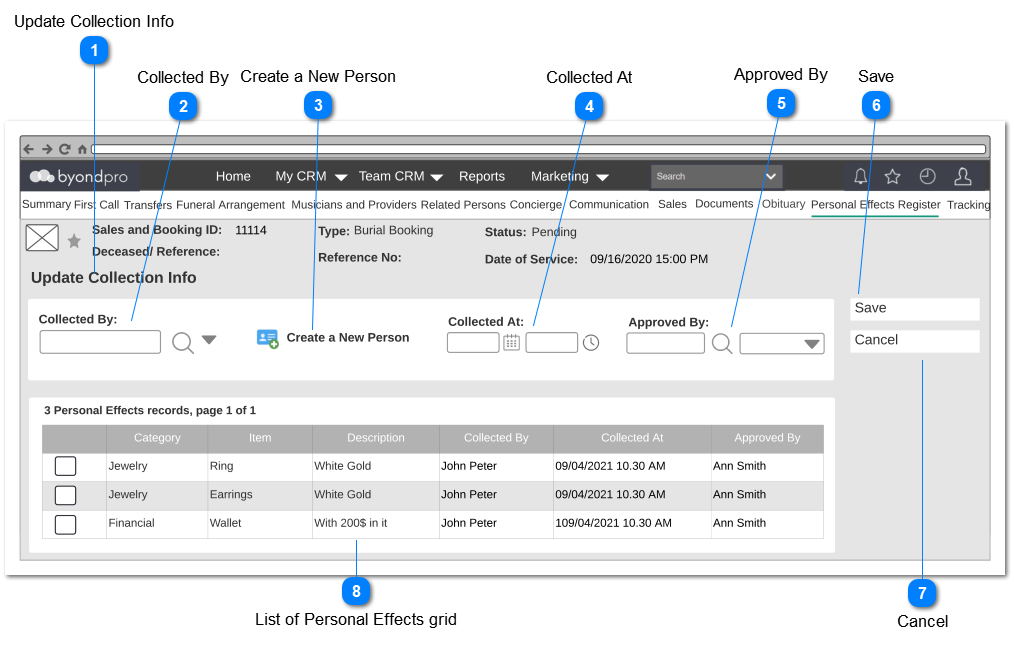
Update Collection Info


Update Collection Info
1

Update Collection Info

Type
Notes
Rules
Compulsory
Placeholder
Format
Edit
Size
Default
Messages
Page Title
-
-
-
-
-
-
-
-
-
2

Collected By

Type
Notes
Rules
Compulsory
Placeholder
Format
Edit
Size
Default
Messages
Advanced Select Search
-
Pre Condition:
1. There should be at least one person record added via persons module.
 
2. At least one item should be selected in the grid in order to enable this filed to select.
Yes
-
-
Yes
-
-
-
3

Create a New Person

Type
Notes
Rules
Compulsory
Placeholder
Format
Edit
Size
Default
Messages
Button
-
1. Upon clicking, user shall be navigated to the Person creation screen. (Same functionality available in the Sales and Booking screen.)
-
-
-
-
-
-
-
4

Collected At

Type
Notes
Rules
Compulsory
Placeholder
Format
Edit
Size
Default
Messages
Date and Time
1. By default, current date and time will be set as the value.
 
1. Once the user clicks on the calendar icon (placed next to the date text field), it will show a Date Picker and the user will be able to select a date from it.
(Consider
Profile Menu -> Preferences -> Date/ Time Preferences
for the date format)
 
2. Once the user clicks on the clock icon (placed next to the time text field), it will show a Time Picker and the user will be able to select a time from it.
(Consider
Profile Menu -> Preferences -> Date/ Time Preferences
for the time format).
 
3. Both fields will only allow to enter numbers.
 
4. Only the current date or a past date should be allowed to select.
 
Pre Condition:
 
1. At least one item should be selected in the grid in order to enable this filed to select.
Yes
-
Date and Time
No
-
Current Date and Time
-
 
5

Approved By

Type
Notes
Rules
Compulsory
Placeholder
Format
Edit
Size
Default
Messages
User Select
1. By default, the logged in user's name will be set as the value of this field.
 
2. List the full names of the persons (will be employees of FH) created underneath the funeral home and order by ASC.

3. This element allows the user to  search/ filter and select a value from the list.


1. This allows to enter any characters including numbers, letters and special characters.
 
Pre-conditions:
1. There should be at least one person (will be an employee of FH) created underneath the funeral home, in order to list down as the options.
Yes
-
-
Yes
-
-
-
6

Save

Type
Notes
Rules
Compulsory
Placeholder
Format
Edit
Size
Default
Messages
Button
-
Upon clicking,
1. If all the mandatory fields are filled,
Then
1a. Save the records.
1b. Update the status as "Collected" of Update Instructions and the Personal Effects Summary screens.
1c. Success message should be shown.
1d. User will be navigated to the  Personal Effects Summary screen.
 
Else
 
1e. Show the error message
 
 
-
-
-
-
-
-
Success Message:
 
1c. Record has been updated.
 
Error Message:
 
1e. Default SAGE CRM error message for mandatory fields.
7

Cancel

Type
Notes
Rules
Compulsory
Placeholder
Format
Edit
Size
Default
Messages
Button
-
1. Upon clicking,
 
1a. Entered data should be discarded without saving.
 
1b. User should be navigated to the Personal Effects Summary screen.
-
-
-
-
-
-
-
8

List of Personal Effects grid

Type
Notes
Rules
Compulsory
Placeholder
Format
Edit
Size
Default
Messages
Column Header
Check box will be available for each row.
Post Condition:
1. Upon checking a check box, the following fields should be enabled for editing.
-
-
-
Yes
-
-
-
Column Header
Category
1. Category selected in the Add Personal Effects screen will be displayed.


No


Column Header
Item
1. Item selected in the Add Personal Effects screen will be displayed.


No


Column Header
Description
1. Description entered in the Add Personal Effects screen will be displayed.


No


Column Header
Collected By
1. Person entered for Collected By field, will be displayed


Yes


Column Header
Collected At
1. Date and Time entered for Collected At field will be displayed.


Yes


Column Header
Approved By
1. User entered for the Approved By filed, will be displayed


Yes


The online help was created with Dr.Explain