To properly display this page you need a browser with JavaScript support.
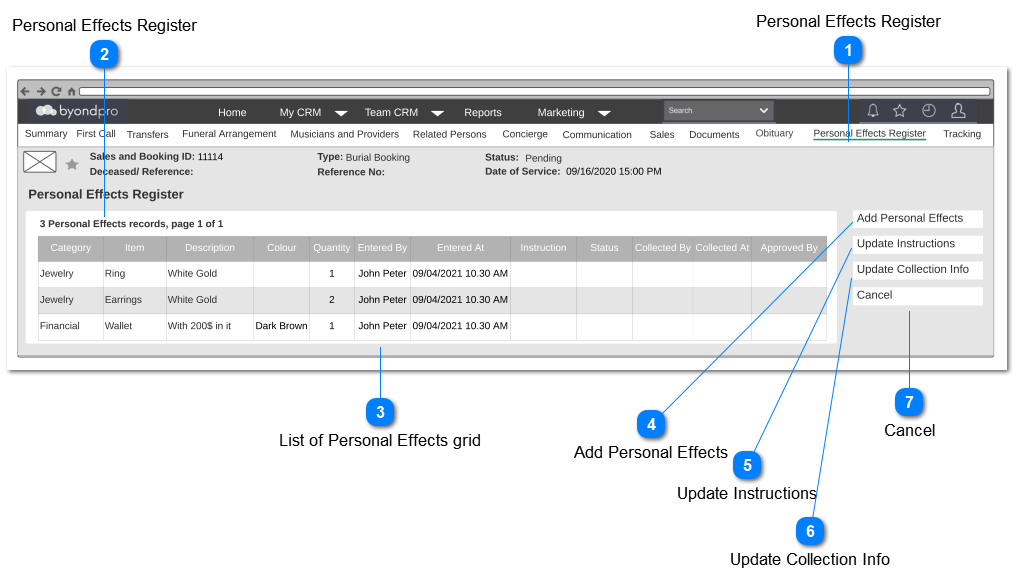
Personal Effects Summary screen will show the summary of the personal effects in read-only mode, including what are the personal effects, actions taken for those personal effects and who are the persons involved for those actions.
User can access this tab through the respective Sales and Booking Record.
Personal Effects Register
Type
Notes
Rules
Compulsory
Placeholder
Format
Edit
Size
Default
Messages
Tab Header
-
-
-
-
-
-
-
-
-
Personal Effects Register
Type
Notes
Rules
Compulsory
Placeholder
Format
Edit
Size
Default
Messages
Page Title
-
-
-
-
-
-
-
-
-
List of Personal Effects grid
Type
Notes
Rules
Compulsory
Placeholder
Format
Edit
Size
Default
Messages
Column Header
Category
-
-
-
-
-
-
-
Column Header
Item
-
-
-
-
-
-
-
Column Header
Description
-
-
-
-
-
-
-
Column Header
Colour
-
-
-
-
-
-
-
Column Header
Quantity
-
-
-
-
-
-
-
Column Header
Entered By
1. The person who created the personal effects record in Add Personal Effects screen will be displayed.
-
-
-
-
-
-
-
Column Header
Entered At
1. The data entry date and time when created the personal effects record in Add Personal Effects screen will be displayed.
-
-
-
-
-
-
-
Column Header
Instruction
-
-
-
-
-
-
-
Column Header
Status
-
-
-
-
-
-
-
Column Header
Collected By
-
-
-
-
-
-
-
Column Header
Collected At
-
-
-
-
-
-
-
Column Header
Approved By
-
-
-
-
-
-
-
Add Personal Effects
Type
Notes
Rules
Compulsory
Placeholder
Format
Edit
Size
Default
Messages
Button
-
-
-
-
-
-
-
-
Update Instructions
Type
Notes
Rules
Compulsory
Placeholder
Format
Edit
Size
Default
Messages
Button
-
Pre Conditions:
1. At least one personal effects record should be added through the Add Personal Effects , in order to available this button.
-
-
-
-
-
-
-
Update Collection Info
Type
Notes
Rules
Compulsory
Placeholder
Format
Edit
Size
Default
Messages
Button
-
Pre Conditions:
1. At least one personal effects record should be added with the Instruction = "Handover to Family", in order to available this button.
-
-
-
-
-
-
-
Cancel
Type
Notes
Rules
Compulsory
Placeholder
Format
Edit
Size
Default
Messages
Button
-
1. Upon clicking, user will be navigated to the Home screen of the byondpro.
-
-
-
-
-
-
-