-
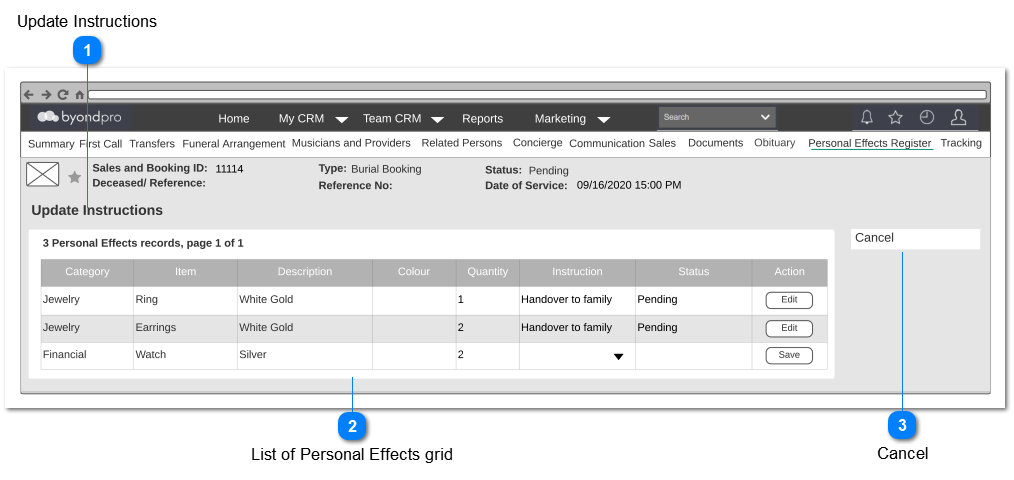
Update Instruction screen will facilitate to update the relevant instructions to the added Personal Effects.
 Update Instructions
|
Type
|
Notes
|
Rules
|
Compulsory
|
Placeholder
|
Format
|
Edit
|
Size
|
Default
|
Messages
|
|
Page Title
|
-
|
-
|
-
|
-
|
-
|
-
|
-
|
-
|
-
| |
|
 List of Personal Effects grid
|
Type
|
Notes
|
Rules
|
Compulsory
|
Placeholder
|
Format
|
Edit
|
Size
|
Default
|
Messages
|
|
Column Header
|
Category
|
|
-
|
-
|
-
|
No
|
-
|
-
|
-
|
|
Column Header
|
Item
|
|
-
|
-
|
-
|
No
|
-
|
-
|
-
|
|
Column Header
|
Description
|
|
-
|
-
|
-
|
No
|
-
|
-
|
-
|
|
Column Header
|
Colour
|
|
-
|
-
|
-
|
No
|
-
|
-
|
-
|
|
Column Header
|
Quantity
|
|
-
|
-
|
-
|
No
|
-
|
-
|
-
|
|
Column Header
|
Instruction
|
1. The following values should be listed out to select.
-
-
Keep with the deceased body
Pre Condition:
1. Edit button of the respective row, should be clicked, in order to enable this cell for editing.
|
Yes
|
-
|
-
|
Yes
|
-
|
-
|
-
|
|
Column Header
|
Status
|
1. If Instruction = Handover to Family
Then "Pending" should be shown as the value
Else
Keep blank
|
-
|
-
|
-
|
No
|
-
|
-
|
-
|
|
Column Header
|
Action
|
1. This column should consist of following buttons:
2. Initially, only the Edit button will be available for each row.
3. Upon clicking the Edit button,
3a. Instruction cell of the respective row, should become editable.
3b. Save button should be available and Edit button should be hidden for the respective row.
4. Upon clicking the Save button,
4a. editable cells of the particular row should become read-only.
4b. Edit button should be shown and Save button should be hidden.
4c. Entered data should be saved.
Post Condition:
1. If any row consists of Instruction = "Handover to Family",
|
-
|
-
|
-
|
-
|
-
|
-
|
-
|
|
|
 Cancel
|
Type
|
Notes
|
Rules
|
Compulsory
|
Placeholder
|
Format
|
Edit
|
Size
|
Default
|
Messages
|
|
Button
|
-
|
1. Upon clicking,
1a. Entered data should be discarded without saving.
|
-
|
-
|
-
|
-
|
-
|
-
|
-
| |
|