-
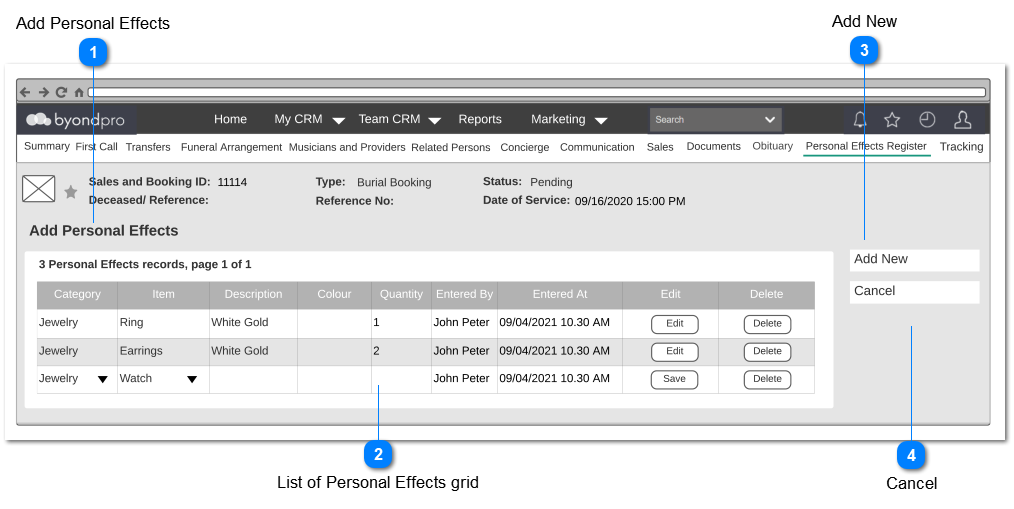
Add Personal Effects screen will facilitate to add the personal effects for a particular Sales and Booking record.
 Add Personal Effects
|
Type
|
Notes
|
Rules
|
Compulsory
|
Placeholder
|
Format
|
Edit
|
Size
|
Default
|
Messages
|
|
Page Title
|
-
|
-
|
-
|
-
|
-
|
-
|
-
|
-
|
-
| |
|
 List of Personal Effects grid
-
System shall support the in-grid editing for the specified columns. -
If there's no record added, then show only the column headers. -
If there are records available, then show those records with the Edit and Delete buttons in each row.
|
Type
|
Notes
|
Rules
|
Compulsory
|
Placeholder
|
Format
|
Edit
|
Size
|
Default
|
Messages
|
|
Column Header
|
Category
|
Pre Condition:
1. At least one category should be added
Post Condition:
1. Items added under the selected category, should be listed down in the dropdown of the Item column.
|
Yes
|
-
|
-
|
Yes
|
-
|
-
|
-
|
|
Column Header
|
Item
|
Pre Condition:
1. Category should be selected in order to list down the related items in the dropdown.
2. At least one item should be added under the selected category.
|
Yes
|
-
|
-
|
Yes
|
-
|
-
|
-
|
|
Column Header
|
Description
|
1. User shall be able to enter the required description.
|
-
|
-
|
Text
|
Yes
|
100
|
-
|
-
|
|
Column Header
|
Colour
|
1.. User shall be able to enter the colour
|
Yes
|
-
|
Text
|
Yes
|
100
|
-
|
-
|
|
Column Header
|
Quantity
|
1. User shall be able to enter the number
|
Yes
|
-
|
Text
Numeric
(CS correction Nov-22)
|
Yes
|
100
-
|
-
|
-
|
|
Column Header
|
Entered By
|
1. Logged in user's full name should be shown.
|
-
|
|
|
No
|
|
Logged in User
|
|
|
Column Header
|
Entered At
|
1. The time stamp at the the time of hitting the Save button of the each row, should be shown.
|
-
|
|
|
No
|
|
-
|
|
|
Column Header
|
Edit
|
1. The column will consist of following buttons:
2. At the time of new row is added,
2a. Only the Save button should be available.
2b. The cells of the columns which have been specified as editable, should become editable.
3. Edit button should be available only for the saved rows.
4. Upon clicking the Save button,
4a. editable cells of the particular row should become read-only.
4b. Edit button should be shown and Save button should be hidden.
4c. Entered data should be saved.
Post Condition:
|
-
|
-
|
-
|
-
|
-
|
-
|
-
|
|
Column
|
Delete
|
1. Upon clicking, alert should be popped up asking the confirmation to delete.
2. Upon confirming the deletion, respective record should be deleted. (Soft delete)
3. Permission should be granted to the user level to allow to perform delete.
|
-
|
-
|
-
|
-
|
-
|
-
|
Alert Message:
You are about to delete this record.
| |
|
 Add New
|
Type
|
Notes
|
Rules
|
Compulsory
|
Placeholder
|
Format
|
Edit
|
Size
|
Default
|
Messages
|
|
Button
|
-
|
1. Upon clicking, new row should be added to the grid just below the existing row.
|
-
|
-
|
-
|
-
|
-
|
-
|
-
| |
|
 Cancel
|
Type
|
Notes
|
Rules
|
Compulsory
|
Placeholder
|
Format
|
Edit
|
Size
|
Default
|
Messages
|
|
Button
|
-
|
1. Upon clicking,
1a. Entered data should be discarded without saving.
|
-
|
-
|
-
|
-
|
-
|
-
|
-
| |
|