To properly display this page you need a browser with JavaScript support.
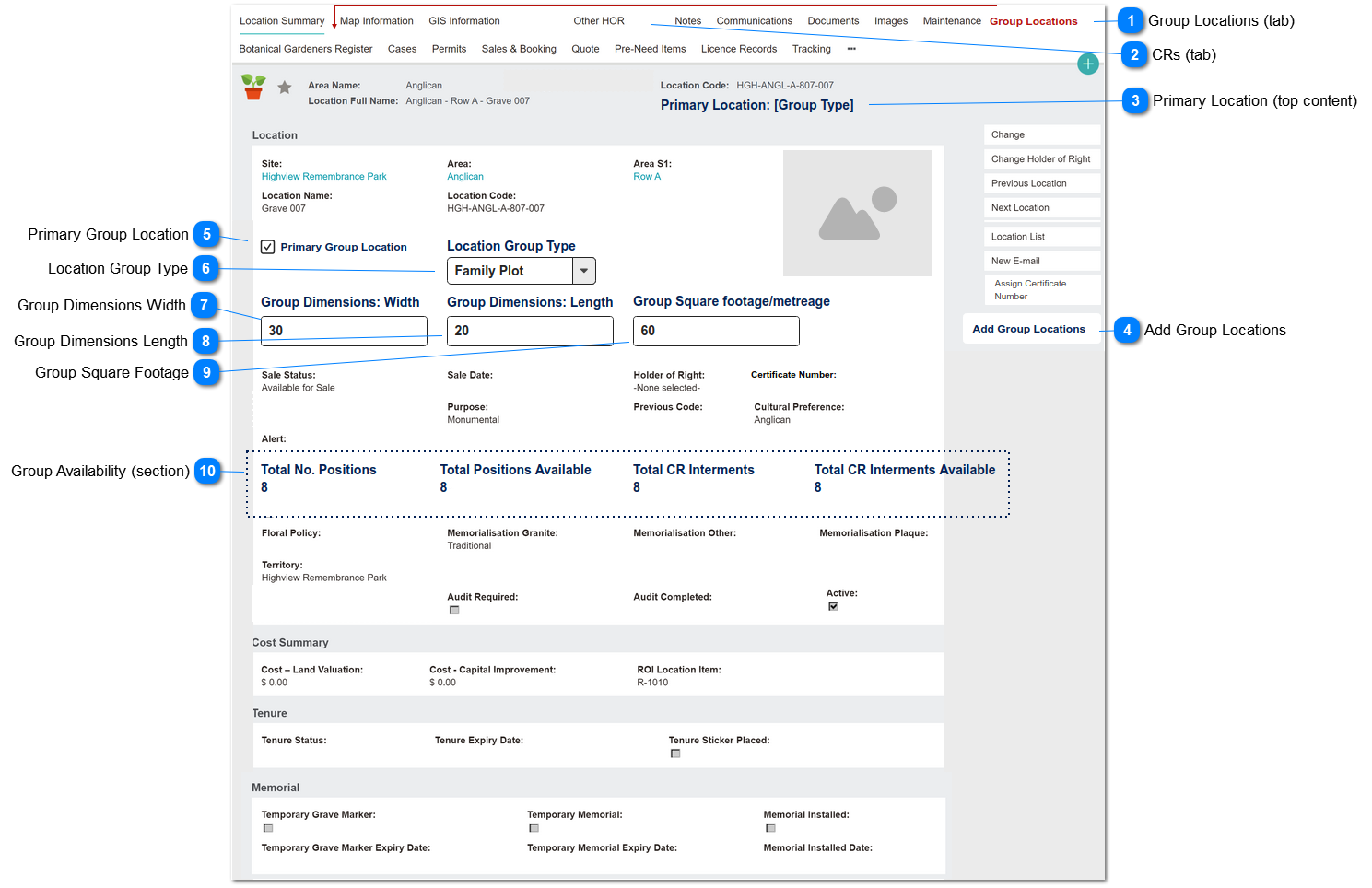
This screen is used the manage the attributes of a Group Location.
A Locations Group is a collection of cemetery locations sold under a single sales agreement.
The Primary Group location is the saleable entity
The Primary Group location is not one of the active (burial) locations
The primary Group location shows attributes pertaining to the group of locations
The component location records are retained and used for grave management and interments; they cannot be purchased separately.
Group Locations (tab)
This is the tab header that shows for the Primary location in a group, to display the list of linked locations (group components).
Type
Notes
Rules
Compulsory
Format
Edit
Size
Default
Error Message
Tab Header
1. Tab is displayed when Primary Group Location = Y
2. Tab should show as the second tab header.
CRs (tab)
The CRs tab header should be hidden for the Primary location in a group .
Primary Location (top content)
This is an indicator in the location record that the location record being viewed is the primary record of a Location Group.
Type
Notes
Rules
Compulsory
Format
Edit
Size
Default
Error Message
Text
Displayed in Top Content
1. Shows when Primary Group Location = Y
2. Display Location Group Type (custom caption) in this format:
"Primary Location: " + [group type]
Text
N
Add Group Locations
This is the button function that opens the Add Group Locations screen, used to link component locations to a Locations Group.
Type
Notes
Rules
Compulsory
Format
Edit
Size
Default
Error Message
Button
1. Show if Primary Group Location = Y
Primary Group Location
This is the key indicator that this location record is the main (parent) record for a Locations Group.
Type
Notes
Rules
Compulsory
Format
Edit
Size
Default
Error Message
checkbox
If Y, triggers show/hide rules for other fields and buttons on this screen.
1. If Y, show following:
Fields:
- Location Group Type
- Group Dimensions: Width
- Group Dimensions: Length
- Group Square Footage
- Total No. Positions
- Total Positions Available
- Total CR Interments
- Total CR Interments Available
Button:
- Add Group Locations
2. If Y, hide following:
- Primary Location
- Location Type
- Operational Status
- War Grave
- Public Grave
- Premium Location
- Premium Location Description
- Available for Batch CR Task
Screen Section:
- Burial / Mausoleum Interments
Y
blank
Location Group Type
This is a categorisation of types of Location Groups, e.g. Family Plot in the grounds or Family Room in a mausoleum.
Type
Notes
Rules
Compulsory
Format
Edit
Size
Default
Error Message
Selection List
Default values:
1. Family Plot
2. Family Room
3. Garden Plot
4. Burial Plot
1. Shows when Primary Group Location = Y
Y
if Primary Group Location = Y
Text
Y
blank
1. Please select Location Group Type
Group Dimensions Width
This is a field to capture the width of the physical space consumed by the Locations Group.
Type
Notes
Rules
Compulsory
Format
Edit
Size
Default
Error Message
Numeric
to be used in calculation of square footage
Y
numeric - allow up to 4 decimal places
Y
0.0000
Group Dimensions Length
This is a field to capture the length of the physical space consumed by the Locations Group.
Type
Notes
Rules
Compulsory
Format
Edit
Size
Default
Error Message
Numeric
to be used in calculation of square footage
Y
numeric - allow up to 4 decimal places
Y
0.0000
Group Square Footage
This is a calculation of the total square footage (metreage) consumed by the Locations Group
Type
Notes
Rules
Compulsory
Format
Edit
Size
Default
Error Message
Numeric
Calculation; allow user to edit
1. on screen calculation as user enters width & length.
CALCULATION:
Group Dimensions Width x
Group Dimensions Length = Group Square Footage
2. Allow user to edit (overwrite) calculated result
N
numeric
Y
0.0000
Group Availability (section)
This series of 4 fields is a dynamic summary of the corresponding field values for each linked Group Location (component) record.
- Total Positions Available
- Total CR Interments
- Total CR Interments Available
Type
Notes
Rules
Compulsory
Format
Edit
Size
Default
Error Message
Integer
1. Shows when Primary Group Location = Y.
2. View only all users.
3. For each field... summarise corresponding field value on Group Location component records.
N