To properly display this page you need a browser with JavaScript support.
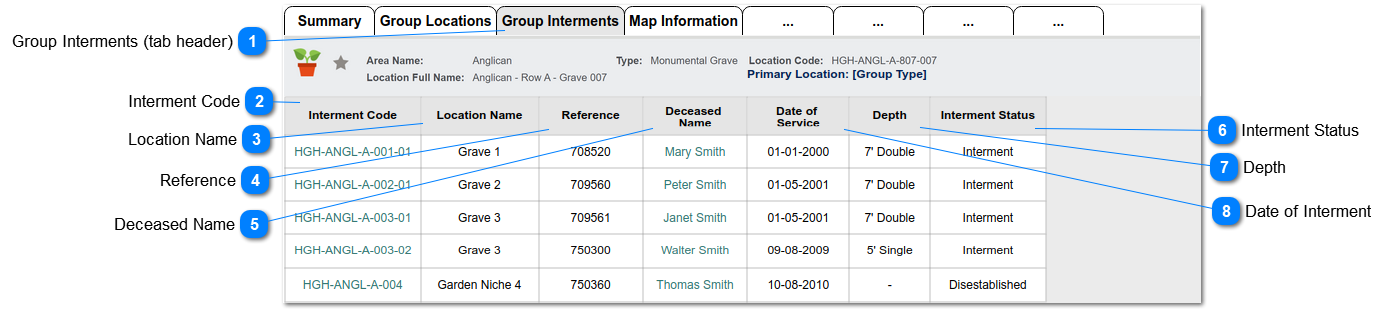
This screen shows the list of interments (burials) for all locations in the group, as viewed from the Primary Group Location record.
Group Interments (tab header)
This is the tab header that shows for the Primary location in a group, to display list of linked interments. That is, burials/cremations interred in locations that are linked to the primary location
Type
Notes
Rules
Compulsory
Format
Edit
Size
Default
Error Message
Tab Header
1. Tab is displayed when Primary Group Location = Y
2. Tab should show as the third tab header.
Interment Code
This is the interment code for each burial, where the location is part of the Primary Group.
Type
Notes
Rules
Compulsory
Format
Edit
Size
Default
Error Message
Column
1. Show interment code
2. Hyperlink to the Interment entry
Text
Location Name
This is the name of the Location in which the deceased is buried.
Type
Notes
Rules
Compulsory
Format
Edit
Size
Default
Error Message
Column
1. Show location name field for the corresponding interment entry.
2. Hyperlink to the Location summary screen
Text
Reference
This is the person reference number for each deceased record.
Type
Notes
Rules
Compulsory
Format
Edit
Size
Default
Error Message
Column
1. Show person reference number for the corresponding interment entry.
(pers_ReferenceNumber)
Text
Deceased Name
This is the name of the deceased.
Type
Notes
Rules
Compulsory
Format
Edit
Size
Default
Error Message
Column
1. Show person name for the corresponding interment entry.
1a. Display First and Last Names
2. Hyperlink to the Person summary screen
Text
Interment Status
This is the status of the interment record.
Type
Notes
Rules
Compulsory
Format
Edit
Size
Default
Error Message
Column
1. Show interment status for the corresponding interment entry
(posi_status)
Text
Depth
This is the depth at which the deceased was buried.
Type
Notes
Rules
Compulsory
Format
Edit
Size
Default
Error Message
Column
1. Show depth for the corresponding interment entry
(posi_depth)
Text
Date of Interment
This is the date of interment for the deceased.
Type
Notes
Rules
Compulsory
Format
Edit
Size
Default
Error Message
Column
1. Show date of interment for the corresponding interment entry
(posi_intermentdate)