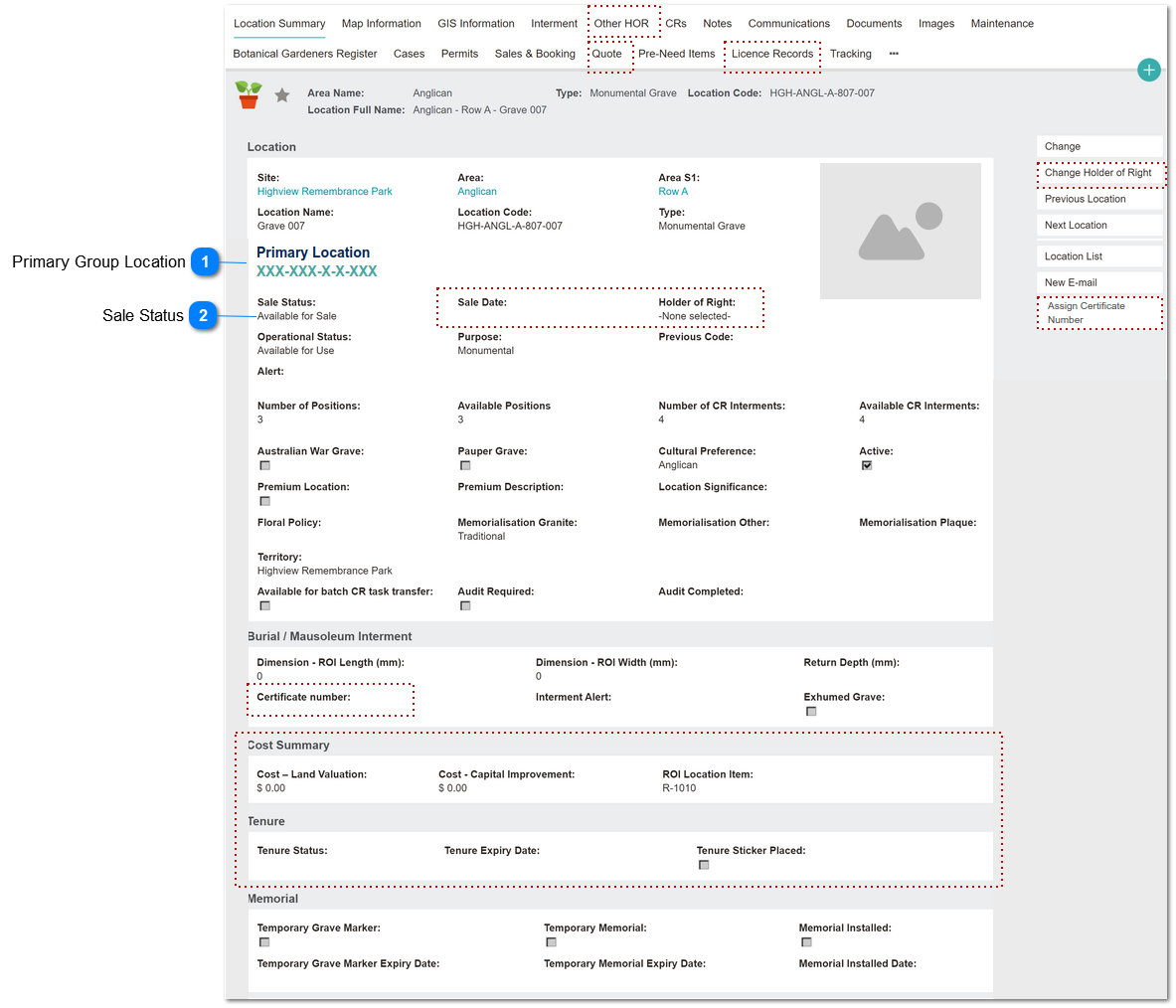
This screen is used to manage the cemetery location attributes.
Spec shows changes required for Group Locations features [Oct 2020]
All fields, screen sections, tab headers and action buttons shown outlined in red dotted line are to be hidden when the Location has been
added to a Locations Group.
 Primary Group Location
This field is displayed on component records of a Location Group; it is a hyperlink to the Primary Group Location record.
|
Type
|
Notes
|
Rules
|
Compulsory
|
Format
|
Edit
|
Size
|
Default
|
Error Message
|
|
Hyperlink
|
|
1. Shows if not null.
that is, the location record has been linked to a Location Group.
2. Updated by the Add Group Locations screen.
3. Shows the location code string of the Primary Group Location
3a. is a hyperlink to the corresponding Location record.
4. If not null, hide following:
Fields:
- Sale Date
- Holder of Right
- Certificate Number
Buttons:
- Change Holder of Right
- Assign Certificate Number
Screen Sections & all fields within those screen blocks:
- Cost Summary
- Tenure
Tab Headers:
- Other HOR
- Quote
- Licence Records
4a. If not null, view only:
Fields:
- Sales Status
|
|
Text
|
N
non-editable through the UI.
|
|
|
| |
|
 Sale Status
This field indicates the sales status of a cemetery location: available for sale, quoted, sold, etc.
|
Type
|
Notes
|
Rules
|
Compulsory
|
Format
|
Edit
|
Size
|
Default
|
Error Message
|
|
Selection List
|
Include new value in selection list:
- Per Primary
|
All pre-existing rules apply, plus:
1. View only if Primary Location is not null
|
|
Text
|
Y
except per 1)
|
|
Available for Sale
|
| |
|