byondpro
Functional Specifications
×
Menu
Index

New Single Location

This screen is used to create new location records.
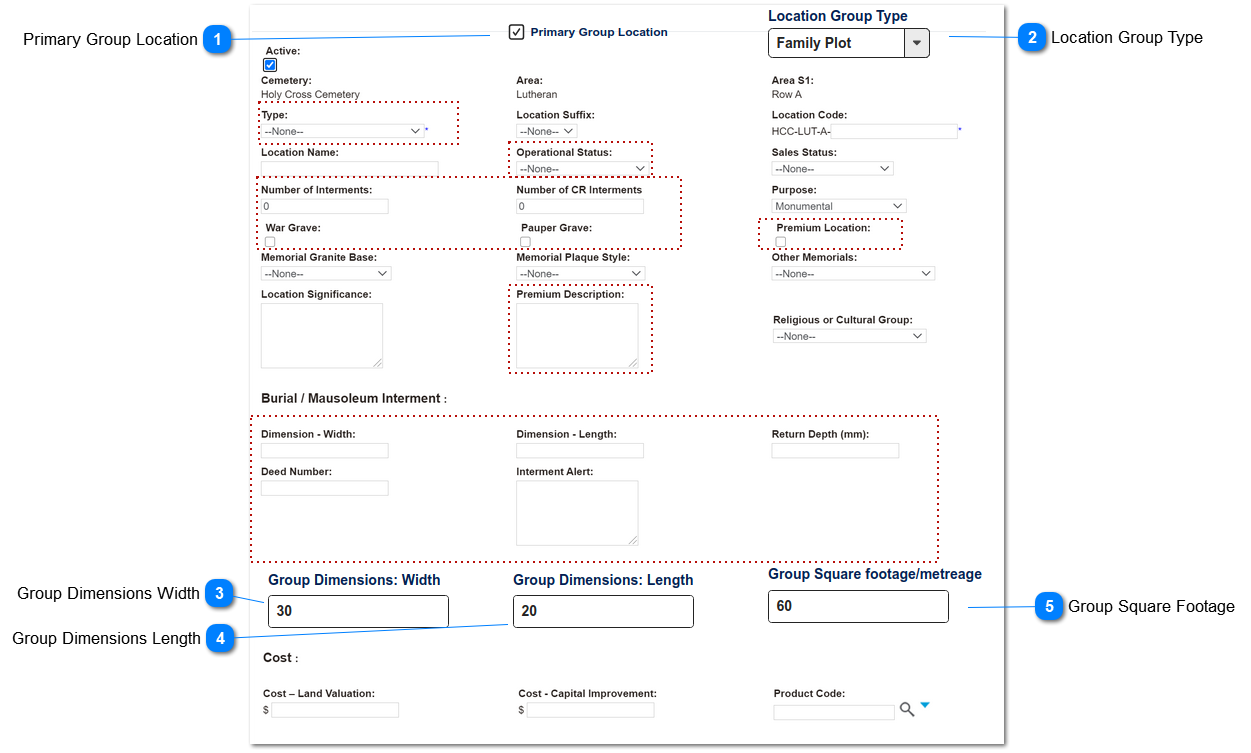
Spec shows changes required for Group Locations features [Oct 2020].
All fields outlined in red dotted line are to be hidden when the Primary Group Location checkbox is marked.
 
 
New Single Location
1

Primary Group Location

 
This is the indicator that this new location record will be the main (parent) record for a Locations Group.
When checked the fields shown/hidden on the screen will be changed.
The ability to create a Primary Group Location will only be available on the New Single Location screen.
 
Type
Notes
Rules
Compulsory
Format
Edit
Size
Default
Error Message
checkbox
If Y, triggers show/hide rules for other fields and buttons on this screen.
1. If Y, show following:
 
Fields:
- Location Group Type
- Group Dimensions: Width
- Group Dimensions: Length
- Group Square Footage
 
2. If Y, hide following:
- Type
- Operational Status
- Number of Interments
- Number of CR Interments
- War Grave
- Public (pauper) Grave
- Premium Location
- Premium Description
- Dimension - Width
- Dimension - Length
- Return Depth
- Deed Number
- Interment Alert
 
 
Y
 
blank
 
2

Location Group Type

 
This is a categorisation of types of Location Groups, e.g. Family Plot in the grounds or Family Room in a mausoleum.
 
Type
Notes
Rules
Compulsory
Format
Edit
Size
Default
Error Message
Selection List
Default values:
1. Family Plot
2. Family Room
3. Garden Plot
4. Burial Plot
1. Shows when Primary Group Location = Y
Y
if Primary Group Location = Y
Text
Y
 
blank
1. Please select Location Group Type
3

Group Dimensions Width

 
This is a field to capture the width of the physical space consumed by the Locations Group.
 
Type
Notes
Rules
Compulsory
Format
Edit
Size
Default
Error Message
Numeric
to be used in calculation of square footage
 
Y
numeric - allow up to 4 decimal places
Y
 
0.0000
 
4

Group Dimensions Length

 
This is a field to capture the length of the physical space consumed by the Locations Group.
 
Type
Notes
Rules
Compulsory
Format
Edit
Size
Default
Error Message
Numeric
to be used in calculation of square footage
 
Y
numeric - allow up to 4 decimal places
Y
 
0.0000
 
5

Group Square Footage

 
This is a calculation of the total square footage (metreage) consumed by the Locations Group
 
Type
Notes
Rules
Compulsory
Format
Edit
Size
Default
Error Message
Numeric
Calculation; allow user to edit
1. on screen calculation as user enters width & length.
 
CALCULATION:
Group Dimensions Width  x
Group Dimensions Length =
Group Square Footage
 
2. Allow user to edit (overwrite) calculated result
N
numeric
Y
 
0.0000
 
 
The online help was created with Dr.Explain