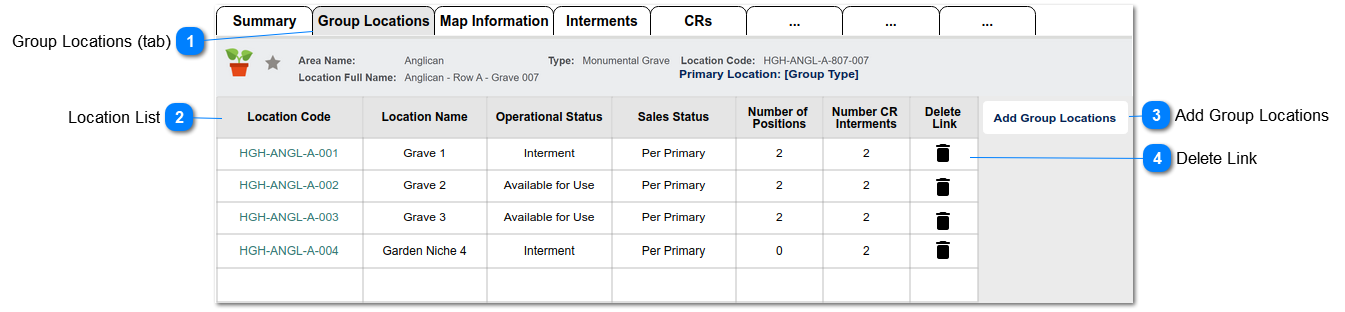
This screen shows the list of component locations, as viewed from the Primary Group Location record.
 Group Locations (tab)
This is the tab header that shows for the Primary location in a group, to display list of linked locations (group components).
|
Type
|
Notes
|
Rules
|
Compulsory
|
Format
|
Edit
|
Size
|
Default
|
Error Message
|
|
Tab Header
|
|
1. Tab is displayed when Primary Group Location = Y
2. Tab should show as the second tab header.
|
|
|
|
|
|
| |
|
 Location List
This is a list of linked locations (group components).
|
Type
|
Notes
|
Rules
|
Compulsory
|
Format
|
Edit
|
Size
|
Default
|
Error Message
|
|
List
|
|
Include columns to display:
- Location Code (hyperlink to record)
- Location Name
- Operational Status
- Sales Status
- Number of Positions
- Number CR Interments
- Edit Link (action refer #4 below)
|
|
|
|
|
|
| |
|
 Add Group Locations
This is the button function that opens the Add Group Locations screen, used to link component locations to a Locations Group.
|
Type
|
Notes
|
Rules
|
Compulsory
|
Format
|
Edit
|
Size
|
Default
|
Error Message
|
|
Button
|
This is the same button/function shown on the Location Summary
|
1. Show if Primary Group Location = Y
|
|
|
|
|
|
| |
|
 Delete Link
This is an action to delete the link between the Group Location and the component location record.
|
Type
|
Notes
|
Rules
|
Compulsory
|
Format
|
Edit
|
Size
|
Default
|
Error Message
|
|
Action
|
1) standard Sage CRM 2-stage authentication applies to confirm record/link should be deleted.
|
1. Deletes the link for the location to the Group record.
2. Sets following values on the component location record:
a. Primary Location field = null
b. Sales Status = Available for Sale
3. Writes tracking record linked to the component location:
Removed from Primary Group Location [location code]
plus user, date & time
4. Writes tracking record linked to the Primary Location:
Removed Component Location [location code]
plus user, date & time
|
|
|
|
|
|
| |
|