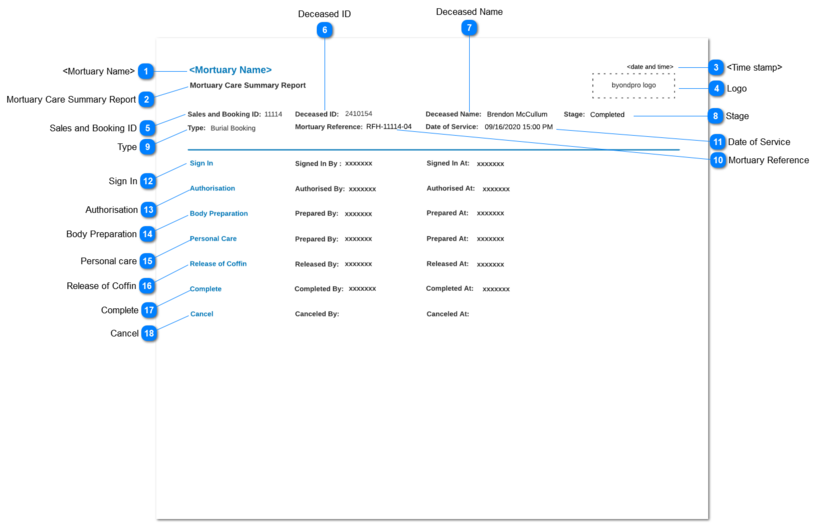
Mortuary Care Summary Report
-
If any field of the report, does not have a value keep those fields blank.
 <Mortuary Name>
|
Type
|
Notes
|
Rules
|
Compulsory
|
Placeholder
|
Format
|
Edit
|
Size
|
Default
|
Messages
|
|
Readonly text
|
Logged in user's Mortuary Name should be displayed as the value
|
-
|
-
|
-
|
Text
|
-
|
-
|
-
|
-
|
|
|
 Mortuary Care Summary Report
|
Type
|
Notes
|
Rules
|
Compulsory
|
Placeholder
|
Format
|
Edit
|
Size
|
Default
|
Messages
|
|
Readonly text
|
Title of the report
|
-
|
-
|
-
|
Text
|
-
|
-
|
-
|
-
| |
|
 <Time stamp>
|
Type
|
Notes
|
Rules
|
Compulsory
|
Placeholder
|
Format
|
Edit
|
Size
|
Default
|
Messages
|
|
Readonly text
|
Time stamp of the report generation should be displayed.
|
-
|
-
|
-
|
text
|
-
|
-
|
-
|
-
| |
|
 Logo
|
Type
|
Notes
|
Rules
|
Compulsory
|
Placeholder
|
Format
|
Edit
|
Size
|
Default
|
Messages
|
|
Image
|
Logo of the byondpro should be shown
|
-
|
-
|
-
|
image
|
-
|
-
|
-
|
-
|
|
|
 Sales and Booking ID
|
Type
|
Notes
|
Rules
|
Compulsory
|
Placeholder
|
Format
|
Edit
|
Size
|
Default
|
Messages
|
|
Readonly Text
|
Sales and Booking No of the respective Mortuary Reference should be shown.
|
-
|
-
|
-
|
Text
|
-
|
-
|
-
|
-
|
|
|
 Deceased ID
|
Type
|
Notes
|
Rules
|
Compulsory
|
Placeholder
|
Format
|
Edit
|
Size
|
Default
|
Messages
|
|
Readonly Text
|
Deceased ID of the respective Mortuary Reference should be shown
|
-
|
-
|
-
|
Text
|
-
|
-
|
-
|
-
| |
|
 Deceased Name
|
Type
|
Notes
|
Rules
|
Compulsory
|
Placeholder
|
Format
|
Edit
|
Size
|
Default
|
Messages
|
|
Readonly Text
|
Full name of the deceased of the respective Mortuary Reference should be shown
|
-
|
-
|
-
|
Text
|
-
|
-
|
-
|
-
| |
|
 Stage
|
Type
|
Notes
|
Rules
|
Compulsory
|
Placeholder
|
Format
|
Edit
|
Size
|
Default
|
Messages
|
|
Readonly Text
|
Workflow stage at the time of report printing should be shown
|
-
|
-
|
-
|
Text
|
-
|
-
|
-
|
-
| |
|
 Type
|
Type
|
Notes
|
Rules
|
Compulsory
|
Placeholder
|
Format
|
Edit
|
Size
|
Default
|
Messages
|
|
Readonly Text
|
Type value entered in the Sales and Booking record attached to the respective Mortuary Reference should be shown
|
-
|
-
|
-
|
Text
|
-
|
-
|
-
|
-
| |
|
 Mortuary Reference
|
Type
|
Notes
|
Rules
|
Compulsory
|
Placeholder
|
Format
|
Edit
|
Size
|
Default
|
Messages
|
|
Readonly Text
|
Mortuary Reference should be shown
|
-
|
-
|
-
|
Text
|
-
|
-
|
-
|
-
| |
|
 Date of Service
|
Type
|
Notes
|
Rules
|
Compulsory
|
Placeholder
|
Format
|
Edit
|
Size
|
Default
|
Messages
|
|
Readonly Text
|
Date of Service entered in the Sales and Booking record attached to the Mortuary Reference should be shown.
|
-
|
-
|
-
|
Text
|
-
|
-
|
-
|
-
| |
|
 Sign In
|
Type
|
Notes
|
Rules
|
Compulsory
|
Placeholder
|
Format
|
Edit
|
Size
|
Default
|
Messages
|
|
Readonly Text
|
Sign In section is consist of Signed In By and Signed In At fields.
|
1. Signed In By =value entered for Signed In By field in the Sign In screen
|
-
|
-
|
Text
|
-
|
-
|
-
|
-
| |
|
 Authorisation
|
Type
|
Notes
|
Rules
|
Compulsory
|
Placeholder
|
Format
|
Edit
|
Size
|
Default
|
Messages
|
|
Readonly Text
|
Authorisation section is consist of Authorised By and Authorised At fields.
|
1. Authorised By =value entered for Authorised By field in the Authorisation screen
2. Authorised At = value entered for Authorised At field in the Authorisation screen
|
-
|
-
|
Text
|
-
|
-
|
-
|
-
| |
|
 Body Preparation
|
Type
|
Notes
|
Rules
|
Compulsory
|
Placeholder
|
Format
|
Edit
|
Size
|
Default
|
Messages
|
|
Readonly Text
|
Body Preparation section is consist of Prepared By and Prepared At fields.
|
1. Prepared By =value entered for Prepared By field in the Body Preparation screen
2. Prepared At = value entered for Prepared At field in the Body Preparation screen.
|
-
|
-
|
Text
|
-
|
-
|
-
|
-
| |
|
 Personal care
|
Type
|
Notes
|
Rules
|
Compulsory
|
Placeholder
|
Format
|
Edit
|
Size
|
Default
|
Messages
|
|
Readonly Text
|
Personal Care section is consist of Prepared By and Prepared At fields.
|
1.Prepared By =value entered for Prepared By field in the Personal Care screen
2. Prepared At = value entered for Prepared At field in the Personal Care screen
|
-
|
-
|
Text
|
-
|
-
|
-
|
-
| |
|
 Release of Coffin
|
Type
|
Notes
|
Rules
|
Compulsory
|
Placeholder
|
Format
|
Edit
|
Size
|
Default
|
Messages
|
|
Readonly Text
|
Release of Coffin section is consist of Released By and Released At fields.
|
1. Released By =value entered for Released By field in the Released of Coffin
2. Released At = value entered in the Released On field in the Released of Coffin screen
|
-
|
-
|
Text
|
-
|
-
|
-
|
-
| |
|
 Complete
|
Type
|
Notes
|
Rules
|
Compulsory
|
Placeholder
|
Format
|
Edit
|
Size
|
Default
|
Messages
|
|
Readonly Text
|
Complete section is consist of Completed By and Completed At fields.
|
1. Completed By =value entered for Completed By field in the Completion screen
2. Completed At = value entered for Completed At field in the Completion screen.
|
-
|
-
|
Text
|
-
|
-
|
-
|
-
| |
|
 Cancel
|
Type
|
Notes
|
Rules
|
Compulsory
|
Placeholder
|
Format
|
Edit
|
Size
|
Default
|
Messages
|
|
Readonly Text
|
Cancel section is consist of Canceled By and Canceled At fields.
|
1.Canceled By =value entered for Canceled By field in the Cancellation screen
2. Canceled At = value entered for Canceled At field in the Cancellation screen.
|
-
|
-
|
Text
|
-
|
-
|
-
|
-
| |
|