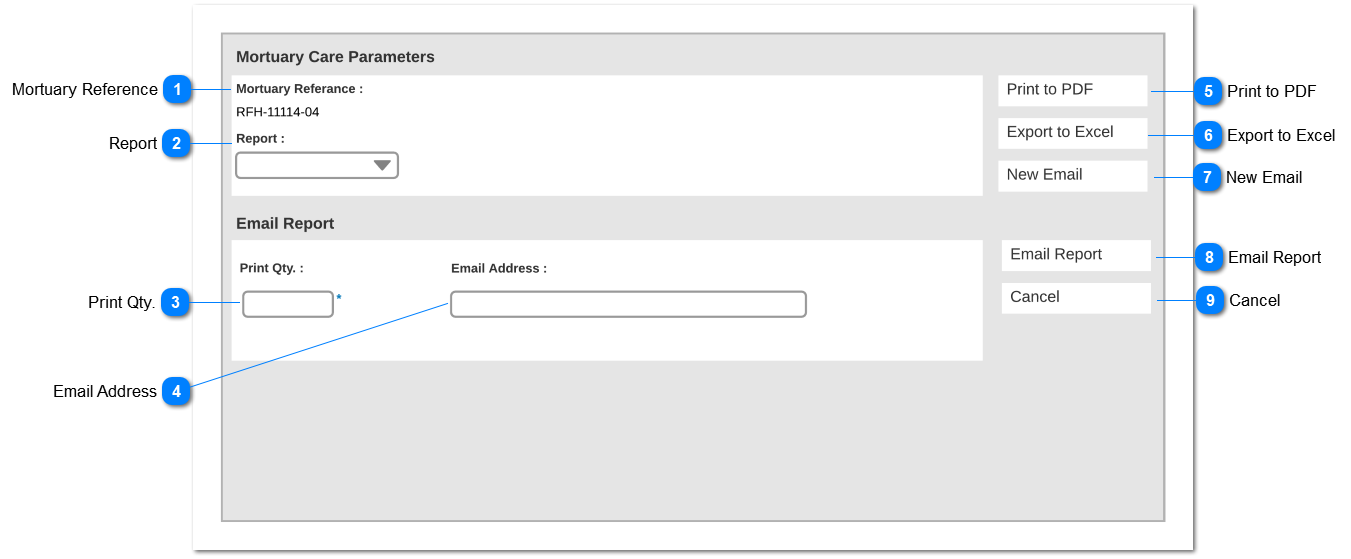
Mortuary Reference
|
Type
|
Notes
|
Rules
|
Compulsory
|
Placeholder
|
Format
|
Edit
|
Size
|
Default
|
Messages
|
|
Readonly text
|
Mortuary Reference number should be displayed.
|
-
|
-
|
-
|
Text
|
-
|
-
|
-
|
-
| |
|
 Report
|
Type
|
Notes
|
Rules
|
Compulsory
|
Placeholder
|
Format
|
Edit
|
Size
|
Default
|
Messages
|
|
Dropdown
|
1. Following options should be available for select
-
-
Mortuary Care Summary Report
|
-
|
Yes
|
-
|
Text
|
Yes
|
-
|
Blank
|
-
| |
|
 Print Qty.
|
Type
|
Notes
|
Rules
|
Compulsory
|
Placeholder
|
Format
|
Edit
|
Size
|
Default
|
Messages
|
|
Text field
|
-
|
-
|
Yes
|
-
|
Number
|
Yes
|
-
|
1
|
-
| |
|
 Email Address
|
Type
|
Notes
|
Rules
|
Compulsory
|
Placeholder
|
Format
|
Edit
|
Size
|
Default
|
Messages
|
|
Text field
|
-
|
-
|
-
|
-
|
Text
|
Yes
|
-
|
Blank
|
-
| |
|
 Print to PDF
|
Type
|
Notes
|
Rules
|
Compulsory
|
Placeholder
|
Format
|
Edit
|
Size
|
Default
|
Messages
|
|
Button
|
-
|
Upon clicking the button;
1.Selected report should be generated as a pdf and opened in the new browser tab
|
-
|
-
|
-
|
-
|
-
|
-
|
-
| |
|
 Export to Excel
|
Type
|
Notes
|
Rules
|
Compulsory
|
Placeholder
|
Format
|
Edit
|
Size
|
Default
|
Messages
|
|
Button
|
-
|
Upon clicking the button;
1. Selected report should be generated as an excel file and opened in the new browser tab
|
-
|
-
|
-
|
-
|
-
|
-
|
-
| |
|
 New Email
|
Type
|
Notes
|
Rules
|
Compulsory
|
Placeholder
|
Format
|
Edit
|
Size
|
Default
|
Messages
|
|
Button
|
-
|
Upon clicking the button;
1. Default New Email screen of SAGE CRM should be opened.
|
-
|
-
|
-
|
-
|
-
|
-
|
-
| |
|
 Email Report
|
Type
|
Notes
|
Rules
|
Compulsory
|
Placeholder
|
Format
|
Edit
|
Size
|
Default
|
Messages
|
|
Button
|
-
|
Upon clicking the button,
1.If the Email Address field is filled
Then send the report to the stated email address.
(email template to be mentioned)
Else
Error message should be shown
|
-
|
-
|
-
|
-
|
-
|
-
|
Error Message:
Default SAGE CRM error message for mandatory fields.
| |
|
 Cancel
|
Type
|
Notes
|
Rules
|
Compulsory
|
Placeholder
|
Format
|
Edit
|
Size
|
Default
|
Messages
|
|
Button
|
-
|
Upon clicking user will be navigated to the Summary screen.
|
-
|
-
|
-
|
-
|
-
|
-
|
-
| |
|