|
Field
|
Description
|
Associated Business Process
|
When Creating Multiple New Locations
|
|
Location
|
|
Active
|
Designates an active location
|
|
-
|
|
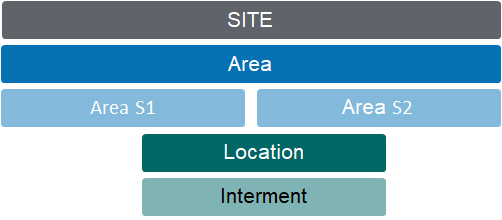
Site
|
The site/cemetery/facility where the location exists
|
Linked to the corresponding Territory
|
Prefills from the preceding records
|
|
Area
|
The area the location belongs to
|
|
Prefills from the preceding records
|
|
Area S1
|
The section or garden within the Area.
|
|
Prefills from the preceding records
|
|
Area S2
|
The row or bed within the section/garden
|
|
Prefills from the preceding records
|
|
Area S3
|
Additional level in location code
|
This is an optional functionality and can be activated through custom configuration.
|
|
|
Type
|
A dropdown list displaying the type of location
|
Can be incorporated as a segment into the Location Code.
|
Select Type
|
|
Location Name
|
A descriptive name of the cemetery location used in family-facing documentation
|
Create location feature uses text name & appends location number
|
Enter text to apply, e.g. "Grave".
When created, the specific location number will be added to this text, e.g. "Grave 100"
|
|
Location Code
|
The location code of the specific cemetery location. Incorporates segments reflecting Site and area codes.
|
New entries are created using Create Single or Create Multiple Location feature
|
Builds dynamically from values entered
|
|
Location Suffix
|
|
[only visible on new entry screens]
|
If selections are made from the list, the character chosen will be added to every location code created. Leave blank if not required
|
|
Number of Characters in Location Segment
|
Allows user to enter the number of characters for the location segment directly in the screen, overriding the default configuration.
|
If this field has no value when creating locations, the defaut configuration value defined in the Cemetery Setup will apply.
|
|
|
Operational Status
|
A dropdown list identifying the operational status of the location, such as available for use or unavailable for use
|
Can be reset from summary screen or using Batch Location Status Change feature
|
Select operational status to apply for all locations
|
|
Sale Status
|
A dropdown list identifying the sales status of the location. examples are sold, future release or available for sale
|
Can be reset from summary screen or using Batch Location Status Change feature.
Managed during sales processes: Available for Sale, Quoted, Sold.
Managed by Batch CR Task: Disestablished
|
Select sales status to apply for all locations
Note: Available for Sale makes these locations immediately visible in sales order screens
|
|
Purpose
|
A dropdown list displaying the high-level purpose of the location, such as Monumental or Lawn Burials
|
Used for high-level reporting of location types
|
Prefills from the preceding Area record (can be edited)
|
|
Cultural Preference
|
A dropdown list used to identify the cultural preference or religion of the location
|
|
Prefills from the preceding Area record (can be edited)
|
|
Range from (1,2,3)
|
|
[only visible on create multiple entry screen]
|
Enter first location number to be created
Multiple ranges means you can allow for breaks in the numbering sequence, e.g. 1-10 and 14-40 allows space for a pathway in current physical layout that will be removed and used for interments 11-13 at a later time.
|
|
Range to (1,2,3)
|
|
[only visible on create multiple entry screen]
|
Enter last location number to be created
All location number segments will be padded with leading 0s to a minimum 3 characters, e.g. 1 will be created 001 to allow for sequential presentation in lists. If 1000+ numbers are entered then leading 0s to 4 characters will be created, etc.
|
|
Number of Positions
|
The number of burial interment positions intended at this location
|
Specified when new locations are created.
|
Enter number of burial interments expected for these locations
|
|
Number of CR Interments
|
The number of CR (ash) positions intended at this location
|
Specified when new locations are created
|
Enter number of cremated remains placements expected for these locations
|
|
Australian War Grave
|
A tickbox identifying whether the location is an Australian War Grave
|
|
Check to indicate Right of Interment and maintenance for these locations is to be managed by war graves commission
|
|
Premium Location
|
A tickbox identifying whether the location is a premium location
|
|
Check to indicate locations are of premium standard
|
|
Memorialisation Granite
|
A dropdown list used to identify the preferred granite types to apply for the location
|
|
Prefills from the preceding Area record (can be edited)
|
|
Memorialisation Plaque
|
A dropdown list used to identify the preferred plaque types to apply for the location
|
|
Prefills from the preceding Area record (can be edited)
|
|
Memorialisation Other
|
A dropdown list used to identify other memorial requirements for the location
|
|
Prefills from the preceding Area record (can be edited)
|
|
Premium Description
|
A freeform text box for describing why a location is a premium location
|
|
|
|
Location Significance
|
A freeform text box for describing location significance, e.g. historical memorial or notable burial
|
|
|
|
Sale Date
|
The date the location was sold
|
Managed during sales process: invoice date.
|
-
|
|
Holder of Right
|
The name of the person who is the holder of right of interment for the location
|
Managed during sales process: linked to Authorising Person of the sales transaction.
Can be updated only using the Change Holder of Right feature.
|
-
|
|
Alert
|
A free form text field to record any matters of concern to which staff should be alerted.
|
Alert content is displayed as a pop up warning for users when the Location is used in a sale, booking or communication.
|
|
|
Previous Code
|
Former database code for reference purposes, if applicable
|
|
-
|
|
Available Positions
|
The number of interments remaining for this location
|
A dynamic calculation against positions occupied
|
-
|
|
Available CR Interments
|
The number of CR interments remaining for this location
|
A dynamic calculation against positions occupied
|
-
|
|
Public Grave
|
A tickbox identifying whether the location is a public (pauper) grave
|
Can be used to suppress location/position details for reporting, e.g. deceased search.
|
Check if locations are intended for public (pauper) use
|
|
Floral Policy
|
A dropdown list used to identify the floral policy to apply for the location
|
|
Prefills from the preceding Area record (can be edited)
|
|
Burial/Mausoleum Interment
|
|
Dimension – Right of Interment Length(mm)
|
The length of the Location (grave or crypt)
|
|
Enter outer location length in mm
|
|
Dimension – Right of Interment Width(mm)
|
The width of the Location (grave or crypt)
|
|
Enter outer location width in mm
|
|
Interment Alert
|
A free form text field that can be used for reporting purposes
|
Prints onto burial schedules to alert grounds staff to potential site issues.
|
Enter known issues that could be encountered when digging, e.g. water pipes at foot of graves
|
|
Return Depth
|
The return depth of the grave site
|
|
-
|
|
Certificate Number
|
The certificate number (deed) that was generated when the location was first used or sold
|
Generated using the Assign Certificate Number feature
|
-
|
|
Exhumed Grave
|
Identifies that the Location (grave or crypt) has been previously used and that an exhumation has occurred.
|
Managed on completion of Burial Transaction of type Exhumation
|
-
|
|
Cost Summary
|
|
Cost – Land Valuation
|
A currency field used to identify the cost of the land associated with the location.
|
Can be passed to ERP as cost of goods sold.
Can be updated using Batch Location Revaluation process.
|
Enter location unit land value
|
|
Cost – Capital Improvements
|
A currency field used to identify the cost of the construction of the location.
|
Can be passed to ERP as cost of goods sold.
Can be updated using Batch Location Revaluation process.
|
Enter unit cost of capital improvement works
|
|
Item Code
|
The Item code associated with the location; determines sales price
|
Required for location sale. Price determined per site and validity dates. Lookup restricted to ROI items only.
|
Select item code that will be used in sales transactions
|
|
Tenure
|
|
Tenure Status
|
A dropdown list identifying the tenure status of the location
|
Managed during sales process – defined tenure period.
Can be updated using Batch Tenure Status Change feature.
|
-
|
|
Tenure Expiry Date
|
The tenure expiry date of the location
|
Managed during sales process – per tenure period selected.
|
-
|
|
Tenure Sticker Placed
|
A tickbox to identify whether a tenure sticker has been placed on the memorial warning of imminent expiry
|
Managed using Batch Tenure Status Change feature
|
-
|
|
Memorials
|
|
Temporary Grave Marker
|
A tickbox to identify whether a temporary grave marker has been placed
|
Managed on completion of Burial Transactions – checked for first interments
|
-
|
|
Temporary Grave Marker Expiry Date
|
A date field for recording the expiry date of the temporary grave marker
|
Managed on completion of Burial Transactions: +12 months for first interments
|
-
|
|
Temporary Memorial
|
A tickbox to identify whether a temporary memorial has been placed
|
|
-
|
|
Temporary Memorial Expiry Date
|
A date field for recording the expiry date of the temporary memorial
|
|
-
|
|
Memorial Installed
|
A tickbox to identify whether a permanent memorial has been installed
|
Managed on completion of Permits and on installation of Memorial Orders – checked only if previously blank.
|
-
|
|
Memorial Installed Date
|
A date field for recording the date the memorial was installed at the site
|
Managed on completion of Permits and on installation of Memorial Orders – populated only if previously blank.
|
-
|