Purpose
An Area record provides structure to data searches for deceased and location records, assists with operational zoning activities and helps provide meaningful reporting outcomes.
Fit within the Location Hierarchy
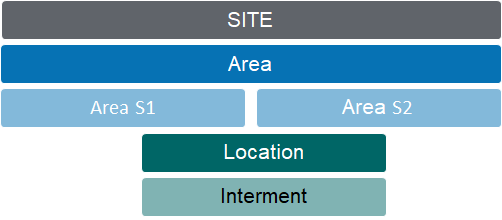
The area records provide logical coding segmentation that mirror the layout of the grounds, and allow cemetery locations to be grouped according to areas, sections, rows, garden beds or mausolea atriums. The non-descriptive naming convention means site specific names can be added directly in the records.
Area coding structure
The Area coding structure has 2 sub-elements that can be included (or disregarded) when creating location codes in accordance with the structure of your grounds. Your location codes must include an Area segment, but do not need to use the S1 or S2 code sections.
A new feature has been introduced to include a third optional level into the location coding structure for byondpro. Its use is activated in the custom configuration settings. Area A3 behaves per Area S1/S2.
Example:
Area Roman Catholic Lawn
Area S1 Section 1
Area S2 Row A1
Area Roman Catholic Lawn
Area S1 Row A1
Area S2 [not required]
The Area code segments can be between 2-4 characters and are carried forward through the coding structure of Areas and Locations.
Example:
HGH Highview Remembrance Park
HGH-LAWN Lawn Gardens (at Highview Remembrance Park)
HGH-LAWN-01 Section 1 (in the Lawn Gardens)
HGH-LAWN-01-A1 Row A1 (within Section 1)
Related Information available on the Area Summary pages:
-
-
-
Locations (directly linked to the Area record)
-
-
-
-
-
-
Adding new Records
Area records are created from the Area tab of the Site record, using the specific New Area function.
Area S1 & S2 records are created from the S1/S2 tab of the preceding Area (S1) record, using the specific New Area S1 (S2) function.
Any attributes entered on the Area (S1/S2) record are passed down to dependent records, e.g. location type or floral policy settings.
Standard Field List
|
Field
|
Description
|
Associated Business Process
|
|
Site
|
The site/cemetery/facility where the location exists
|
Linked to the corresponding Territory
|
|
Area Code
Area S1 Code
Area S2 Code
|
The code of the specific cemetery area. Incorporates site segment.
|
New entries are created using New Area feature on the Areas tab of the preceding Site record.
|
|
Area (S1/S2) Name
|
A descriptive name for the area used in family-facing documentation
|
|
|
Is Crem provided memorial
(Area only)
|
Checkbox that indicates this area contains cemetery controlled locations for temporary display of CRs post service
|
CR tasks reference this in ensuring 1 set of CRs per location.
|
|
Status
|
A dropdown list identifying the status of the area. Examples are Open, Under Development, Future Construction, Closed
|
|
|
Purpose
|
A dropdown list displaying the high-level purpose of the area, such as Monumental or Lawn Burials
|
The value entered is passed down to newly created dependent records
|
|
Type
|
A dropdown list displaying the type of location
|
The value entered is passed down to newly created dependent records
|
|
Known As
|
A freeform text box to record previous name of the area
|
|
|
Known As 2
|
A freeform text box to record previous name/s of the area
|
|
|
Floral Policy
|
A dropdown list used to identify the floral policy to apply for the area
|
The value entered is passed down to newly created dependent records
|
|
Memorialisation Granite
|
A dropdown list used to identify the preferred granite types to apply for the area
|
The value entered is passed down to newly created dependent records
|
|
Memorialisation Plaque
|
A dropdown list used to identify the preferred plaque types to apply for the area
|
The value entered is passed down to newly created dependent records
|
|
Memorialisation Other
|
A dropdown list used to identify other memorial requirements for the area
|
The value entered is passed down to newly created dependent records
|
|
Description
|
A freeform text box to describe the area
|
The value entered is passed down to newly created dependent records
|
|
Site Significance
|
A freeform text box for describing location significance, e.g. historical memorial or notable burial
|
|
|
Territory
|
Selection list of sites within the organisation
|
Influences security access to associated records. 1:1 relationship with Sites
|
|
Replace Location Name
|
A freeform textbox that will replace the actual location with the populated location.
|
|
|
Suppress from Deceased Search
|
Checkbox if ticked will show the deceased record but will hide the location information only.
|
|
|
Hide from Deceased Search
|
Checkbox if ticked will hide entire record
|
|
|
Cost
|
|
Cost - Land
|
A currency field used to identify the cost of the land associated with the area.
|
|
|
Cost - Construction
|
A currency field used to identify the cost incurred developing the area.
|
|
Sub Area 3 Configuration:
A Sub Area 3 option is now available to customer if you require an extra level in your location code configuration for new areas.
This might be a beneficial inclusion where a cemetery has an area with multiple offerings and would like to distinguish between each.
This functionality can be activated for new cemetery areas and sections.