An interment record is created for every deceased, whether buried, cremated or memorialised only. The interment record is directly linked to a Location and identifies the whereabouts of the bodily remains or memorial. This includes cremated remains held in storage, collected or scattered.
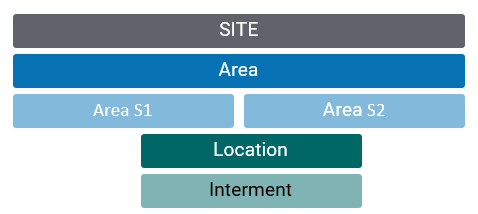
Fit within the Location Hierarchy
The interment record is dependent on the Site, Area and Location hierarchy.
Interment coding structure
The Interment code incorporates the code for the parent Location record. The code number (-01, -02) does not necessarily reflect the order of interments due to the nature of data migration on historical records; the interment date and burial depths are stronger indicators of interment sequence.
Related Information available on the Interment Summary page:
Tracking
Adding new Records
byondpro creates new interment records as needed on completion of burial bookings or using the CR Tasks features to record cremated remains movements. If needed for manual record creation / correction purposes, use the NEW button on the Interments list of the parent location record and set field values appropriately.
Standard Field List
Field
Description
Associated Business Process
Active
Designates an active interment record
Site
The site/cemetery/facility where the location exists
Linked to the corresponding Territory
Area (S1 / S2)
The area within which the location is found
Location Code
The code of the parent cemetery location
Interment Code
The code for the interment position
Interment Status
A dropdown list identifying the status of the interment position. Examples are Available for Use, Interment, Off Site, Disestablished, Token/Memorial only
Is set on completion of burial booking and CR task activities
Pocket
Checkbox denotes pocket used within grave
Pocket Type
Selection list identifying type of bodily remains. examples are CRs, Baby, Other
Type CR is set by CR task activities
Interment
Selection list identifying interment position. examples are N,S,E,W,Head,Foot, etc
Interment position transferred from CR task. Must be set manually for other interments
Interment Date
Date of interment
Is set on completion of burial booking and CR task activities
Depth
Selection list identifying interment depth. Examples are 2700mm, 2130, 1520, 610 CRs
Is set on completion of burial booking
Restrictions
Free form text field
Deceased
Link to deceased person record
Is set on completion of burial booking and CR task actvities