|
2a: PRE-NEED = N/null
DISCOUNT APPLICABILITY options:
- At-Need
- Both
PRE-NEED = Y
DISCOUNT APPLICABILITY options:
- Pre-Need
- Both
4a. Calculation Example
Unit Price: $999.00
Discount: 5.55%
Discount: $55.4445
Rounded to $55.44
Discounted Unit price: $943.56
Extended Price:
943.56 x (Qty) 2 = $1,887.12
Extended Total Tax
943.56 x (Tax %) 0.1 = 94.356
Rounded to 94.36
94.36 x (Qty) 2 = $188.72
(above assumes tax is NOT included in unit price)
|
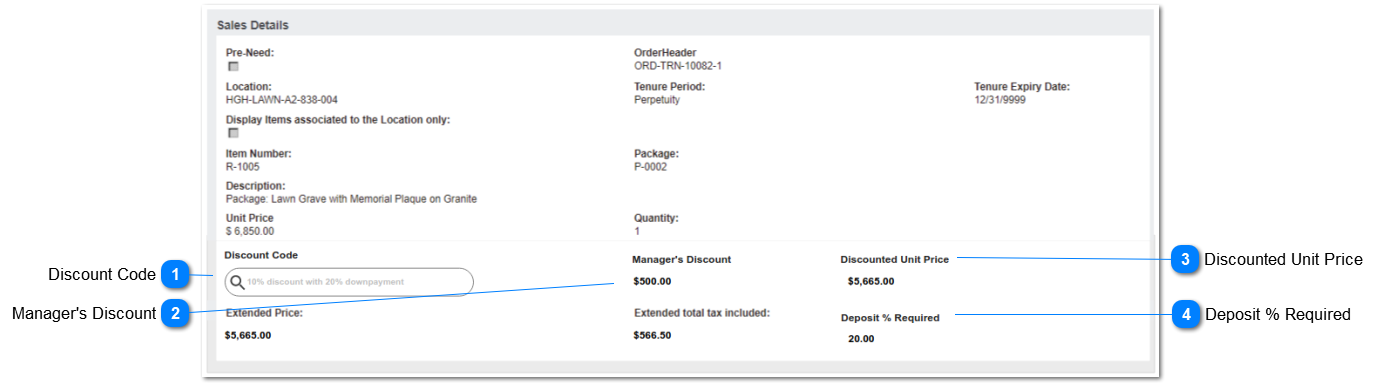
2. Allow search by Discount Code and Description,including wildcard % and Discount Codes included on the Company record will be available for use on Sales.
2a. Filter Discount Code selections dependent on Pre-Need field value on Order Details, and Discount Applicability field.
2b. Exclude Discount Codes where Active is N/null.
3. On selection, populate following field, with the value from the Discount entry:
DEPOSIT % REQUIRED.
(this is for information only in this screen - will be used to calculate total deposit on Order Header.)
4. On selection, perform following field calculations, using DISCOUNT % on the Discount entry.
4a. Calculated $ discount to be rounded to 2 decimals. Refer example in Notes
4b. DISCOUNTED UNIT PRICE: Unit Price minus $ discount amount (rounded to 2 decimals)
4c. EXTENDED PRICE: Discounted Unit Price * Quantity
4d. EXTENDED TOTAL TAX INCLUDED: Tax % calculations on Discounted Unit Price * quantity
5. While in new/edit mode, if the discount code is removed:
5a. clear the data value in the following field:
DEPOSIT % REQUIRED
5b. Recalculate the following fields:
DISCOUNTED UNIT PRICE: Unit Price minus Manager's Discount
EXTENDED PRICE: Discounted Unit Price * Quantity
EXTENDED TOTAL TAX INCLUDED: Tax % calculations on Discounted Unit Price * Quantity
6. While in new/edit mode, if the Item code is removed:
6a. clear the data value in the following fields:
DISCOUNT CODE
DISCOUNTED UNIT PRICE
MANAGER'S DISCOUNT
EXTENDED PRICE
EXTENDED TOTAL TAX INCLUDED
DEPOSIT % REQUIRED
7. While in new/edit mode, if the PRE-NEED value is changed:
7a. Validate Discount Applicability value on Discount Code.
7b. If value remains valid for the changed pre-need field selection, no action required.
7c. If value conflicts with pre-need field selection, display error message.
7d. If user selects OK: Clear the Discount Code and perform actions 5a, 5b.
7e. If user selects CANCEL: change Pre-Need field value to opposite of current, i.e.
if Y/checked - set to NULL/cleared
if N/NULL - set to Y/checked
When adding new or editing existing Order Detail records, after selection of ITEM code, auto-insert DISCOUNT CODE if the following criteria are met:
8a. Order Header Bill-To Company <> null
8b. Company Default Discount Code <> null
8c. Discount Code meets Item/Category and Site requirements.
8d. Perform calculations per 4) & field updates per 3) above.
|