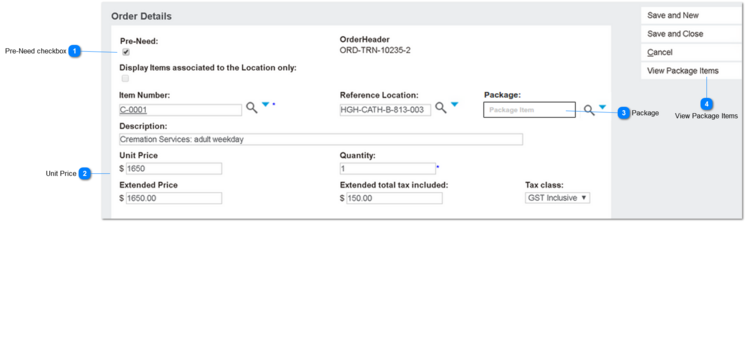
This screen is opened using the Add Items button on the Order Header screen.
It allows the user to add non-ROI products and services to the sales order, that is, any product that is not a cemetery location.
Apr-2020: inclusion of At-Need/Pre-Need price applicability logic.
Aug-2020: inclusion of Package lookup functions, specific to non-ROI items.
Sep-2020: restrict Package lookup to Sales Quotes/Invoices only.
 Pre-Need checkbox
Based on the value shown in this checkbox, the Unit Price will be inserted from the pricing table.
|
Type
|
Notes
|
Rules
|
Compulsory
|
Format
|
Edit
|
Size
|
Default
|
Error Message
|
|
Checkbox
|
orde_preneed
|
All pre-need management rules apply unchanged.
|
N
|
Text
|
Yes
|
|
|
|
|
|
 Unit Price
The unit price will be inserted based on the value selected in the PreNeed checkbox.
|
Type
|
Notes
|
Rules
|
Compulsory
|
Format
|
Edit
|
Size
|
Default
|
Error Message
|
|
currency
|
orde_unitprice
|
1. PreNeed is checked = Y, then insert price where Price Applicability value is Pre-Need or Both.
2. PreNeed is not checked = N or NULL, then insert price where Price Applicability value is At-Need or Both.
All other pricing rules apply re territory, tenure and validity date ranges.
|
Y
|
Currency
|
Yes
|
|
|
| |
|
 Package
The package lookup field will be displayed when the item number selected by the user is identified as a package component.
|
Type
|
Notes
|
Rules
|
Compulsory
|
Format
|
Edit
|
Size
|
Default
|
Error Message
|
|
Lookup
|
Behaviour of this field is like Packages shown on the Add Location screen.
|
1. Packages used/displayed in this screen are not marked as ROI.
2. Package field is displayed if Item Number is identified as a package component.
2a. Package field is displayed for order (header) type: Quote.
Hidden for order (header) type: Credit Note
3. List of packages displayed is limited to those containing the item number as a component.
4. When a package code is selected:
a) the Description is replaced with the package item description
b) the Unit Price is replaced with the package unit price (all standard rules of current ruling price apply)
c) the Extended price, Extended Total Tax Included and Tax Class fields are all correspondingly updated.
4. When Order Details line is saved, the rules / data insert requirements for package detail lines apply (per Location Updates). This includes:
a) integration requirements with ERP/iMan
b) generation of pre-need line items for each component
|
N
|
Text
|
Yes
|
|
|
| |
|
 View Package Items
This button opens the View Package Items screen.
|
Type
|
Notes
|
Rules
|
Compulsory
|
Format
|
Edit
|
Size
|
Default
|
Messages
|
|
Button
|
Post-conditions:
1. Once the user clicks on this button, the page should show a new window/pop up showing list of items/components.
|
1. By default, this button will be hidden/invisible.
2. This button will be shown, ONLY when the user selects a package item.
|
-
|
-
|
-
|
-
|
Not Visible
|
-
| |
|