byondpro
Functional Specifications
×
Menu
Index

Sales Discounts - New/Edit

Updated on 04th April 2023
 
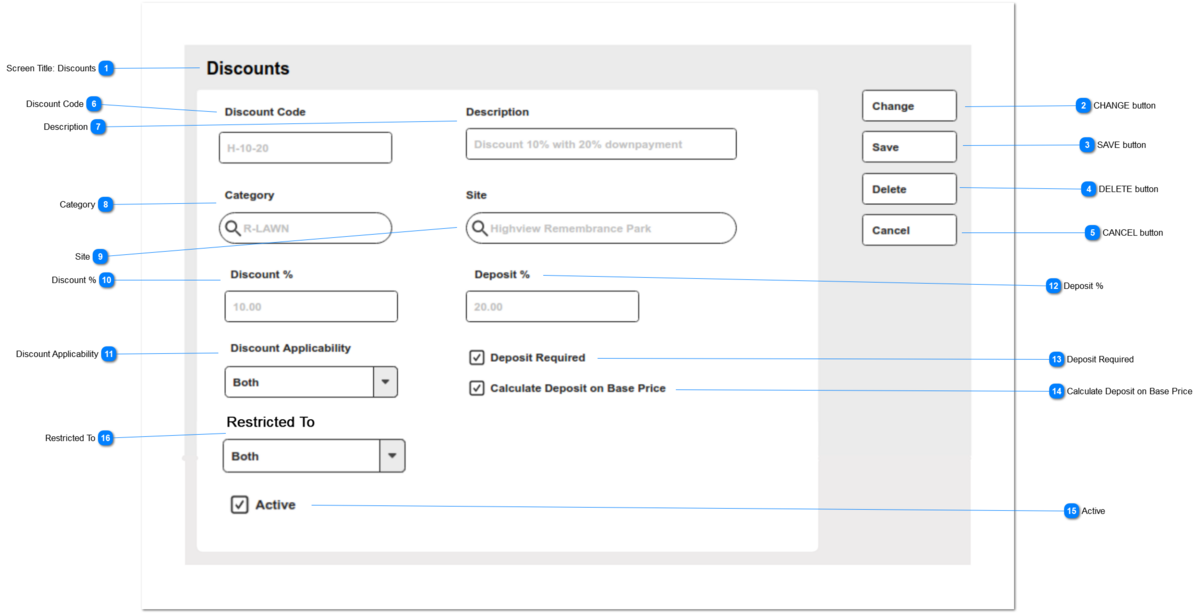
This is the set up record for discount codes and % to apply to order detail lines.
 
Sales Discounts - New/Edit
1

Screen Title: Discounts

 
This is the screen title: Discounts
 
Type
Notes
Rules
Compulsory
Format
Edit
Size
Default
Error Message
Title
 
1) This screen is visible to users with security rights to the Sales Discounts entity.
N


-
 
2

CHANGE button

 
This is an action button to put an existing summary record into edit mode.
 
Type
Notes
Rules
Compulsory
Format
Edit
Size
Default
Error Message
Button
Subject to all standard CRM rules.
1.This Button is visible when the screen is in VIEW mode.
 
2. Selection places the screen into edit mode
N


-
 
3

SAVE button

 
This is an action button to save the record. 
 
Type
Notes
Rules
Compulsory
Format
Edit
Size
Default
Error Message
Button
Subject to all standard CRM rules.
1.This Button is visible when the screen is in ADD or EDIT mode.
 
2. New entries are inserted to the database.
3. Edited entries are updated in the database.
N


-
 
4

DELETE button

 
This is an action button to delete the record.
 
Type
Notes
Rules
Compulsory
Format
Edit
Size
Default
Error Message
Button
Subject to all standard CRM rules.
1.This Button is visible when the screen is in EDIT mode.
 
2. When selected, the user is prompted with standard CRM warning, and options to proceed or cancel.
 
3. The record is soft-deleted in the database.
N


-
 
5

CANCEL button

 
This is an action button to return the user to the list of Discount entries, without committing any record changes to the database.
 
Type
Notes
Rules
Compulsory
Format
Edit
Size
Default
Error Message
Button
Subject to all standard CRM rules.
1. This button is visible when the screen is in EDIT mode.
 
2. When selected, returns the user to the list of Discount codes.
N


-
 
6

Discount Code

 
This field will represent the discount record in short-form.
 
Type
Notes
Rules
Compulsory
Format
Edit
Size
Default
Error Message
String
New entries should be validated to ensure the discount code is unique.
1. This field will accept alpha-numeric text combinations, up to 24 characters.
 
2. On navigation to the next field, this entry will be validated against existing entries in the database.
2a. If code entered is unique, no action required.
2b. If code is already present (and the entry is not marked deleted = 1), present an error message to the user. Return the cursor to the Discount Code field.
 
2. On navigation to the next field, this entry will be capitalized.
Y
string
Y
24
blank
2b.  This Discount Code already exists. Please review.
7

Description

 
This field represents the discount code in long, descriptive form.
 
Type
Notes
Rules
Compulsory
Format
Edit
Size
Default
Error Message
String
 
1. This field will accept alpha-numeric text combinations, up to 200 characters.
1a. Field entry width on-screen 40
Y
string
200
 
blank
 
8

Category

 
This is a lookup to the list of Categories, controlling reporting and financial configuration.
In the Order Details screen, the Discount code will be made available to Items linked to the corresponding Category code.
 
Type
Notes
Rules
Compulsory
Format
Edit
Size
Default
Error Message
Search Advanced Select
 
1. This is a lookup to the list of Categories.
 
2. If left blank, the Discount code will be available to all Items in the Order Details screen.
N
ID
Y
 
blank
 
9

Site

 
This is a lookup to the list of Sites configured in byondpro.
In the Order Details screen, the Discount code will be made available where the Order Header is associated with the corresponding Site record.
 
Type
Notes
Rules
Compulsory
Format
Edit
Size
Default
Error Message
Search Advanced Select
 
1. This is a lookup to the list of Sites.
 
2. If left blank, the Discount code will be available to all Order Header/Detail entries.
2a. Subject to Category rule above.
N
ID
Y
 
blank
 
10

Discount %

 
This is the percentage value of discount to be applied in the Order Details screen.
The unit price will be reduced by this %, rounded to 2x decimal places.
Example: 
Unit Price: $999.00
Discount:  5.55%
Discount:  $55.4445, rounded to $55.44
Discounted Unit Price:  $943.56
 
Type
Notes
Rules
Compulsory
Format
Edit
Size
Default
Error Message
numeric
 
1. This field accepts numeric values, up to 2 decimal spaces.
 
2. Negative values will not be allowed to entered by user
Y
 
Y
 
0.00
 
11

Discount Applicability

 
This selection reflects the Price Applicability feature in Item Pricing; and controls whether the discount code can be selected in the Order Details screen for At-Need and/or Pre-Need sales transactions.
 
Type
Notes
Rules
Compulsory
Format
Edit
Size
Default
Error Message
Selection List
Uses same values as Item Prices: Price Applicability
1. This field is a selection list, and shares the list values for Price: Price Applicability (itpr_applies).
- At-Need
- Pre-Need
- Both
N
 
Y
 
Both
 
12

Deposit %

 
This is the percentage value of deposit required for this contract code.
Will be calculated on the Order Total, and passed as the Contract Downpayment (if active) and to the first Receipt entry.
 
Type
Notes
Rules
Compulsory
Format
Edit
Size
Default
Error Message
numeric
 
1. This field accepts numeric values, up to 2 decimal spaces.
 
2. Negative values will not be allowed to entered by user which will be identified as invalid entry
Y
 
Y
 
0.00
 
13

Deposit Required

 
This field indicates that a Deposit must be collected in conjunction with this Discount Code.
If activated, will validate that the Deposit % value is not 0, when saved.
 
Type
Notes
Rules
Compulsory
Format
Edit
Size
Default
Error Message
Checkbox
 
1. If value = N/null - no action required.
 
2. If value = Y, when record is saved, validate that Deposit % is greater than 0.00.
2a. If value = 0, show error message.
N
Y/N
Y
 
unchecked
2a. Deposit % must be greater than 0.00. Please review.
14

Calculate Deposit on Base Price

 
This field indicates that the Deposit calculation is required on the original/base unit price, and not the discounted amount.
 
Type
Notes
Rules
Compulsory
Format
Edit
Size
Default
Error Message
Checkbox
 
 
N
Y/N
Y
 
unchecked
 
15

Active

 
This field indicates that the Discount Code is active and can be used in Sales Orders.
 
Type
Notes
Rules
Compulsory
Format
Edit
Size
Default
Error Message
Checkbox
 
 
N
Y/N
Y
 
Y/checked
 
16

Restricted To

 
This selection reflects the Price Applicability feature in Item Pricing; and controls whether the discount code can be selected in the Order Details screen for Person and/or Company transactions.
 
Type
Notes
Rules
Compulsory
Format
Edit
Size
Default
Error Message
Selection List
The selections made control whether the discount code can be used (is able to be selected by:
Person: Bill-to Applicant
Company: Bill-to Company
Both:  either of Bill-to Applicant or Company
1. This field is a selection list, and shares the list values for Discount Applicability.
- Person
- Company
- Both
2. If the Restricted to - Person; only the Bill to Applicant field should applicable on Order header screen.
3. If the Restricted to - Company; only the Bill to Company field should applicable on Order header screen.
4. If the Restricted to - Both; both Bill to Company and Bill to Applicant fields should applicable on Order header screen.
N
 
Y
 
Both
 
The online help was created with Dr.Explain