This feature will allow byondpro customers to apply discounts to sales orders.
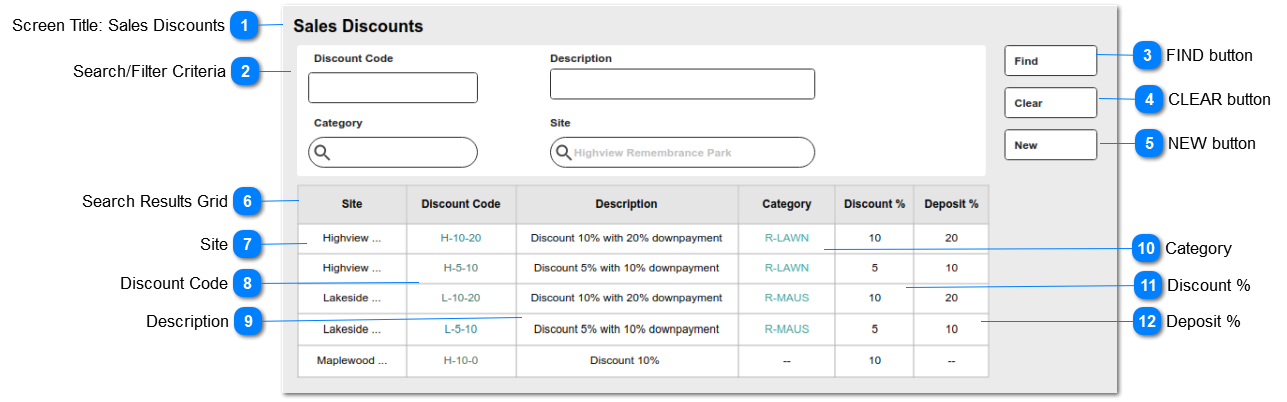
This is the screen that allows system administrators to review existing discount codes and to start new entries.
It is accessed from the ADMINISTRATION menu > Cemetery System Setup > Sales Discounts
 Screen Title: Sales Discounts
This is the screen and feature title: Sales Discounts
|
Type
|
Notes
|
Rules
|
Compulsory
|
Format
|
Edit
|
Size
|
Default
|
Error Message
|
|
Title
|
|
1. This entity is to be located in the Administration > Cemetery System Setup in byondpro.
2. This screen is visible to users with security rights to the Sales Discounts entity, and to the Administration menus.
|
N
|
|
|
|
|
| |
|
 Search/Filter Criteria
The fields shown here will be provided as standard search criteria.
|
Type
|
Notes
|
Rules
|
Compulsory
|
Format
|
Edit
|
Size
|
Default
|
Error Message
|
|
Search Criteria
|
The fields listed will be stored with the Sales Discount records in byondpro
|
DISCOUNT CODE: string
DESCRIPTION: string
CATEGORY: search select
SITE: search select
|
N
|
|
|
|
|
| |
|
 FIND button
This is an action button to initiate a new search based on the filter criteria selected
|
Type
|
Notes
|
Rules
|
Compulsory
|
Format
|
Edit
|
Size
|
Default
|
Error Message
|
|
Button
|
|
1.Selecting the FIND button will initiate a search of the Sales Discount entries, filtered according to the selections made in (2).
2. Search results to be listed in the grid shown below.
3. Records will be based on the "AND" operation among the search filters.
|
N
|
|
|
|
|
| |
|
 CLEAR button
This is an action button to clear all search results
|
Type
|
Notes
|
Rules
|
Compulsory
|
Format
|
Edit
|
Size
|
Default
|
Error Message
|
|
Button
|
|
1. Selecting the CLEAR button, will clear all search parameter selections previously made in (2).
1a. Will empty the search results grid of previous results.
|
N
|
|
|
|
|
| |
|
 NEW button
This is an action button to open a new Sales Discount entry screen
|
Type
|
Notes
|
Rules
|
Compulsory
|
Format
|
Edit
|
Size
|
Default
|
Error Message
|
|
Button
|
|
1. Selecting the NEW button, will open the NEW Sales Discount entry screen.
|
N
|
|
|
|
|
| |
|
 Search Results Grid
This is the list of search results, including (standard CRM) number of results found and page navigation objects.
|
|
 Site
This column in the search results grid will show the Site Name, recorded in the Sales Discount entry.
|
Type
|
Notes
|
Rules
|
Compulsory
|
Format
|
Edit
|
Size
|
Default
|
Error Message
|
|
String
|
Column header to be sortable
|
1. This column shows the Site Name
|
N
|
|
N
|
|
|
| |
|
 Discount Code
This column in the search results grid will show the Discount Code, recorded in the Sales Discount entry.
|
Type
|
Notes
|
Rules
|
Compulsory
|
Format
|
Edit
|
Size
|
Default
|
Error Message
|
|
String
|
Column header to be sortable
|
1. This column shows the Discount Code.
2. This will hyperlink to open the corresponding Discount Code summary screen.
|
Y
|
hyperlink
|
N
|
|
|
| |
|
 Description
This column in the search results grid will show the Description of the Sales Discount entry.
|
Type
|
Notes
|
Rules
|
Compulsory
|
Format
|
Edit
|
Size
|
Default
|
Error Message
|
|
String
|
Column header to be sortable
|
1. This column shows the Discount Description.
|
Y
|
|
N
|
|
|
| |
|
 Category
This column in the search results grid will show the Category Code, as recorded in the Sales Discount entry.
|
Type
|
Notes
|
Rules
|
Compulsory
|
Format
|
Edit
|
Size
|
Default
|
Error Message
|
|
String
|
Column header to be sortable
|
1. This column shows the Category Code.
2. This will hyperlink to open the corresponding Category Code summary
|
N
|
hyperlink
|
N
|
|
|
| |
|
 Discount %
This column in the search results grid will show the Discount % value recorded in the Sales Discount entry.
|
Type
|
Notes
|
Rules
|
Compulsory
|
Format
|
Edit
|
Size
|
Default
|
Error Message
|
|
numeric
|
Column header to be sortable
|
1. This column shows the Discount % amount (2 decimals)
|
Y
|
|
N
|
|
|
| |
|
 Deposit %
This column in the search results grid will show the Deposit % value recorded in the Sales Discount entry.
|
Type
|
Notes
|
Rules
|
Compulsory
|
Format
|
Edit
|
Size
|
Default
|
Error Message
|
|
String
|
Column header to be sortable
|
1. This column shows the Deposit % amount (2 decimals)
|
Y
|
|
N
|
|
|
| |
|