Configuration Code
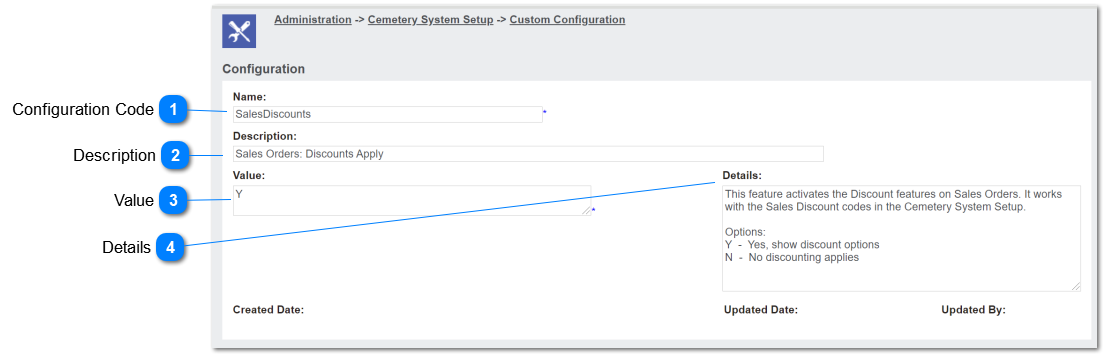
This value will be used to control whether Discount options will be available on the Sales Order Details screens.
|
Type
|
Notes
|
Rules
|
Compulsory
|
Placeholder
|
Format
|
Edit
|
Size
|
Default
|
Messages
|
|
Text
|
-
|
1. The entered value will be
SalesDiscounts
|
Y
|
-
|
Text
|
N
|
-
|
-
|
-
| |
|
 Description
This describes the purpose of the configuration option to system administrators.
|
Type
|
Notes
|
Rules
|
Compulsory
|
Placeholder
|
Format
|
Edit
|
Size
|
Default
|
Messages
|
|
Text
|
-
|
1. This allows to enter any characters including numbers, letters and special characters.
2. The entered value will be:
Sales Orders: Discounts Apply
|
Y
|
-
|
Text
|
Y
|
-
|
-
|
-
| |
|
 Value
|
Type
|
Notes
|
Rules
|
Compulsory
|
Placeholder
|
Format
|
Edit
|
Size
|
Default
|
Messages
|
|
Multiline Text
|
-
|
1. The entered value will be;
either Y or N.
2. The default value will be N.
3. If Y, show Discount field options in the S&B Order Details screens; refer Discounts
4. If N, show warning message in the top content of the Discount Find screen
|
Y
|
-
|
Text
|
Y
|
-
|
N
|
4. byondpro has not been configured to allow Sales Discounts. Please check the Configuration option: SalesDiscounts
| |
|
 Details
This describes the rules for each configuration option to system administrators.
|
Type
|
Notes
|
Rules
|
Compulsory
|
Placeholder
|
Format
|
Edit
|
Size
|
Default
|
Messages
|
|
Multiline Text
|
-
|
1. This allows to enter any characters including numbers, letters and special characters.
2. The entered value will be:
This feature activates the Discount features on Sales Orders. It works with the Sales Discount codes in the Cemetery System Setup.
Options:
Y - Yes, show discount options
N - No discounting applies
|
N
|
-
|
Text
|
Y
|
-
|
-
|
-
| |
|