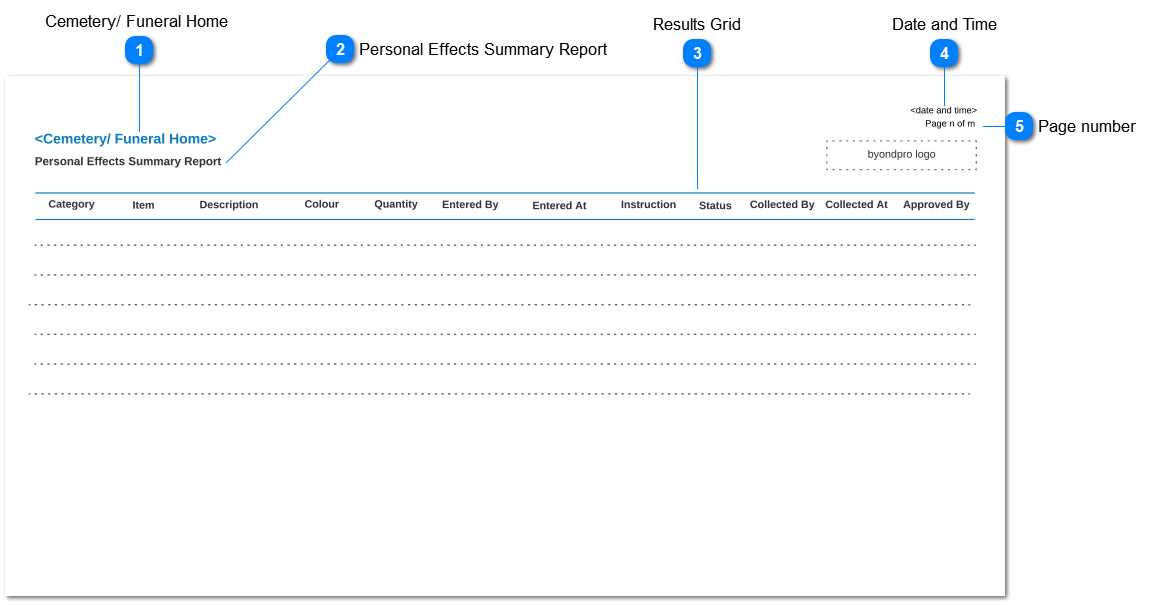
Personal Effects Summary Report
-
This report can be accessed through the
Sales and Booking -> Summary -> Funeral Forms.
 Cemetery/ Funeral Home
|
Type
|
Notes
|
Rules
|
Compulsory
|
Placeholder
|
Format
|
Edit
|
Size
|
Default
|
Messages
|
|
Read-only text
|
1. Respective funeral home/ cemetery name will be shown.
|
-
|
-
|
-
|
-
|
-
|
-
|
-
|
-
| |
|
 Personal Effects Summary Report
|
Type
|
Notes
|
Rules
|
Compulsory
|
Placeholder
|
Format
|
Edit
|
Size
|
Default
|
Messages
|
|
Read-only text
|
-
|
-
|
-
|
-
|
-
|
-
|
-
|
-
|
-
| |
|
 Results Grid
|
Type
|
Notes
|
Rules
|
Compulsory
|
Placeholder
|
Format
|
Edit
|
Size
|
Default
|
Messages
|
|
Column Header
|
Category
|
|
-
|
-
|
-
|
-
|
-
|
-
|
-
|
|
Column Header
|
Item
|
|
-
|
-
|
-
|
-
|
-
|
-
|
-
|
|
Column Header
|
Description
|
|
-
|
-
|
-
|
-
|
-
|
-
|
-
|
|
Column Header
|
Colour
|
|
-
|
-
|
-
|
-
|
-
|
-
|
-
|
|
Column Header
|
Quantity
|
|
-
|
-
|
-
|
-
|
-
|
-
|
-
|
|
Column Header
|
Entered By
|
1. The person who created the personal effects record in Add Personal Effects screen will be displayed.
|
-
|
-
|
-
|
-
|
-
|
-
|
-
|
|
Column Header
|
Entered At
|
1. The data entry date and time of the personal effects record in Add Personal Effects screen will be displayed.
|
-
|
-
|
-
|
-
|
-
|
-
|
-
|
|
Column Header
|
Instruction
|
|
-
|
-
|
-
|
-
|
-
|
-
|
-
|
|
Column Header
|
Status
|
|
-
|
-
|
-
|
-
|
-
|
-
|
-
|
|
Column Header
|
Collected By
|
|
-
|
-
|
-
|
-
|
-
|
-
|
-
|
|
Column Header
|
Collected At
|
|
-
|
-
|
-
|
-
|
-
|
-
|
-
|
|
Column Header
|
Approved By
|
|
-
|
-
|
-
|
-
|
-
|
-
|
-
| |
|
 Date and Time
|
Type
|
Notes
|
Rules
|
Compulsory
|
Placeholder
|
Format
|
Edit
|
Size
|
Default
|
Messages
|
|
Read-only text
|
1. Generated date and time of the report should be shown.
|
-
|
-
|
-
|
-
|
-
|
-
|
-
|
-
| |
|
 Page number
|
Type
|
Notes
|
Rules
|
Compulsory
|
Placeholder
|
Format
|
Edit
|
Size
|
Default
|
Messages
|
|
Read-only text
|
1. Page number should be shown as per the below format.
|
-
|
-
|
-
|
-
|
-
|
-
|
-
|
-
| |
|