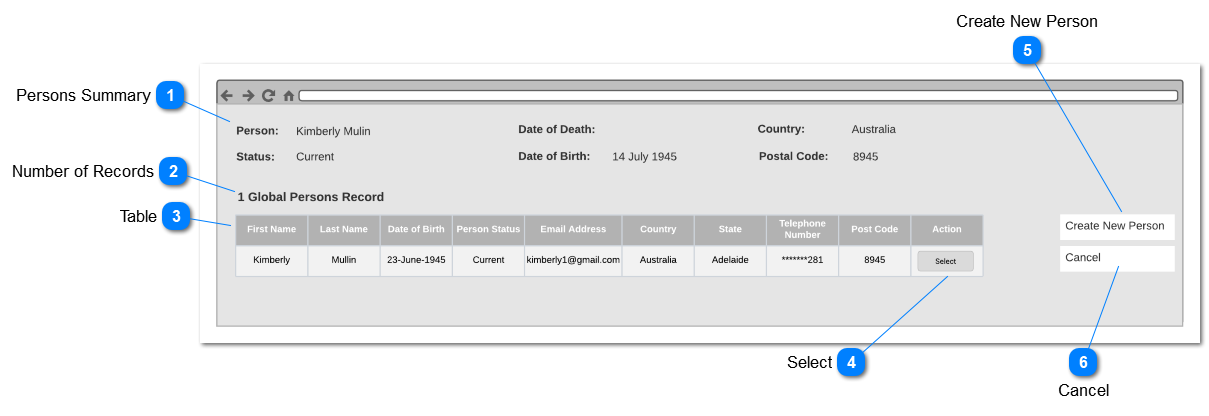
This screen will allow the user to sync global records if the user approach to create new person or sync an existing person to global person record. Current Person will be matched base on unique identifiers such as First name, Last name and Date of Birth. Decease Person will be uniquely identified based on First name, Last name and Date of Death. This screen will pop-up if user create a new person and click on the "Save" button or Clicking "Sync Global Person" button in syncing unlinked persons records
Persons Summary
Type
Notes
Rules
Compulsory
Placeholder
Format
Edit
Size
Default
Messages
Read Only - Text
Display Persons details of selected person in byondpro
Person summary will display the details entered in persons record (Person Module> Add New Person> Enter Person Details) Or Existing Person Details ( Person Module> Find Person> Person Record)
Clicking the action button will sync the persons record in byondpro to selected global persons record.
If the global persons record already linked to a byondpro persons record created or synced person record will be merged with linked person record and same rule merge contacts in byondpro will be applied.
When syncing details from byondpro to cloud only latest updated fields will be sync to byondcloud
If byondcloud contains fields with recent update, field value will not change.
Sync will not update information from byondcloud to byondpro once the person is created in byondpro.