If byoncloud sync in switched on cemetery system configuration, the system should facilitate a sync with byondcloud to create persons and update to date persons information.
If there is an existing byondpro person who is not sync to global persons, The person record will be sync by using the Sync Button in person record.
The below conditions are applicable based on the related synchronizations
Create Person
Have to run all the validation which is in the persons module and check for duplicates by setting first name, last name and date of birth as unique identifier for current persons record. First name, last name and Date of Death will be added as an unique identifier for Deceased Person,
If there an possible match found in global persons module which match the unique identifier the Linking Global Person Screen will pop-up to the user to sync to possible global person records to avoid any duplicates.
Once a global person created, Global persons ID will kept as reference in the byondpro persons database and it will be used for global persons updates.
Edit Person
If the person records are getting updated, It a requirement check the latest update to the sync from byondpro to byondcloud. only change fields will be updated to global persons records. Tracking records will be maintained in byondpro and byondcloud for updates passed from the sync process.
Delete Person Record
If user delete person record in view person record will remove the sync with global person record. This will remove the person record from byondpro and If the global person link to the record is not used in byondcloud or any other instance, global person record will be removed. If the global person record used in byondcloud or any other instance, global person record status will be changed to inactive status in byondcloud.
Existing rules for delete person record will apply.
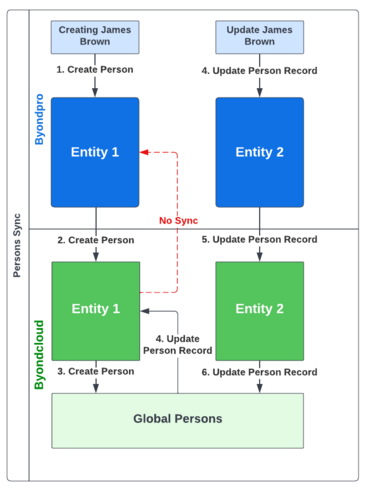
The following scenario represents persons creation process from byondpro entity one and how it will sync to byondcloud and global persons. This will also present the update of the same record from a byondpro instance which is from entity two and its sync process.
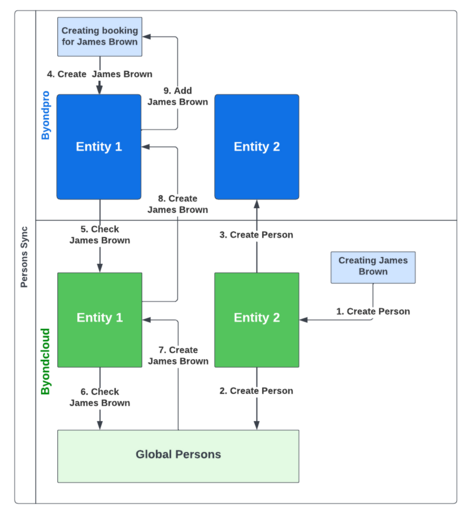
Scenario 2
The following scenario represents persons creation process from byondcloud entity two and how it will sync to byondpro and global persons. This will also represent calling of existing record to byondpro entity one to add a person for existing booking.
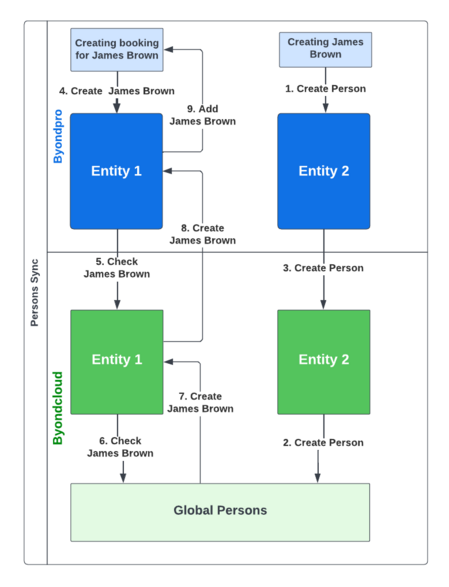
Scenario 3
The following scenario represents persons creation process from byondpro entity two and how it will sync to byondpro and global persons. This will also represent calling of existing record to byondpro entity one to add a person for existing booking.
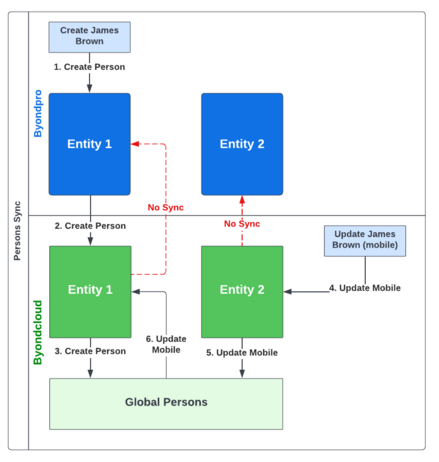
Scenario 4
The following scenario represents persons creation process from byondpro entity one and how it will sync to byondcloud and global persons. This will also present the update of the same record from a byondcloud entity two and its sync process.
Persons records created through byondpro should be visible within byondcloud (i.e. the persons records should sync from byondpro to byondcloud) in instances where the above sync between byondpro and byondcloud is switched on.
byondpro Field Name
byondcloud Path
byondcloud global Persons Module Field Name
pers_title
Persons Module > Add New Person > Contact Details
Title
pers_firstname
Persons Module > Add New Person > Contact Details
First Name
pers_lastname
Persons Module > Add New Person > Contact Details
Last Name
pers_territory
Persons Module > Add New Person > Contact Details
Site
Persons Module > Add New Person > Contact Details
Person: Phone Number
Type: Primary
Telephone Number
emai_emailaddress
Persons Module > Add New Person > Contact Details
Email Address
addr_address1
Persons Module > Add New Person > Contact Details
Address 1
addr_address2
Persons Module > Add New Person > Contact Details
Address 2
addr_country
Persons Module > Add New Person > Contact Details
Country
addr_state
Persons Module > Add New Person > Contact Details
State
addr_city
Persons Module > Add New Person > Contact Details
Suburb/ Town
addr_postcode
Persons Module > Add New Person > Contact Details
Postcode
pers_status
Persons Module > Add New Person > Contact Details
Status
pers_culturalpreference
Persons Module > Add New Person > Personal Details
Religion
pers_dateofbirth
Persons Module > Add New Person > Personal Details
Date of Birth
pers_dateofdeath
Persons Module > Add New Person > Personal Details
Date of Death
pers_age
Persons Module > Add New Person > Personal Details
Age
pers_veteran
Persons Module > Add New Person > Personal Details
Veteran
note_note
Persons Module > Add New Person > Personal Details
Additional Details
resp_relatedpersonid
Persons Module > Add New Person > Relationships
Select Related Person
resp_relatedentitylinkid
Persons Module > Add New Person > Relationships
Select Relationship to Person
resp_relatedentitylinkid
Persons Module > Add New Person > Relationships
Select Relationship to Related Person
Relationships
During synchronization of the persons information, relationship types should be mapped according to the relationship set up in global persons module.
byondpro should map the byondcloud relationship types with those that exist within byondpro.
If the relationship type that exists within byondpro does not match, those that exist within byondcloud, then the relationship tab will add the relationship naming the relationship type "Unknown" and Relationship description will show the relationship define in byondpro. Description will shown in "Notes" column after user clicking the persons name on relationship tab (rend_Notes field in the RelatedEntityData table)
E.g. If byondpro define the persons relationship of jhon smith as grand father of Michelle Smith. If the relatioship type grandfather is not mapped to byondpro. relationship will be defined as unknown and relationship description will be "Grand Father".
If the related person does not exist in global persons new persons record will be created with person details
E.g. If Jhon Smith who is grand father of Michelle Smith does not exist in global person, Jhon Smith will be added as persons record.
If the a related person is forced unsync by using the unsync global person button unsynced related person will not be sync to the global person record.
The process of syncing relationship from the person record will sync direct and inverse relationship for the person record
Merge Person Record
Merging byondpro person records will also merge linked global person records in byondcloud and update primary persons record. Current rules for "merge contact" will remain the same and same merge rules will apply for byondcloud.