byondpro
Functional Specifications
×
Menu
Index

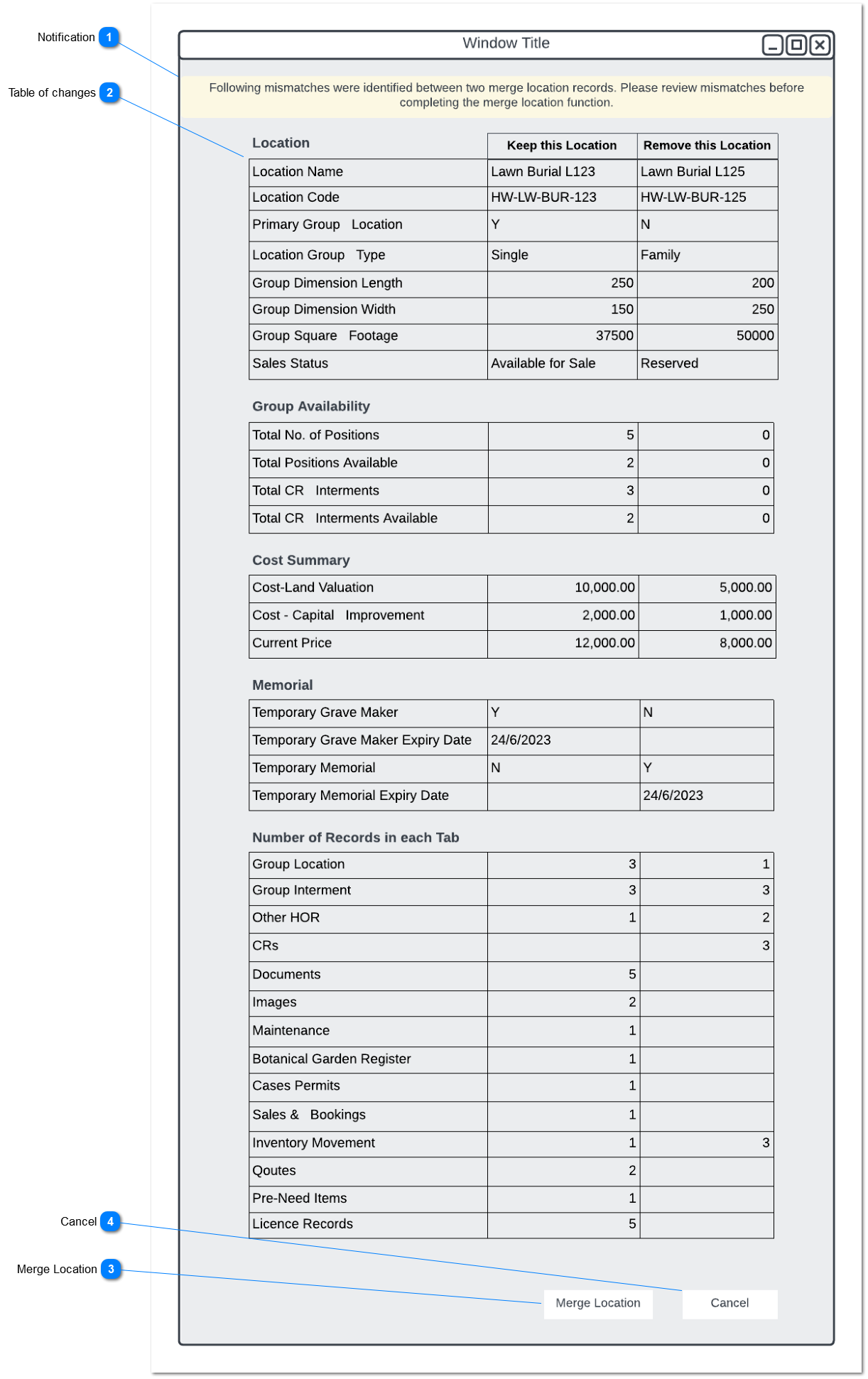
Merge Location - Review Screen

 
This pop-up screen will appear upon clicking the save button on the Merge Location - Screen.
 
Merge Location - Review Screen
1

Notification

 
Type
Notes
Rules
Compulsory
Placeholder
Format
Edit
Size
Default
Messages
Notification
Notify the user to check changes to merge location.
Notification will display following;
" Following mismatches were identified between two merge location records. Please review mismatches before completing the merge location function. "
-
-
-
-
-
-
-
2

Table of changes

 
Type
Notes
Rules
Compulsory
Placeholder
Format
Edit
Size
Default
Messages
Table
Display differences in values and number of records in each Tab or Field in location record.
 
Table will display change in values.
Table will consist of to two columns namely "Keep this Location" and "Remove this location"
 
1. Changes in following fields will be Display on the table:
Location Summary
  • Location Name
  • Location Code
  • Type
  • Site
  • Area
  • Primary Group Location
  • Location Group Type
  • Group Dimention Length
  • Group Dimention Width
  • Group Square Footage
  • Sales Status
  • Sales Date
  • Holder Of Right
  • Cerificate Number
  • Purpose
  • Pervious Code
  • Cultural Preference
  • Location Significance
  • Alert
  • Premium Description
  • Floral Policy
  • Memorialisation Granite
  • Memorialisation Other
  • Memorialisation Plaque
  • Active
  • Audit Required
  • Audit Completed
  • Date (multi-Pupose)
  • Exhumed Grave
  • Heritage Status
  • Date Issued
  • Monument Safety Rating
  • Reason Unusable
  • Tenure Grace Period
  • Tenure in Years
  • User Removed
 
Group Availability
  • Total No. of Positions
  • Total Positions Available
  • Total CR Interments
  • Total CR Interments Available
 
Cost Summary
  • Cost-Land Valuation
  • Cost - Capital Improvement
  • ROI Location Item
  • Current Price
  • Price Applicability
 
Tenure
  • Tenure Status
  • Tenure Expiry Date
  • Tenure Sticker Placed
     
Memorial
  • Temporary Grave Maker
  • Temporary Grave Maker Expiry Date
  • Temporary Memorial
  • Temporary Memorial Expiry Date
  • Memorial Installed
  • Memorial Installed Date
 
Location Geographic Cooordinates
  • Longitude
  • Latitude
 
GIS Information
  • GIS Feature Sub Layer
  • GIS Object Id
  • GIS Sync Date time
 
2. Number of records will be show on following tabs in location record:
 
  • Group Location
  • Intement (Group Intement)
  • Other HOR
  • CRs
  • Notes
  • Communication
  • Documents
  • Images
  • Maintenance
  • Botanical Garden Register
  • Cases Permits
  • Sales & Bookings
  • Inventory Movement
  • Qoutes
  • Pre-Need Items
  • Licence Records
 
-
-
-
-
-
-
-
3

Merge Location

 
Type
Notes
Rules
Compulsory
Placeholder
Format
Edit
Size
Default
Messages
Action Button
Clicking the action button will merge selected location in "merge location" field
Clicking action button will apply following rules;
 
  • Merge location will be marked as inactive in location record
     
  • Merge location reference will be maintained in the active record.
     
  • Records associated with merge location will be replaced with the merged record.
 
  • Burial booking and Chapel booking records associated with location will be deleted.
     
  • Additional information updated in the merge location will be updated to active location
 
  • Communication Records will be replaced by the merged Location ID and the communication records will be added to communication tab in the merge location.
-
-
-
-
-
-
-
4

Cancel

 
Type
Notes
Rules
Compulsory
Placeholder
Format
Edit
Size
Default
Messages
Action Button
-
Clicking the action button will return back to Merge Location - Screen
-
-
-
-
-
-
-
The online help was created with Dr.Explain