byondpro
Functional Specifications
×
Menu
Index

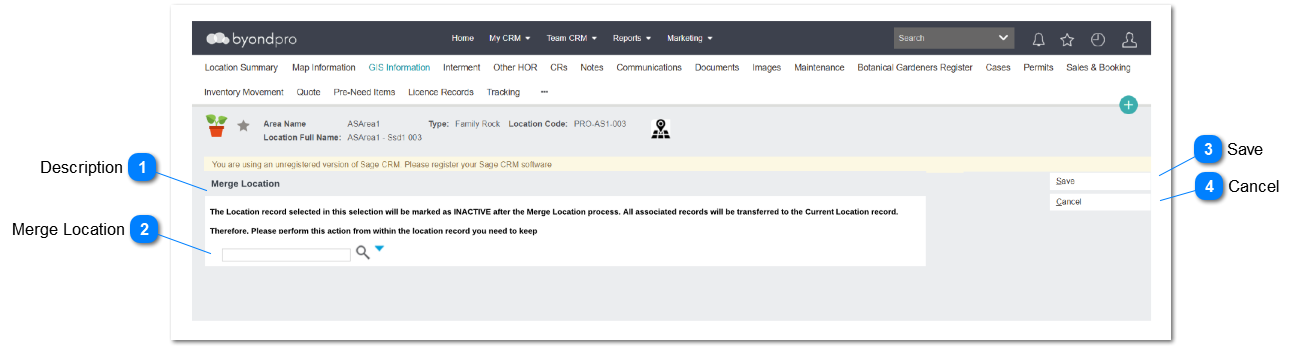
Merge Location - Screen

 
User will be navigated to the screen once the user click on Merge location button in Location Summary screen
Merge Location - Screen
1

Description

 
Type
Notes
Rules
Compulsory
Placeholder
Format
Edit
Size
Default
Messages
Read Only Field
Display implication of merging location record
Implications will be display as below:
 
" The Location record selected in this selection will be marked as INACTIVE after the Merge Location process. All associated records will be transferred to the Current Location record.
 
Therefore, please perform this action from within the location record you need to keep."
 
-
-
-
-
-
-
2

Merge Location

 
Type
Notes
Rules
Compulsory
Placeholder
Format
Edit
Size
Default
Messages
Advance Search Select
Allow user to select location record that user wish to merge with the selected record.
Allow user to select any location from location record
Y
-
-
-
-
-
-
3

Save

 
Type
Notes
Rules
Compulsory
Placeholder
Format
Edit
Size
Default
Messages
Action Button
Action button will direct the user to Merge Location - Review Screen
Pre-Condition:
Merge Location should be selected to merge location.
 
 
-
-
-
-
-
" Please select a location to merge location "
4

Cancel

 
Type
Notes
Rules
Compulsory
Placeholder
Format
Edit
Size
Default
Messages
Action Button
-
Clicking the cancel button will return to location summary screen
-
-
-
-
-
-
-
The online help was created with Dr.Explain