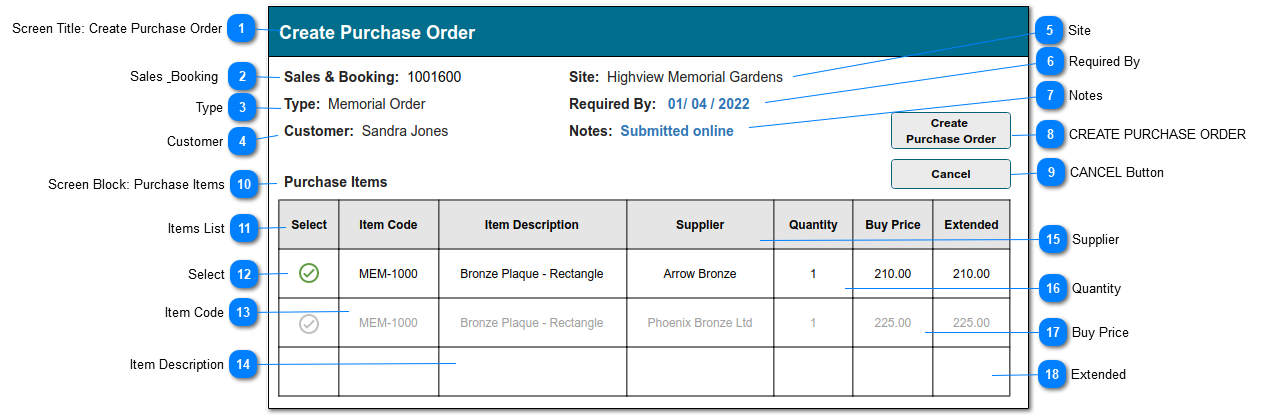
This screen will allow the user to create a Purchase Order based on the Memorial Type used in a Memorial Order.
It opens from a button on the Memorial Order summary screen: Create Purchase Order.
This function will prepare the Create Purchase Order screen with relevant Item and Supplier Price information. Its core functions are the same as the Sales Order: Create Purchase Order screen - just the source for some of the data is different.
The user will be presented with a list of items showing:
- Item code and description sourced from the Item & Supplier Price records.
- Supplier/s associated with the product, filtered by the site (park)
2. CUSTOMER: this is the Authorising Person on the Sales & Booking summary = First & Last Name. Show as text string.
3a. The purpose is that if an item from this S&B already exists on a purchase order, it should not be ordered for a second time.
1. This screen opens when the CREATE PURCHASE ORDER button on the Sales order summary screen is selected.
2. The following values are copied from the Sales & Booking record, to which the Memorial Order is attached:
- SALES & BOOKING (tran_opssaleid)
- SITE (tran_SiteID)
- TYPE (tran_type)
- CUSTOMER (tran_AuthorisingID)
3. The Items list is populated per the rules described in Items List below.
3a. The items list validates against existing Purchase Orders with the same source Sales & Booking ID (and where PO Status is not Cancelled), and filters out items that already exist as Purchase Details.
This is the Customer name, taken from the S&B summary/Authorising Person and shown for information purposes only (it does not pass to the purchase order record).
Type
Notes
Rules
Compulsory
Format
Edit
Size
Default
Error Message
Text
1. This is the Authorising Person name from the Sales & Booking summary.
This is the Unit Price of the Item, from the valid Supplier Price.
Type
Notes
Rules
Compulsory
Format
Edit
Size
Default
Error Message
numeric
1. Supplier Price: Unit Price
2. Edit is allowed for all users if the control on Item Master: Can Edit Price = Y 2a. Edit is allowed for logged-in user if control on User profile: Is Allow Edit Price = Y