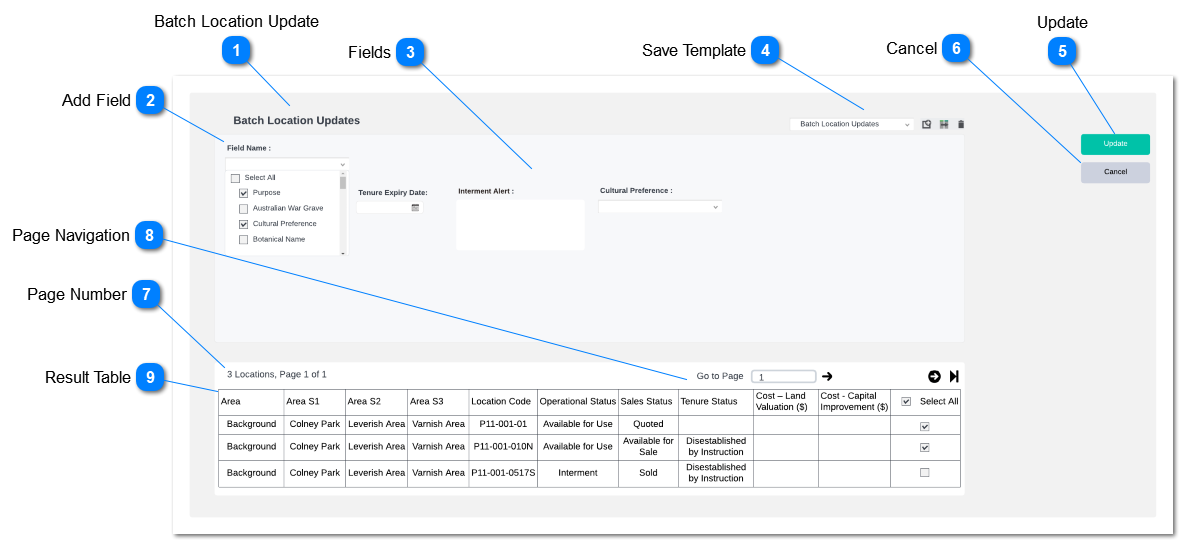
This action buttons are used to change, edit, delete and save templates.
Stand byondpro rules to save templates will be applied.
System will allow the user to save templates, update templates, select between templates and delete templates. Functionality is similar to managing template in advanced find.
User will be allowed to save templates with selected fields and filter criteria.
Based on selected entity from the drop down result grid will show column that needed to be displayed entity wise.
Pre-condition:
At-least 1 field should be selected from a selected entity to save a template.
Clicking the action button will update the location records as per the updated fields.
The same batch location update rules will be applied as per existing functionality. (MyCRM> Batch Location Updates)
Confirmation message will pop-up with fields with changed values as per the standard location update confirmation screen. Clicking "update" will process the location update.
If a select field does not have any value. The selected batch locations will record the field with zero/ invalid value. If there is any validation will not allow the user to update zero/ invalid value, error message will be pop-up mentioning the field that requires as a value.
If a select field field validation will be applied if the user enter invalid value. listing the list of transactions which were not updated will appear on the pop-up if the user click on the update failure notification appear on the batch location update tool.
Field which allows the user to update zero value will update the field zero value if selected field kept zero value.
Only selected fields will be updated to the location record.
Following fields will appear on the result grid based on filter criteria. Filed data will be fetched from location summary; (Location> Find> Location> Location Summary)
In the Select All column, Ticking select all will select all the transaction and deselecting the tick box will deselect all transactions. User will be having option to select and deselect each transaction.