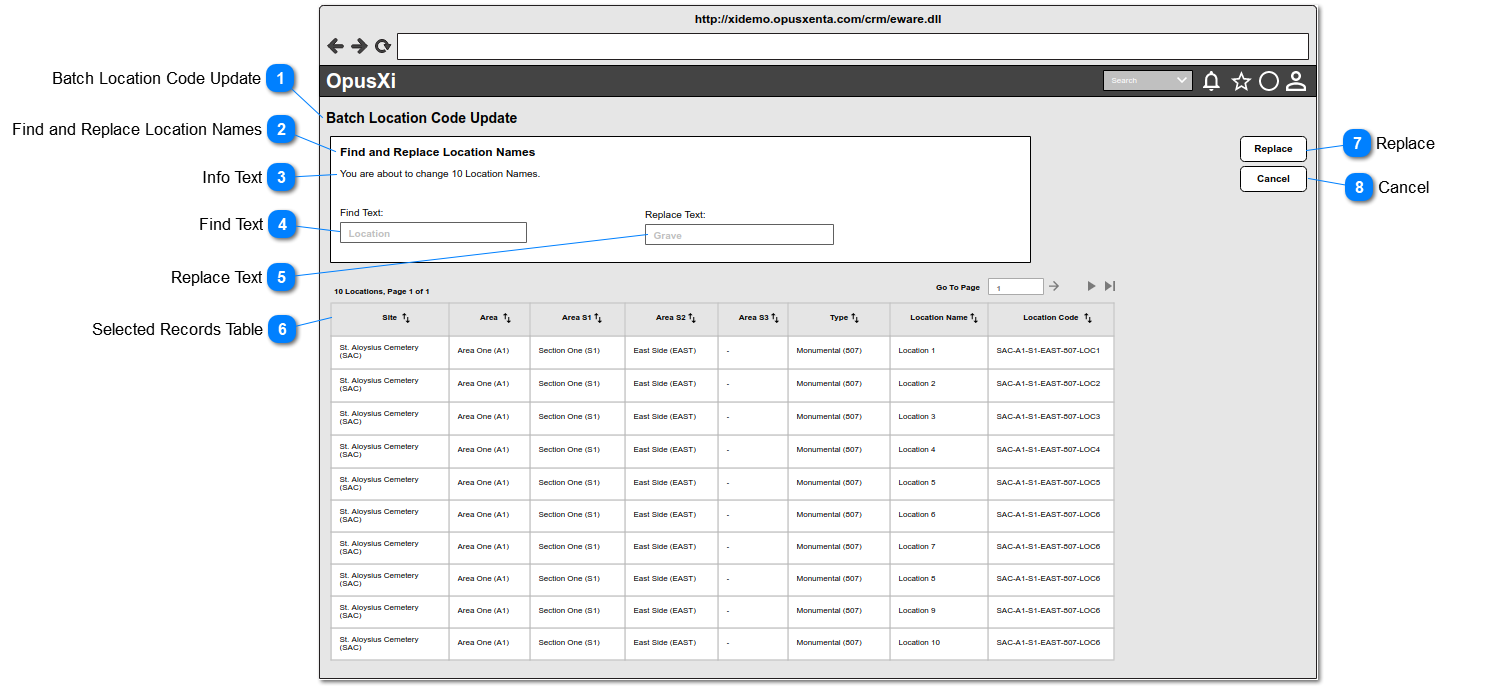
The system will navigate the user to this page, when the user selects one or more records (including "Select All") from the Results Table and clicks on the Find and Replace Location Names button.
This allows to enter a text to find an exact match or a partial match included in the location names from the selected records table.
Type
Notes
Rules
Compulsory
Placeholder
Format
Edit
Size
Default
Messages
Text Field
-
This allows to enter any character including word-space (The word-space finds the gap/s with in the text which will be available at the beginning, at the end or in between the texts).
This will be able to find an exact match or a partial matches of the content. (ex:- "cat" finds "Category 001" and "Location 111").
This will NOT be considered the letter case (i.e Upper case and Lower case) when finding the matching records. (ex:-The "Find Text" will be able to find the "Location 001" via the text "location")
4. For more details, refer Possible Scenarios section.
This allows to enter a text, which is used to replace the text content of the location names (i.e. found through Find Text).
Type
Notes
Rules
Compulsory
Placeholder
Format
Edit
Size
Default
Messages
Text Field
-
This allows to enter any character including word-space.
2. If this is intentionaly left blank (i.e. empty) the matching content of the location names will be removed (means replace with empty string/text).
3. This allows to replace a exact content or a partial content that finds through the Find Text (ex:- "cat" partial content of "Location" can be replaced with "-", so the result will be "Lo-ion").
4. For more details, refer Possible Scenarios section.
Post-conditions: 1. Retain the user in the same page.
2. Retain the values entered in the "Find Text" and "Replace Text"
3. For a successful location name change, the new name/s will be displayed underneath the "Location Name" column.
4. The track/log record/s should be added to the "Tracking" list.
1. This button will be enabled/active, when the user enters at least one character in to the Find Text.
2. This button will be disabled/inactive, when the user clears/resets the Find Text.
3. For more details, refer Possible Scenarios section.
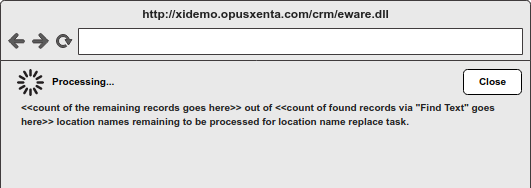
4. While the location name change task is being processing, it will show a message box including a "Task processing" message - see Message Box 1.
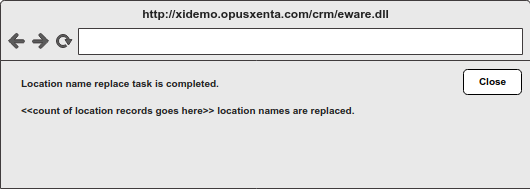
5. For a successfully completed task, it will show a message box including "Success" Message - see Message Box 2.
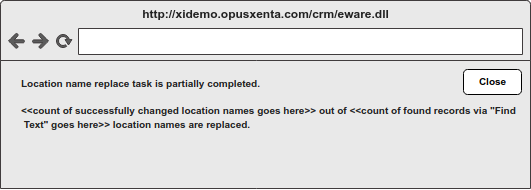
6. For a partialy completed task, it will show a message box including "Success" Message - see Message Box 3. (This might be shown when the server timeouts occured).
-
-
-
-
-
Inactive / disabled
Message Box 1 - Processing...
<<count of the remaining records goes here>> out of <<count of found records via "Find Text" goes
here>> location names remaining to be processed for location name replace task.
Message Box 2 -
Location name replace task is completed.
<<count of location records goes here>> location names are replaced.
Message Box 3 - Location name replace task is partially completed.
<<count of successfully changed location names goes here>> out of <<count of found records via "Find
Text" goes here>> location names are replaced.
Possible Scenarios
Example:- The list of Location Names of the Selected Records are as follows (records selected via the Results Table).
Location 001
Location 002
Location 003
Grave 011
Grave 012
Grave 013
LOC - 1
LOC - 2
LOC - 3
Find Text
Replace Text
Results
Remarks
Location or location
Grave
Location 001 changes to Grave 001 Location 002 changes to Grave 002 Location 003 changes to Grave 003
And other location names retain as same.
Finds by the exact match "Location" and replace with "Grave".
The Letter Case will NOT be considered for the "Find Text".
loc
add a word-space here
Location 001 changes to <<word-space adds here>>ation 001
Location 002 changes to <<word-space adds here>>ation 002 Location 003 changes to <<word-space adds here>>ation 003
Grave 011 retains same
Grave 012 retains same
Grave 013 retains same
LOC - 1 changes to <<word space adds here>> - 1 LOC - 2 changes to <<word space adds here>> - 2 LOC - 3 changes to <<word space adds here>> - 3
Finds by a partial text "loc" and replace with a word space.
The Letter Case will NOT be considered for the "Find Text".
add a word-space here
-
Location 001 changes to Location-001 Location 002 changes to Location-002 Location 003 changes to Location-003
Grave 011 changes to Grave-011
Grave 012 changes to Grave-012
Grave 013 changes to Grave-013
LOC - 1 changes to LOC---1
LOC - 2 changes to LOC---2
LOC - 3 changes to LOC---3
Finds by a word space and replace with "-".
Finds texts which included word space/s any where(word spaces are at the begining, at the end or in between the texts) in the text.
001
002
Location 001 changes to Location 002 Location 002 retains same Location 003 retains same
And other location names retain as same.
This is just a change of the location name, so checking uniqueness will NOT be considered.
-
->
LOC - 1 changes to LOC -> 1
LOC - 2 changes to LOC -> 2
LOC - 3 changes to LOC -> 3
And other location names retain as same.
Finds by a special character and replace with two special characters.