2. All images loaded must be subject to virus checking.
3. Include controls to restrict file size.
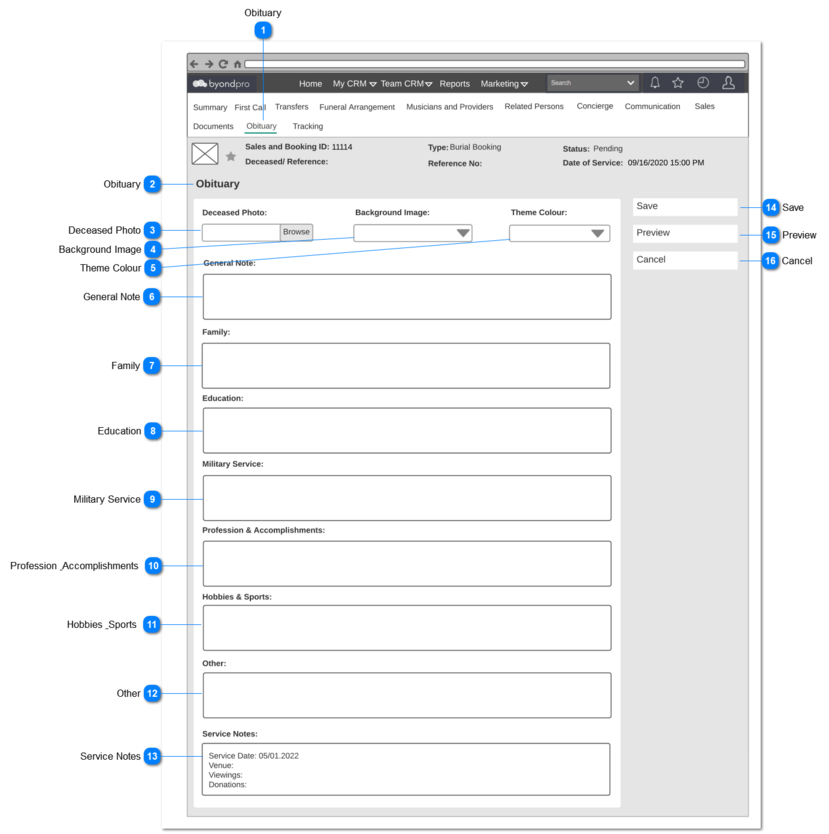
1. Upon clicking the Browse button, PC's default image upload screen will be popped up to select and upload the Deceased image.
2. On selection, insert the image URL
Post Conditions:
1. Document library record should be created automatically under the Document tab of the respective Sales and Booking and Persons records, for the uploaded Deceased Photo with following values with the image URL:
1. Service Date, Venue Viewing information and Donations recorded in the Sales and Booking record -> Funeral Arrangement section, should be reflected here by default as below.
Service Date: <Sales and Booking Record -> Funeral Arrangement ->Date of Service value>
Venue: <Sales and Booking Record -> Funeral Arrangement -> Funeral Home or Venue External value>
Viewings: <Sales and Booking Record -> Funeral Arrangement ->Viewing -> Dates entered for Viewing values> (This should be displayed as Viewing 1 + Date, Viewing 2 + Date. etc.)
Donations: <Sales and Booking Record -> Donations>
2. User shall have the ability to edit the information.
3. Once the user save the record, the values should not be reset to initial values when the user come back to this screen. (the values added in the previous successfully saved record should be appeared.)