To properly display this page you need a browser with JavaScript support.
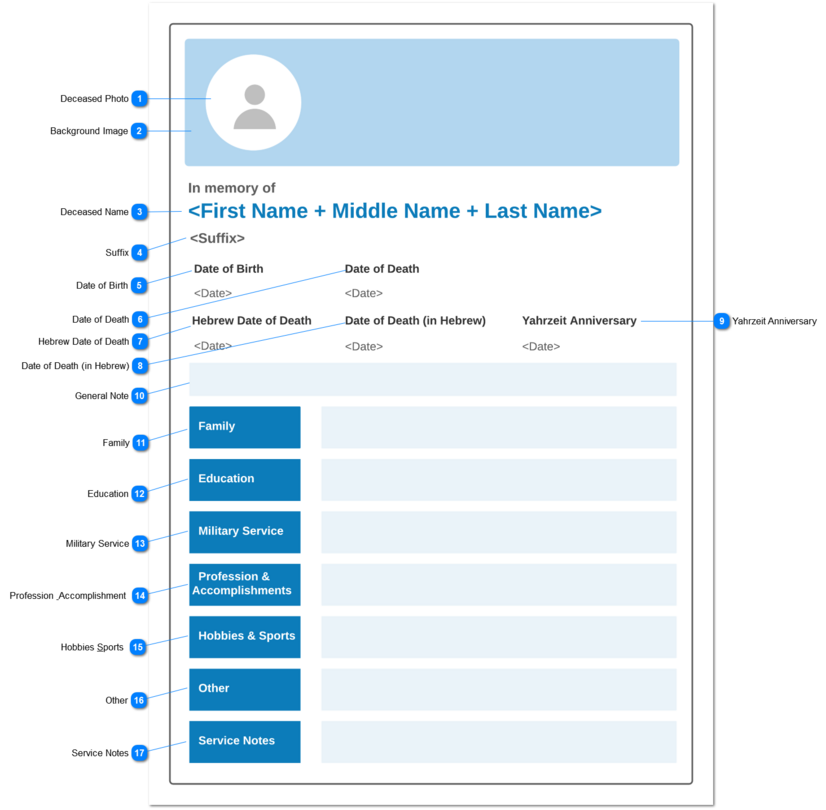
The Obituary preview should be generated based on the information provided in the
Create Obituary screen.
Fields without any value, should not be shown in the preview.
Deceased Photo
Type
Notes
Rules
Compulsory
Placeholder
Format
Edit
Size
Default
Messages
Image
-
-
-
-
-
-
-
-
Background Image
Type
Notes
Rules
Compulsory
Placeholder
Format
Edit
Size
Default
Messages
Image
-
-
-
-
-
-
-
-
Deceased Name
Type
Notes
Rules
Compulsory
Placeholder
Format
Edit
Size
Default
Messages
Read-only
1. First Name + Last Name value linked with the the Deceased/ Reference value of the Sales and Booking record will be shown.
2. Text should be shown in the dark shade of the selected Theme Colour
-
-
-
-
-
-
-
-
Suffix
Type
Notes
Rules
Compulsory
Placeholder
Format
Edit
Size
Default
Messages
Read-only
1. If a value has been entered for the Suffix field of the Sales and Booking record, then that value should be shown.
-
-
-
-
-
-
-
-
Date of Birth
Type
Notes
Rules
Compulsory
Placeholder
Format
Edit
Size
Default
Messages
Read-only
1.Date of Birth value entered in the persons record linked with the the Deceased/ Reference value of the Sales and Booking record will be shown.
-
-
-
-
-
-
-
-
Date of Death
Type
Notes
Rules
Compulsory
Placeholder
Format
Edit
Size
Default
Messages
Read-only
1.Date of Death value entered in the persons record linked with the the Deceased/ Reference value of the Sales and Booking record will be shown.
-
-
-
-
-
-
-
-
Hebrew Date of Death
Type
Notes
Rules
Compulsory
Placeholder
Format
Edit
Size
Default
Messages
Read-only
1.Hebrew Date of Death value entered in the persons record linked with the the Deceased/ Reference value of the Sales and Booking record will be shown.
-
-
-
-
-
-
-
-
Date of Death (in Hebrew)
Type
Notes
Rules
Compulsory
Placeholder
Format
Edit
Size
Default
Messages
Read-only
1.Date of Death (in Hebrew) value entered in the persons record linked with the the Deceased/ Reference value of the Sales and Booking record will be shown.
-
-
-
-
-
-
-
-
Yahrzeit Anniversary
Type
Notes
Rules
Compulsory
Placeholder
Format
Edit
Size
Default
Messages
Read-only
1.Yahrzeit Anniversary value entered in the persons record linked with the the Deceased/ Reference value of the Sales and Booking record will be shown.
-
-
-
-
-
-
-
-
General Note
Type
Notes
Rules
Compulsory
Placeholder
Format
Edit
Size
Default
Messages
Read-only
-
-
-
-
-
-
-
-
Family
Type
Notes
Rules
Compulsory
Placeholder
Format
Edit
Size
Default
Messages
Read-only
-
-
-
-
-
-
-
-
Education
Type
Notes
Rules
Compulsory
Placeholder
Format
Edit
Size
Default
Messages
Read-only
-
-
-
-
-
-
-
-
Military Service
Type
Notes
Rules
Compulsory
Placeholder
Format
Edit
Size
Default
Messages
Read-only
-
-
-
-
-
-
-
-
Profession & Accomplishment
Type
Notes
Rules
Compulsory
Placeholder
Format
Edit
Size
Default
Messages
Read-only
-
-
-
-
-
-
-
-
Hobbies &Sports
Type
Notes
Rules
Compulsory
Placeholder
Format
Edit
Size
Default
Messages
Read-only
-
-
-
-
-
-
-
-
Other
Type
Notes
Rules
Compulsory
Placeholder
Format
Edit
Size
Default
Messages
Read-only
-
-
-
-
-
-
-
-
Service Notes
Type
Notes
Rules
Compulsory
Placeholder
Format
Edit
Size
Default
Messages
Read-only
-
-
-
-
-
-
-
-