To properly display this page you need a browser with JavaScript support.
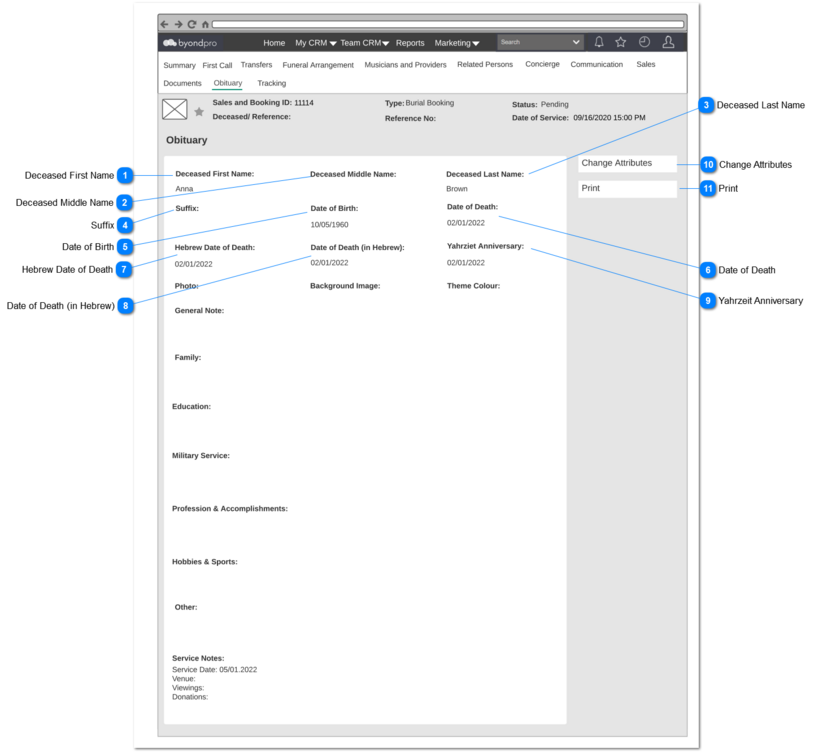
Obituary Summary screen will consist of all the data entered in
Create Obituary screen and element #1 to #9 as read-only mode.
User shall be able to access this screen by;
1. Clicking the Sales and Booking record -> Obituary tab
2. Clicking the Person -> Obituary Tab
When there's no obituary record is created, the screen will be appeared only with the field names.
If there's no data entered for a field, then that field will be kept blank.
Note: The person data represent in element #1 to #9 should be reflected in the screen at the time of screen is opened. These should be dynamic calls to the respective person's record.
Deceased First Name
Type
Notes
Rules
Compulsory
Placeholder
Format
Edit
Size
Default
Messages
Read-only field
1. Deceased First Name value of the person attached to the respective sales and booking Id, will be displayed.
(Sales & Booking -> Deceased/ Reference -> Persons record)
-
-
-
-
-
-
-
-
Deceased Middle Name
Type
Notes
Rules
Compulsory
Placeholder
Format
Edit
Size
Default
Messages
Read-only field
1. Deceased Middle Name value of the person attached to the respective sales and booking Id, will be displayed.
(Sales & Booking -> Deceased/ Reference -> Persons record)
-
-
-
-
-
-
-
-
Deceased Last Name
Type
Notes
Rules
Compulsory
Placeholder
Format
Edit
Size
Default
Messages
Read-only field
1. Deceased Last Name value of the person attached to the respective sales and booking Id, will be displayed.
(Sales & Booking -> Deceased/ Reference -> Persons record)
-
-
-
-
-
-
-
-
Suffix
Type
Notes
Rules
Compulsory
Placeholder
Format
Edit
Size
Default
Messages
Read-only field
1. Deceased Suffix (pers_postnominal) value attached to the respective Sales and Booking Id, will be displayed.
(Sales & Booking -> Deceased/ Reference -> Persons record)
-
-
-
-
-
-
-
-
Date of Birth
Type
Notes
Rules
Compulsory
Placeholder
Format
Edit
Size
Default
Messages
Read-only field
1. Date of Birth value of the person attached to the respective Sales and Booking ID will be shown.
(Sales & Booking -> Deceased/ Reference -> Persons record)
-
-
-
-
-
-
-
-
Date of Death
Type
Notes
Rules
Compulsory
Placeholder
Format
Edit
Size
Default
Messages
Read-only field
1. Date of Death value of the person attached to the respective Sales and Booking ID will be shown.
(Sales & Booking -> Deceased/ Reference -> Persons record)
-
-
-
-
-
-
-
-
Hebrew Date of Death
Type
Notes
Rules
Compulsory
Placeholder
Format
Edit
Size
Default
Messages
Read-only field
1. Hebrew Date of Death value of the person attached to the respective Sales and Booking ID will be shown.
(Sales & Booking -> Deceased/ Reference -> Persons record)
1. This value will be shown only if the YharzeitFunction = Y in byondpro -> Administration -> Cemetery System Configuration -> Yharzeit Function
-
-
-
-
-
-
-
Date of Death (in Hebrew)
Type
Notes
Rules
Compulsory
Placeholder
Format
Edit
Size
Default
Messages
Read-only field
1. Date of Death (In Hebrew) value of the person attached to the respective Sales and Booking ID will be shown.
(Sales & Booking -> Deceased/ Reference -> Persons record)
1. This value will be shown only if the YahrzeitFunction = Y in byondpro -> Administration -> Cemetery System Configuration -> Yahrzeit Function
-
-
-
-
-
-
-
Yahrzeit Anniversary
Type
Notes
Rules
Compulsory
Placeholder
Format
Edit
Size
Default
Messages
Read-only field
1.Yharzeit Anniversary value of the person attached to the respective Sales and Booking ID will be shown.
(Sales & Booking -> Deceased/ Reference -> Persons record)
1. This value will be shown only if the YahrzeitFunction = Y in byondpro -> Administration -> Cemetery System Configuration -> Yahrzeit Function
-
-
-
-
-
-
-
Change Attributes
Type
Notes
Rules
Compulsory
Placeholder
Format
Edit
Size
Default
Messages
Button
-
-
-
-
-
-
-
-
Print
Type
Notes
Rules
Compulsory
Placeholder
Format
Edit
Size
Default
Messages
Button
-
1. Upon clicking, pdf will be generated based on the Obituary Template , will be opened in a new tab.
-
-
-
-
-
-
-