|
Field
|
Description
|
Associated Business Process
|
|
Person
|
|
Salutation
|
A selection list of salutations
|
|
|
First Name
|
Text field to record the person's first name
|
|
|
Middle Name/s
|
Text field to record the person's other given name/s
|
|
|
Last Name
|
Text field to record the person's last name (surname)
|
|
|
Also Known As
|
Text field to record alternative or abbreviated first name (e.g. Tom instead of Thomas)
|
|
|
Reference
|
System generated number
|
Separate reference number ranges are pre-configured by site.
Required on all deceased, customer and pre-need records
|
|
Status
|
Selection list to identify if the person is current (living) or deceased
|
|
|
Disposition
|
Selection to identify manner of person record. Options are: buried, cremated, memorial only (token) and pre-need
|
Updated when burial/cremation bookings are completed or when pre-need sales referencing the person are invoiced
|
|
Territory
|
Selection list to identify the site associated with the person
|
Determines which reference number range is assigned
|
|
Veteran
|
Checkbox identifying the individual as a Veteran
|
|
|
Veteran's Service
|
Selection list to identify associated Veteran Service
|
|
|
Gender
|
Selection to identify gender of the person. Options are: male, female, unknown
|
|
|
Cultural Preference
|
Selection list to record cultural group or religious affiliation
|
|
|
Alert
|
A free form text field to record any matters of concern to which staff should be alerted.
|
Alert content is displayed as a pop up warning for users when the Person is used in a sale, booking or communication.
|
|
Date of Service
|
Date field to record service, burial or cremation date
|
Updated when burial/cremation bookings are completed
|
|
Date of Birth
|
Date field to record date of birth
|
|
|
Date of Death
|
Date field to record date of death
|
|
|
Age
|
Numeric field to record age at time of death. Format YY.MM
e.g. 65.11 is 65 years and 11 months
|
System calculates if dates of birth and death are entered. Can be over-written.
|
|
Baby Details
|
Text field to record age details < 1 month
|
|
|
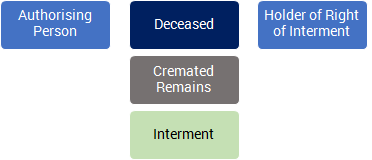
Authorising Person
|
Link to Person record that has authority over the deceased remains
|
Updated using Create Authorising Person function
|
|
Holder of Right
|
Link to Person record that owns the right of interment for the deceased's cemetery location
|
Dynamic lookup to associated Location record
|
|
Funeral Company
|
Link to Company record that performed the funeral services for the deceased.
|
Updated when burial/cremation bookings are completed
|
|
Consultant
|
Link to staff member assigned for family contact
|
|
|
Follow-up Status
|
Lookup to staff lists to show consultant or sales team member assigned to manage post-service follow-ups with the family
|
Used in follow up task assignment and family communication processes
|
|
Audit Required
|
Checkbox to indicate record to be audited
|
|
|
Audit Completed
|
Date that audit was performed
|
|
|
Address
|
|
Active
|
Checkbox to indicate if address is active for marketing or correspondence.
|
|
|
Address 1,2,3,4
|
Text fields to record street address and residence name
|
|
|
City
|
Text field to record city (suburb/town) name
|
Determined on data entry with lookup to standard list of towns/postcodes
|
|
State
|
Selection list of state abbreviations
|
|
Postcode
|
Text field to record postcode (zip code)
|
|
Country
|
Selection list of countries
|
|
|
Place of death
|
Checkbox to indicate if listed address is place of death
|
|
|
Sage 300 A/P Remit- To Address
|
Checkbox indicating integration settings from Sage300. Not a commonly used function.
|
|
ERP AR Address
|
|
Sage 300 A/R Ship-to Address
|
|
Phone / Email
|
|
Primary Phone
|
Used to record primary (best) phone number
|
Displays on screen alongside person record
|
|
Home Phone
|
Alternative home contact number
|
|
|
Mobile Phone
|
Alternative mobile (cell) phone number
|
|
|
Primary Email
|
Used to record primary email address
|
Selection will activate email correspondence screens. Used for standard document distribution by email, e.g. quotes and invoices
|