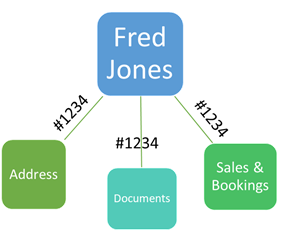
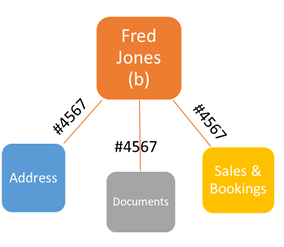
The Merge Contact function allows 2 records to be consolidated to one, and is used when a second record is identified for the same person.
Before Merging Records we suggest you compare the 2 Person summary screens and transfer any missing values to one of the records. This is only necessary for the fields that are edited directly on that screen, e.g. name fields or dates of birth, death and service. If either record had previously been been integrated with the finance system then this record should be kept in the merge process.
Starting with the summary screen open the record that you intend to keep, select the Merge Contact button, then insert the name of the record that is to be removed and save. The result is a single person record to which all related information has been attached. byondpro writes an audit note to track the merge action for future reference.
In the byondpro database related information is linked to the person record using a unique identifier that isn't usually visible through the screens. When 2 person records are merged, the identifier is replaced on all links, e.g. #4567 is replaced with #1234 and so the links are shifted to the record being retained. The second person summary record (Fred Jones b) is deleted.
Cremated Remains
If the merged person records include cremated remains, there will now be two CR records listed under the Cremated Remains tab. Each retains its separate CR-reference number. The validity of these records should be verified, and if necessary, the Merge CR Record function should be used to consolidate the separate entries to one.
The Merge Cremated Remains process functions in the same way as the Contact Merge feature, and should be initiated from the CR record that you intend to keep (with the reference number matching the deceased record).