Person Records

Purpose
A record is created in byondpro for every individual with whom the cemetery interacts. This includes the deceased and their family members, individuals purchasing pre-need and other parties interested in engaging with the organisation. The record status indicates if the person is deceased or living (current).
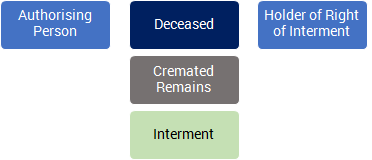
Fit within the Person Hierarchy
Each deceased record is linked with family members using relationships, and to their burial or memorial location via the Interment record.
Person Reference
Each site (cemetery) has a pre-configured series of reference numbers. The next sequential number is assigned to a person record when:
-
The status is changed to deceased
-
They are a bill-to applicant in a sales transaction
-
They are the reference in a pre-need transaction
Related Information available on the Person record:
-
Additional Details: a list of available marketing options
-
Notes: a list of general notes recorded about the person.
-
Communications: with the living family member
-
Reference Communications: in reference to the deceased
-
Documents: a list of documents referencing the person added to the record or generated by the system
-
Holder of Right of Interment: a list of locations where the person is the rights holder
-
Interments: a list of interment records for the deceased
-
Sales & Bookings: a list of sales and booking transactions where the person is the reference or the authorising person
-
Cases: a list of cases where the person is the deceased or has reported an issue
-
Receipts: a list of receipts (money received) created within the record
-
Pre-Need Items: a list of items purchased pre-need in reference to the person
-
Cremated Remains Locations: a list of locations where the cremated remains are located
-
Cremated Remains: a list of cremated remains records for the deceased
-
Addresses: a list of contact addresses for the person
-
Phone/Email: a list of phone and email contacts for the person
-
Relationships: a list of person records linked by relationship
-
Tracking: an audit list of changes to the record
Button Functions
|
Button
|
Description
|
|
Add to Contacts
|
Adds this record to the user's My CRM list of contacts
|
|
Summary Report
|
Shows recent communications and opportunities
|
|
Add to Group
|
Adds this record to a pre-defined group of contacts, for marketing purposes
|
|
Change Attributes
|
Switches to edit mode
|
|
Merge Contact
|
Function to transfer all related information from a second Person record to this one & marks the second record as deleted
|
|
Change Authorising Person
|
Function to change the Authorising Person; also creates a Relationship entry
|
|
Print Tenure Expiry Letters
|
Report link to a series of letters concerning End of Tenure management processes
|
|
Reminder & Follow up Letters
|
Report link to a series of letters concerning the deceased, addressed to the Authorising Person
|
|
Change Status to Current
|
Function to set the Person status back to current; only displayed when status is deceased
|
|
Change Status to Deceased
|
Function to set the Person status to deceased; only displayed when status is current.
Screen presents date of birth, date of death and age fields for entry and/or verification.
Assigns reference number if blank.
|
|
Exhumation Letter 1
|
Report link intended for health authorities regarding exhumation
|
|
Assign Reference Number
|
Function to assign a reference number to the record; only displayed if blank.
Required for sales orders when the person is either the bill-to applicant or the pre-need reference
|
Adding new Records
Person records are created using the New menu function. First and Last Names are checked against matching records that pre-exist in the database; if matches are found they are presented to the user for review. All records are created initially with a status of current (living).
Many functional screens include New Person entry buttons, e.g. Communications or Sales & Bookings.
Standard Field List
|
Field
|
Description
|
Associated Business Process
|
|
Person
| ||
|
Salutation
|
A selection list of salutations
|
|
|
First Name
|
Text field to record the person's first name
|
|
|
Middle Name/s
|
Text field to record the person's other given name/s
|
|
|
Last Name
|
Text field to record the person's last name (surname)
|
|
|
Also Known As
|
Text field to record alternative or abbreviated first name (e.g. Tom instead of Thomas)
|
|
|
Reference
|
System generated number
|
Separate reference number ranges are pre-configured by site.
Required on all deceased, customer and pre-need records
|
|
Status
|
Selection list to identify if the person is current (living) or deceased
|
|
|
Disposition
|
Selection to identify manner of person record. Options are: buried, cremated, memorial only (token) and pre-need
|
Updated when burial/cremation bookings are completed or when pre-need sales referencing the person are invoiced
|
|
Territory
|
Selection list to identify the site associated with the person
|
Determines which reference number range is assigned
|
|
Veteran
|
Checkbox identifying the individual as a Veteran
|
|
|
Veteran's Service
|
Selection list to identify associated Veteran Service
|
|
|
Gender
|
Selection to identify gender of the person. Options are: male, female, unknown
|
|
|
Cultural Preference
|
Selection list to record cultural group or religious affiliation
|
|
|
Alert
|
A free form text field to record any matters of concern to which staff should be alerted.
|
Alert content is displayed as a pop up warning for users when the Person is used in a sale, booking or communication.
|
|
Date of Service
|
Date field to record service, burial or cremation date
|
Updated when burial/cremation bookings are completed
|
|
Date of Birth
|
Date field to record date of birth
|
|
|
Date of Death
|
Date field to record date of death
|
|
|
Age
|
Numeric field to record age at time of death. Format YY.MM
e.g. 65.11 is 65 years and 11 months
|
System calculates if dates of birth and death are entered. Can be over-written.
|
|
Baby Details
|
Text field to record age details < 1 month
|
|
|
Authorising Person
|
Link to Person record that has authority over the deceased remains
|
Updated using Create Authorising Person function
|
|
Holder of Right
|
Link to Person record that owns the right of interment for the deceased's cemetery location
|
Dynamic lookup to associated Location record
|
|
Funeral Company
|
Link to Company record that performed the funeral services for the deceased.
|
Updated when burial/cremation bookings are completed
|
|
Consultant
|
Link to staff member assigned for family contact
|
|
|
Follow-up Status
|
Lookup to staff lists to show consultant or sales team member assigned to manage post-service follow-ups with the family
|
Used in follow up task assignment and family communication processes
|
|
Audit Required
|
Checkbox to indicate record to be audited
|
|
|
Audit Completed
|
Date that audit was performed
|
|
|
Address
| ||
|
Active
|
Checkbox to indicate if address is active for marketing or correspondence.
|
|
|
Address 1,2,3,4
|
Text fields to record street address and residence name
|
|
|
City
|
Text field to record city (suburb/town) name
|
Determined on data entry with lookup to standard list of towns/postcodes
|
|
State
|
Selection list of state abbreviations
| |
|
Postcode
|
Text field to record postcode (zip code)
| |
|
Country
|
Selection list of countries
|
|
|
Place of death
|
Checkbox to indicate if listed address is place of death
|
|
|
Sage 300 A/P Remit- To Address
|
Checkbox indicating integration settings from Sage300. Not a commonly used function.
| |
|
ERP AR Address
| ||
|
Sage 300 A/R Ship-to Address
| ||
|
Phone / Email
| ||
|
Primary Phone
|
Used to record primary (best) phone number
|
Displays on screen alongside person record
|
|
Home Phone
|
Alternative home contact number
|
|
|
Mobile Phone
|
Alternative mobile (cell) phone number
|
|
|
Primary Email
|
Used to record primary email address
|
Selection will activate email correspondence screens. Used for standard document distribution by email, e.g. quotes and invoices
|