Memorial Orders

Purpose
The Memorial Order feature allows you to prepare detailed orders for plaques, headstones and other memorial items that include product features, designs, colours and inscription details.
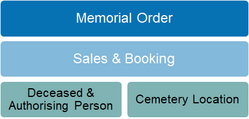
Memorial orders are linked with a Sales & Booking record and use the associated links to deceased, authorising person and cemetery locations. The inscriptions feature draws on data from the deceased record to assist with accuracy including spelling of names and dates of birth and death.
Staff can monitor when the memorial order was submitted to the external supplier and the integrated features for receipting and installation will assist in tracking open orders. When installed, the cemetery location record is updated with the date of installation.
Adding new Records
New Memorial Orders are created from within the Sales & Booking record, and draw on the reference, authorising person and location links on the summary page for system context. On the Memorial Orders screen, select New Memorial Order to start a new entry.
Button Functions
|
Button
|
Description
|
|
Change
|
Switches to edit mode
|
|
Save
|
Updates the record
|
|
Print Memorial Order
|
Report link to print/email memorial order to families and suppliers
|
|
M1 Memorial Complete
|
Report link to print/email completion letter to authorising person
|
|
M2 CRs Placed
|
Report link to print/email confirmation letter to authorising person
|
|
Create Granite Order
|
Function to auto-create second memorial order containing only granite/base options, with memorial type "granite". Allows placement of granite/base to be processed separately to bronze plaque.
|
Field List
|
Field
|
Description
|
Associated Business Process
|
|
Memorial Order Product Summary
Records all the design, colour and special feature attributes of the plaque, headstone or memorial item being ordered
| ||
|
Sales & Booking ID
|
Unique identifier of parent sales record
|
Hyperlink to return to sales record
|
|
Date Ordered
|
Date field
|
Auto-filled with order creation date
|
|
Next of Kin Attendance
|
Selection list. Options are yes/no
|
|
|
Memorial Only
|
Checkbox used to indicate whether memorial site includes bodily remains
|
If checked, on installation of memorial, system will create an interment position record with status memorial only.
|
|
Memorial Type (code)
|
Look up selection for memorial type
| |
|
Memorial Type
|
Text description of memorial type
|
Auto-fills when type code is selected
|
|
Type Description
|
Text description of product properties
|
Auto-fills when type code is selected
|
|
Special Instructions
|
Text field for entry of non-standard feature requests
|
|
|
Status
|
Selection list. Options are open, cancelled, completed
|
|
|
Fittings
|
Selection list
|
Options are linked to type code selected
|
|
Flower Container
|
Checkbox to indicate requirement
|
|
|
Emblem
|
Selection list of commonly used memorial emblems. Options include:
- Crosses - various styles
- Military: AIF, RAAF, RAN - Charitable organisations: Legacy, Masonic |
|
|
Emblem Position
|
Selection list to indicate where emblem should be placed. Options include:
- Centre, top or bottom
- Left, top or bottom
- Right, top or bottom
|
|
|
Style of Granite
|
Selection list to indicate design of base. Options include:
- Panels
- Desks - Concrete bases |
|
|
Granite Colour
|
Selection list to indicate colour choice. Options include: blue pearl, black, cherry red, green, etc
|
|
|
Plaque Colour
|
Selection list to indicate bronze coating. Options include: standard, cream, black, burgundy, blue
|
|
|
Bromide Required
|
Checkbox to indicate requirement
|
|
|
Plaque Type
|
Design range associated with memorial item
|
Auto-fills when type code is selected
|
|
Design Feature
|
Selection list with options pre-configured to match plaque type defined with memorial item
|
|
|
Borders
|
Selection list of border options
|
|
|
Headstone Style
|
Selection list of styles associated with the memorial item master
|
Headstone selection fields are active only when memorial item is in category Headstone.
|
|
Headstone Order Type
|
Selection list of design types/shapes associated with the style
| |
|
Headstone Colour
|
Selection list of colours associated with the type
| |
|
Memorial Order Photos
Records details of any photo attachments including dimensions and style
| ||
|
Photo
|
Checkbox to indicate photo will be attached
|
|
|
Orientation
|
Selection list to indicate portrait or landscape
|
|
|
Photo Size mm (WxH)
|
Text field to record image dimensions
|
|
|
Photo Style
|
Selection list to indicate style of manufacture
|
|
|
Photo Position
|
Selection list to indicate where photo should be placed. Options include:
- Centre, top or bottom
- Left, top or bottom
- Right, top or bottom
|
|
|
Provision for 2 Photos
|
Checkbox to indicate memorial layout should leave space for addition of second photo in future
|
|
|
Photo Instructions
|
Text field for entry of additional requests
|
|
|
Memorial Order & Installation
Records date when order is sent to manufacturer, when received and installed.
| ||
|
Supplier Order Number
|
Text field to record Supplier Order Number
|
|
|
Date PO Raised
|
Date field to record when PO is sent to supplier
|
|
|
Date Received
|
Date field to record when memorial item is received
| |
|
Date Installed
|
Date field to record when memorial item is installed
| |
|
Installation Instructions
|
Text field to record special requests relating to the installation of the memorial item
|
|