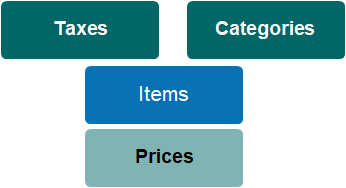
Item categories allow you to group like products and services for reporting purposes.
In ERP integrated systems, the category determines the General Ledger codes for revenue and pre-need reporting, as well as for cemetery inventory and cost-of-goods sold accounts.
Fit within the Item & Pricing Hierarchy
Every item (product or service) is associated with a category.
A category can be associated with many items.
On the category, you determine whether prices charged for associated items are inclusive or exclusive of taxes.
Selection list defines if product is active or inactive
Code
Unique code for product category
Description
Full name of product category
Territory
Parent territory/grouping to which products are assigned
Tax Inclusive
Checkbox denotes if pricing for this product category is set with tax included
refer example above for impact on tax calculations
ROI Location
Checkbox identifies if Right of Interment processing rules apply
Is Levy
Checkbox identifies if items in this category follow govt levy configuration rules
Refer also Custom Configuration - levy conditions
GL Revenue Account
Text field to record revenue account
Used for reporting or ERP integration.
Applies to all items linked to this category.
If site specific GL codes apply, use Cemetery System Configuration to identify which characters in GL code are to be overwritten at time of invoice, e.g. last 2 characters.
On Site record, enter replacement characters, e.g. Highview = 30
GL PreNeed Account
Text field to record balance sheet unearned income if products sold pre-need
GL Land Valuation Account
Text field to record cost of goods sold account for location land value
GL Capital Improvement Account
Text field to record balance sheet account for cemetery stock land values
GL Cost of Goods Sold Account
Text field to record cost of goods sold account
GL Valuations Clearing Account
Text field to record clearing account for land revaluation transactions
Comm % General
Numeric field to record value of commission earned on sales of products in this category
Refer to Finance reports: - Sales Commission
- Sales Commission Detailed
Comm % Sales
Numeric field to record value of salesperson specific commission earned on sales of products in this category
Advanced Revenue Recognition Method
Option for customers to recognize revenue either on payment in full, at time of invoice or at time of redemption.