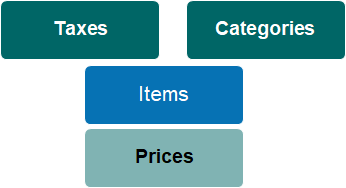
The tax configuration table is where you set up tax codes and percentage charged in accordance with local governing rules. The tax setup includes a General Ledger code to assist with transferring sales data to your preferred ERP.
Fit within the Item & Pricing Hierarchy
Tax codes are associated with Items (products & services) and control the % of the invoiced price to be reported to tax authorities.
Standard Field List
Field
Description
Associated Business Process
Status
Selection list. Options are active/inactive
Territory
Selection list.
Controls at which organisation level the tax code can be used.
Code
Unique code for the tax setting
Description
Descriptive name for tax code
Default Person Tax Group
Checkbox to identify if this is mainly used tax group for person records.
Percentage
Numeric value used in calculating tax against item prices
GL Code
Text field to record General Ledger code
Used in ERP integration processes
Tax Class
Selection list determines ERP tax class
Used in ERP integration processes
For ease of data transfer and reconciliation, we suggest that the tax code and tax classes in byondpro are the same as the tax codes in your ERP (Sage 300: tax class).