Once the sales & booking has been created, it's time to create a memorial order.
From the sales & booking, select the Memorial Order tab.
This tab will list any memorial orders that have been created through this sales & booking entry, with some summary information about each listed under each column.
As this is a new booking, there are no memorial orders listed. To create one, select New Memorial Order.
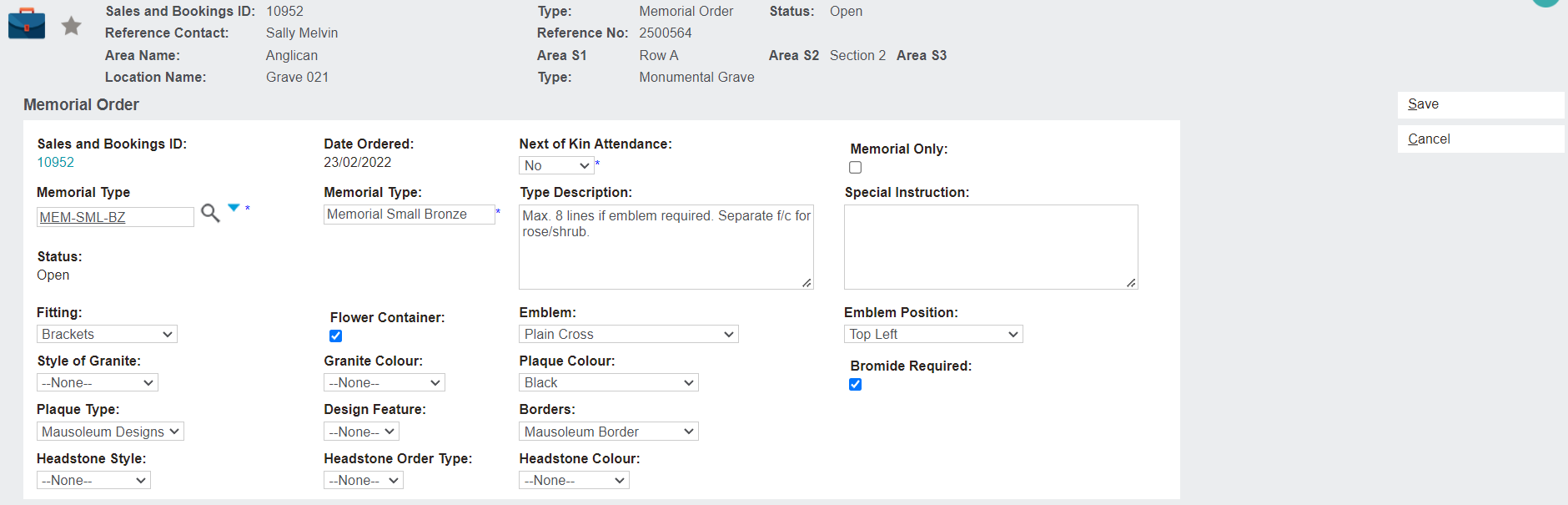
There are many fields to fill out on this page. Some of these fields will only be relevant to certain types of memorial orders.
We'll look at examples for three types: a headstone, a plaque, and a granite order.
First, let's cover the fields that are used in multiple memorial types.
-
Sales and Bookings ID: This is automatically filled in from the Sales & Booking record that our Memorial Order has been created within.
-
Date Ordered: Filled in with today's date.
-
Next of Kin Attendance: If the deceased family are attending the memorial installation, this field will be marked Yes. The family may wish to attend when installing a memorial plaque, for example. The cemetery will need to accommodate visitors to the installation and may require such equipment as chairs or overhead cover from weather. Cemetery staff may need to go out and meet the family, which will require calendar appointments. If marked as No, then the cemetery will install the plaque/headstone and the family is sent a letter to inform them the works are completed.
-
Memorial Only: If the headstone or plaque is being installed without any bodily or cremated remains, this field will be ticked.
-
Memorial Type: Drop-down selection that is configured in the Memorial Types topic. This field dictates several features of the memorial order. For example, the adjacent Memorial Type field and the Type Description are filled with pre-set information. Whether the memorial order allows for an attachment inscription is also dictated by this choice. These types are based on what the supplier informs the cemetery about their products.
-
Special Instructions: If there are any special instructions regarding the memorial order, they can be entered here. This will be printed on any documentation and will be visible to staff when they look at the Memorial Order record in byondpro.
-
Status: Automatically set to Open as it's a new Memorial Order and hasn't yet been fulfilled.
-
Bromide Required: The family want to have a printed proof so they can see how it looks before they confirm the order.
Headstone Memorial
If creating a headstone memorial order, the Memorial Type will be set to a headstone and the following unique fields will be completed:
-
Headstone Style: A drop-down selection of style options for the headstone.
-
Headstone Order Type: A customisable list to determine whether the headstone is a basic/standard type or a headstone that is more intricate and is considered a superior headstone.
-
Headstone Colour: The colour options for the headstone.
Plaque Memorial
If creating a plaque memorial order, the Memorial Type will be set to a plaque and the following unique fields will be completed:
-
Fitting: The type of fittings that will be used to attach the plaque. For example, screws or brackets. There may be no fittings.
-
Flower Container: In the case of a lawn plaque, the family may want a space for a flower container to go with the plaque.
-
Emblem: An emblem, such as a religious or spiritual symbol. These can be setup in the background to create the drop-down list.
-
Emblem Position: Where the emblem will be placed on the memorial.
-
Plaque Colour: The colour of the plaque.
-
Plaque Type: The chosen type of plaque will indicate some of its design features.
-
Design Feature: A more specific design feature that may be offered, for example, a floral or faunal emblem.
-
Borders: The type of border used on the plaque can be listed here, or it can be noted that there are no borders on the plaque.
Granite Order
If creating a granite order, the Memorial Type will be set as granite and the following unique fields will be completed:
-
Style of Granite: The style of the granite being ordered. Note, some cemeteries may have policies for certain areas so that all the locations look uniform.
-
Granite Colour: The colour of the granite.
Memorial Order Photos
The next block to complete is the Memorial Order Photos section. Both plaques and headstones can include a photograph in their design, and the parameters of the photograph /s are entered here. This will not be relevant for granite orders and can be left blank.
This block includes the following fields:
-
Photo: Will the memorial include a photo? If yes, this box is ticked.
-
Orientation: Dictates whether the photo will be oriented as a portrait or landscape.
-
Photo Size mm (WxH): The measurements of the photo.
-
Photo Style: The photo could be ceramic or ultra-image.
-
Photo Position: Where on the memorial the photo will be positioned.
-
Provision For 2 Photos: Tick this if space needs to be left for a second photo. If there are two photos, then the emblem may need to be placed in the middle. A photo can then be placed on the left and the right.
-
Photo Instructions: A free-text box to include any special instructions relating to the photo. For example, the photo used may need to be cropped to show a clear profile of the deceased.
Memorial Order & Installation
The final block contains information relating to the installation and receipting of the memorial order. Much of this information will be gathered after this memorial order is saved.
This block includes the following fields:
-
Supplier Order Number: A reference or order number used by the supplier in their own records and provided to the cemetery.
-
Date PO Raised: This date is automatically filled with today's date when the memorial order is created.
-
Date Received: This date is automatically filled with today's date when the memorial is receipted.
-
Date Installed: This date is automatically filled with today's date when the memorial is installed.
-
Installation Instructions: Any specific instructions relating to the installation of the memorial can be typed free form here.