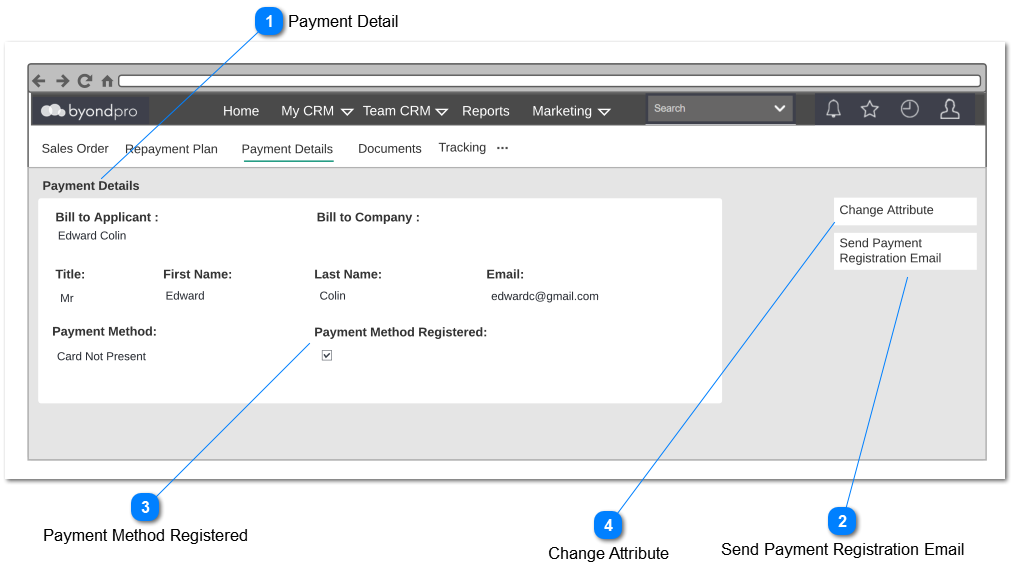
The purpose of this screen is to view payment details which include payee details including payment method and token number. Following field and notifications will be also apply for contracts.
Payment Detail
Type
Notes
Rules
Compulsory
Placeholder
Format
Edit
Size
Default
Messages
Read Only
Details entered on Payment Detail Screen should appear on read only mode
If there is registered payment method already exist warning message will appear to user to confirm confirm if existing payment method should be invalidated.
This is tickbox represent if the reusable token is generated to process recurring payment via opuspay.
1. If customer successfully registered the payment method and a reusable Token was generated from opuspay the payment method registered will be marked as true. If the payment method is not registered checkbox will be marked as false.
2. Absence of a registered token should notify the user via a notification as per View Error - Payment Detail Screen and also sent a Reminder - To Enter Card Details Email. which will be only applicable for only for payment method request method and card not present method.
3. This field will only appear for payment method request and card not present payment methods where a reusable token is generated.
4. Complete of payment plan (Zero Outstanding), Call will be sent to opuspay inactivate the recurring token created against the payment plan and init token will be null in the database (If the init token is registration incomplete, token will be called to expired).
This action button will allow the user to change payment details
1. Clicking "Change Attribute" should allow the user to edit the Bill to Applicant, Bill to Company payment method, Email address whereas other fields on payment details screen should not be editable. Same rule apply on Payment Detail screen should apply in changing payment details.
2. If a payment method was changed via change attribute "payment detail collection workflow" will applied and current registered recurring token will be expired in opuspay and init token will be null in the database (If the init token is registration incomplete, token will be called to expired). Payment Method Registered tick-box will be unticked until new registration completed.
3. Upon saving changes to payment detail screen. warning message will be generated asking user if new payment method required to register. validations based on respond will be as follows;