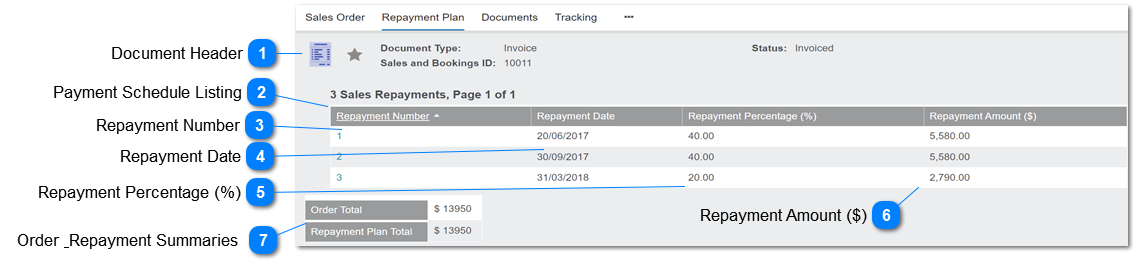
This screen lists the repayment instalments, in accordance with the Terms code selected.
Dec-22: first instalment to equal Deposit Required, if Discount Codes feature is activated.
 Document Header
This is the screen header showing open document number.
|
|
 Payment Schedule Listing
This is the list of calculated results.
It's populated by the Generate Repayment Schedule feature on the Order Header.
The number of instalments, due date rules and % are configured in the Terms Codes.
|
Type
|
Notes
|
Rules
|
Compulsory
|
Format
|
Edit
|
Size
|
Default
|
Error Message
|
|
numeric
|
4a EXAMPLE
Order Total: $895.00
Terms code calculation:
#1 30% 268.50
#2 30% 268.50
#3 40% 358.00
Deposit Req'd: 180.00
#1 30% 180.00
#2 30% 357.50
#3 40% 357.50
|
1. The Repayment instalments are created when the user selects Generate Repayment Schedule on the Order Header.
1a. If not previously created, the repayment schedule is inserted as part of the Create Invoice function.
1b. If the Last Updated date of the Repayment Schedule is not equal to the current date at time of invoicing, its values are recalculated.
2. The number of repayment entries is determined by the Terms Code and equals the Number of Payment Schedules.
3. The Repayment Date and Repayment Amount are calculated per the corresponding rule on the Terms Code/Instalments.
DISCOUNTS APPLY: DEPOSIT REQUIRED
4. If the Cemetery System Setup -> Configuration: SalesDiscounts = Y.
4a. Validate Instalment #1 Repayment Amount against Deposit Required Amount on the Order Totals.
No action if Deposit Required Amount = 0
No action if Repayment Amount = Deposit Required
ELSE:
4b. Update Instalment #1 with the Deposit Required Amount.
4c. Redistribute the invoice balance equally among the remaining instalments (rounded to 2 decimals):
Repayment Amounts
4d. Any rounding differences apply to last instalment.
4e. Do not make changes to Payment Percentage values, i.e. leave per original terms code calculation.
|
Y
|
currency
|
N
|
|
|
| |
|
 Repayment Number
This is the number of instalments in the repayment schedule.
The hyperlink allows the user to open the instalment and review the detailed entry for the Repayment Amount and the Due Date.
|
|
 Repayment Date
This is the calculated due date for the instalment.
|
|
 Repayment Percentage (%)
This is the instalment percentage defined in the Terms code setup.
|
|
 Repayment Amount ($)
This is the calculated amount of the instalment, based on the % of Order Total.
Refer #2 above regarding impact of Discounts feature and Deposit Required
|
|
 Order & Repayment Summaries
This block shows the Order Total and the sum of the Repayment Amounts, to verify that they are in balance.
|
|