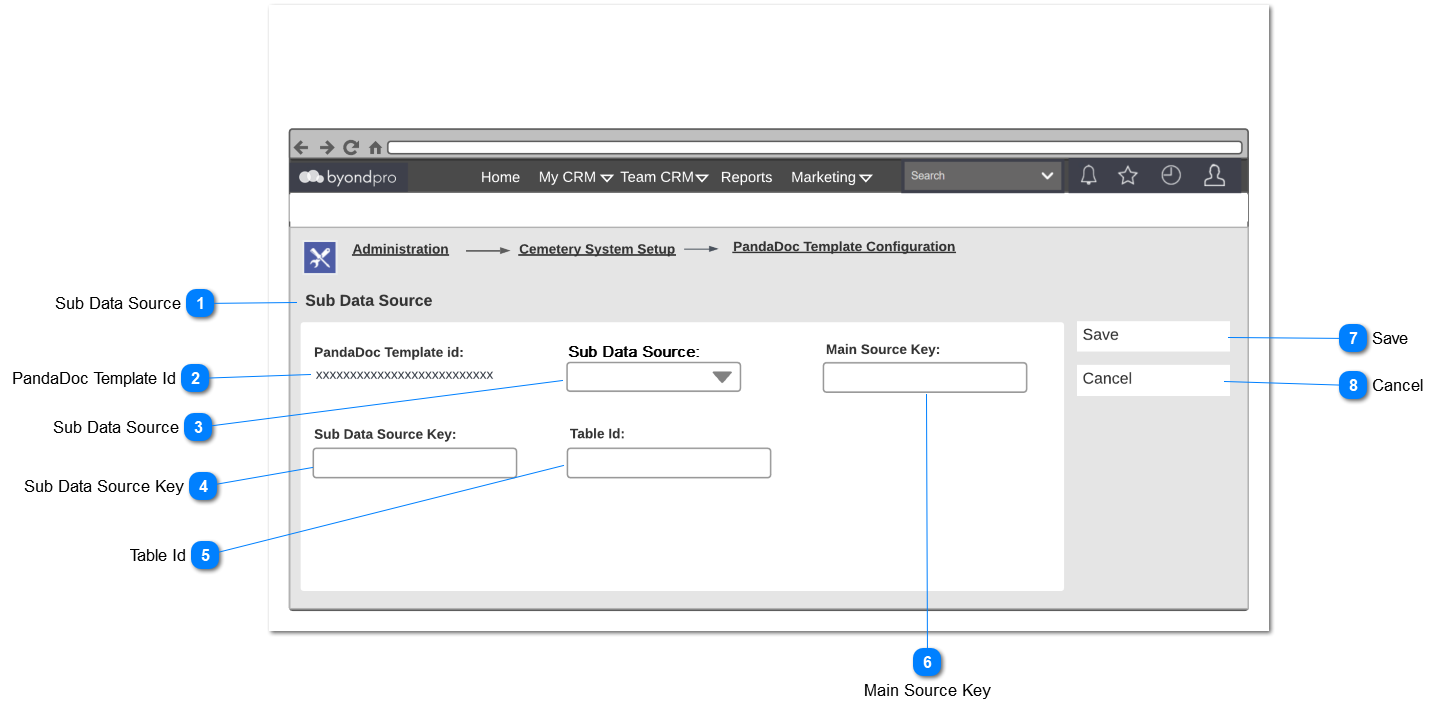
Sub Data Source Configuration
 Sub Data Source
|
Type
|
Notes
|
Rules
|
Compulsory
|
Format
|
Edit
|
Size
|
Default
|
Error Message
|
|
Title
|
|
1. This screen is located in the Administration > Cemetery System Setup.
2. Show title field of the screen - Sub Data Source.
|
|
|
|
|
|
| |
|
 PandaDoc Template Id
|
Type
|
Notes
|
Rules
|
Compulsory
|
Format
|
Edit
|
Size
|
Default
|
Error Message
|
|
String
|
|
1. This should display the selected PandaDoc template id.
|
|
|
|
|
|
| |
|
 Sub Data Source
|
Type
|
Notes
|
Rules
|
Compulsory
|
Format
|
Edit
|
Size
|
Default
|
Error Message
|
|
Dropdown
|
|
1. Should select the primary source from sub view which is define in sub data source.
|
Y
|
|
|
|
|
| |
|
 Sub Data Source Key
|
Type
|
Notes
|
Rules
|
Compulsory
|
Format
|
Edit
|
Size
|
Default
|
Error Message
|
|
String
|
Sub data records should generate based on the mapping of the main source key and the sub data source key in SQL database.
|
1. Should store the primary key from sub view which is define in sub data source.
|
Y
|
|
|
|
|
| |
|
 Table Id
|
Type
|
Notes
|
Rules
|
Compulsory
|
Format
|
Edit
|
Size
|
Default
|
Error Message
|
|
String
|
|
|
N
|
|
|
|
|
| |
|
 Main Source Key
|
Type
|
Notes
|
Rules
|
Compulsory
|
Format
|
Edit
|
Size
|
Default
|
Error Message
|
|
String
|
Sub data records should generate based on the mapping of the main source key and the sub data source key in SQL database.
|
|
Y
|
|
|
|
|
| |
|
 Save
|
Type
|
Notes
|
Rules
|
Compulsory
|
Format
|
Edit
|
Size
|
Default
|
Error Message
|
|
Button
|
|
1.This Button is visible when the screen is in ADD or EDIT mode.
2. New entries are inserted to the database.
3. Edited entries are updated in the database.
|
N
|
|
|
|
-
|
| |
|
 Cancel
|
Type
|
Notes
|
Rules
|
Compulsory
|
Format
|
Edit
|
Size
|
Default
|
Error Message
|
|
Button
|
Subject to all standard CRM rules.
|
1. This button is visible when the screen is in EDIT mode.
|
N
|
|
|
|
-
|
| |
|