To properly display this page you need a browser with JavaScript support.
PandaDoc Template Configuration
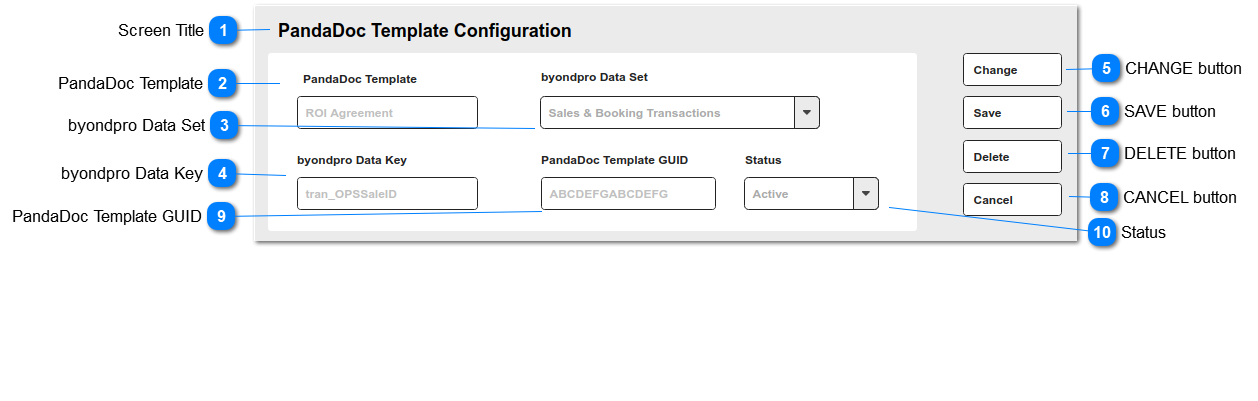
This screen builds a connection between PandaDoc templates and the data set used in byondpro.
Screen Title
This is the screen/feature title: PandaDoc Template Configuration
PandaDoc Template
This is the document template name configured directly within PandaDoc.
Type
Notes
Rules
Compulsory
Format
Edit
Size
Default
Error Message
Text
1. Document name, as entered in PandaDoc
Y
Y
byondpro Data Set
This is the byondpro data set containing field values to be passed in to the PandaDoc template.
Type
Notes
Rules
Compulsory
Format
Edit
Size
Default
Error Message
Selection list
The data set (SQL view) can only be used with 1 entity, ie. attached to "Generate PandaDoc Document" on a single screen in byondpro, e.g. Sales & Booking summary
1. List of SQL views configured specifically for use with PandaDoc.
1a. Selection list code = SQL view name per database
Example might be:
Code: v_PDSales
Translation: Sales & Booking Transactions
Y
Y
byondpro Data Key
This is the primary key field name that must be present within the PandaDoc template, and which defines to which entity/record the document PDFs will be attached.
Type
Notes
Rules
Compulsory
Format
Edit
Size
Default
Error Message
Text
1. Field name in format entity_FIELDNAME
Example: tran_OPSSaleID
Y
Y
CHANGE button
This is an action button to put an existing summary record into edit mode.
Type
Notes
Rules
Compulsory
Format
Edit
Size
Default
Error Message
Button
Subject to all standard CRM rules.
1.This Button is visible when the screen is in VIEW mode.
2. Selection places the screen into edit mode
N
-
SAVE button
This is an action button to save the record.
Type
Notes
Rules
Compulsory
Format
Edit
Size
Default
Error Message
Button
Subject to all standard CRM rules.
1.This Button is visible when the screen is in ADD or EDIT mode.
2. New entries are inserted to the database.
3. Edited entries are updated in the database.
N
-
DELETE button
This is an action button to delete the record.
Type
Notes
Rules
Compulsory
Format
Edit
Size
Default
Error Message
Button
Subject to all standard CRM rules.
1.This Button is visible when the screen is in EDIT mode.
2. When selected, the user is prompted with standard CRM warning, and options to proceed or cancel.
3. The record is soft-deleted in the database.
N
-
CANCEL button
This is an action button to return the user to the list of Discount entries, without committing any record changes to the database.
Type
Notes
Rules
Compulsory
Format
Edit
Size
Default
Error Message
Button
Subject to all standard CRM rules.
1. This button is visible when the screen is in EDIT mode.
2. When selected, returns the user to the list of Template Configuration entries.
N
-
PandaDoc Template GUID
This is the GUID provided by the PandaDoc API for the document template.
Type
Notes
Rules
Compulsory
Format
Edit
Size
Default
Error Message
Text
Y
Y
Status
This indicates that the template configuration entry is available for use.
Type
Notes
Rules
Compulsory
Format
Edit
Size
Default
Error Message
Selection List
1. This is a selection list:
Y
Y
Active