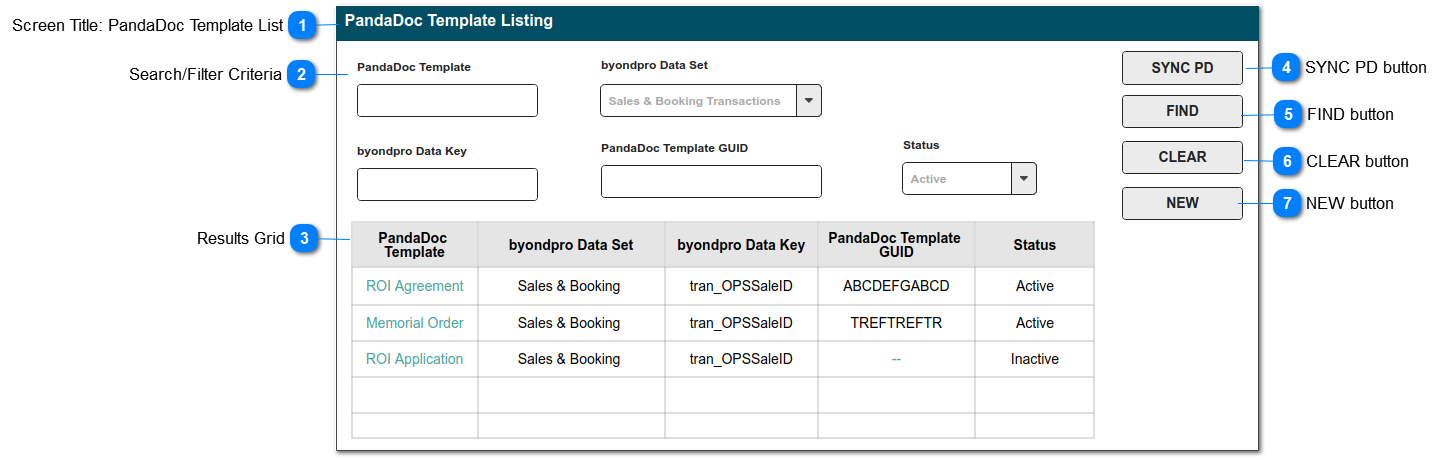
This screen will show a list of the PandaDoc templates configured for use with byondpro.
It includes a "Retrieve" function to call the PD Template List API, and match template names and unique GUIDs.
 Screen Title: PandaDoc Template List
This is the screen title: PandaDoc Template List
|
Type
|
Notes
|
Rules
|
Compulsory
|
Format
|
Edit
|
Size
|
Default
|
Error Message
|
|
Title
|
|
1. this screen / menu item is located in the Administration > Cemetery System Setup
|
|
|
|
|
|
| |
|
 Search/Filter Criteria
|
|
 Results Grid
The following columns should be sortable: PandaDoc Template, byondpro Data Set
The PandaDoc Template should be a hyperlink to corresponding entry summary screen.
|
|
 SYNC PD button
This is an action button to call the PandaDoc List Templates API and to retrieve GUID information.
|
Type
|
Notes
|
Rules
|
Compulsory
|
Format
|
Edit
|
Size
|
Default
|
Error Message
|
|
Button
|
This function will pull in PandaDoc templates using the API.
If GUID does not match, it will create a new entry in byondpro. The entry is set to inactive, until the byondpro Data Set and Key are updated.
|
1.Selecting the SYNC PD button will call the PandaDoc List Templates API.
2. Entries will be matched on the unique GUID.
2a. If the GUID is not present in the byondpro data entries, INSERT an entry, using the corresponding PD values:
- PANDADOC TEMPLATE
- PANDADOC TEMPLATE GUID
- STATUS: Inactive
3. If the GUID for an existing entry in byondpro cannot be matched to PandaDoc Templates, set STATUS: Inactive
|
N
|
|
|
|
|
| |
|
 FIND button
This is an action button to initiate a new search based on the filter crriteria selected
|
Type
|
Notes
|
Rules
|
Compulsory
|
Format
|
Edit
|
Size
|
Default
|
Error Message
|
|
Button
|
|
1.Selecting the FIND button will initiate a search of the PandaDoc Template entries, filtered according to the selections made in (2).
2. Search results to be listed in the search results grid.
3. Records will be based on the "AND" operation among the search filters.
|
N
|
|
|
|
|
| |
|
 CLEAR button
This is an action button to clear all search results
|
Type
|
Notes
|
Rules
|
Compulsory
|
Format
|
Edit
|
Size
|
Default
|
Error Message
|
|
Button
|
|
1. Selecting the CLEAR button, will clear all search parameter selections previously made in (2).
1a. Will empty the search results grid of previous results.
|
N
|
|
|
|
|
| |
|
 NEW button
This is an action button to open a new Template Configuration entry form.
|
Type
|
Notes
|
Rules
|
Compulsory
|
Format
|
Edit
|
Size
|
Default
|
Error Message
|
|
Button
|
|
|
N
|
|
|
|
|
| |
|