byondpro
Functional Specifications
×
Menu
Index

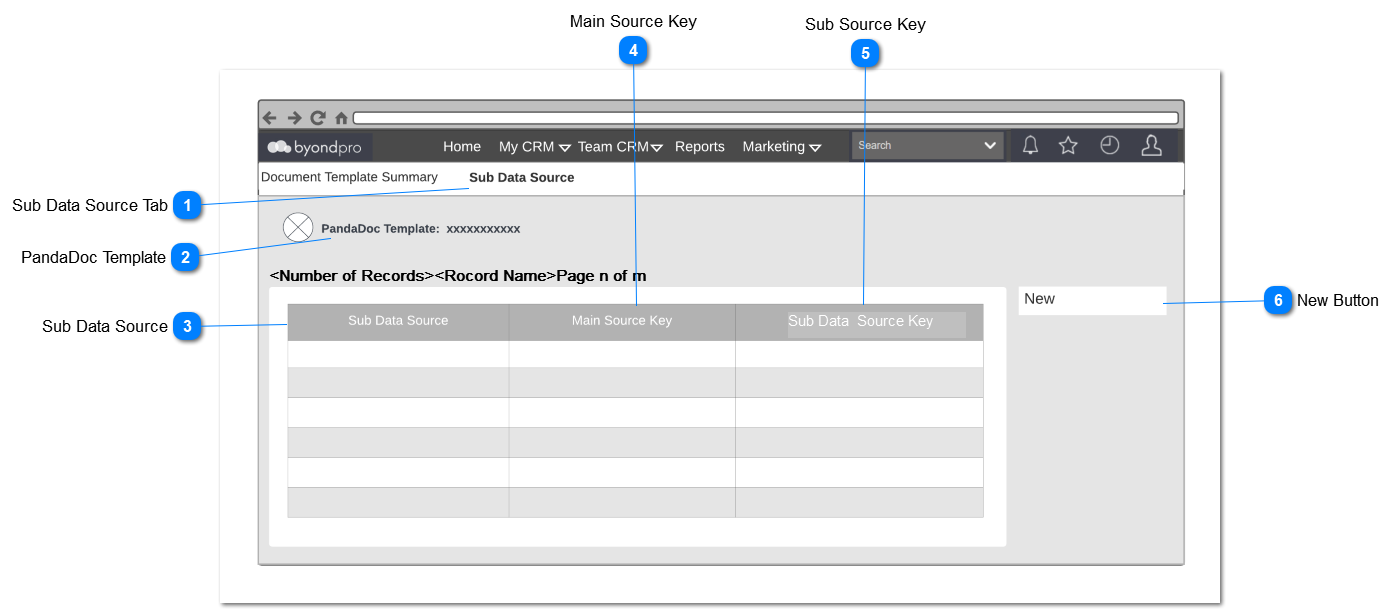
Sub Data Source List

 
Purpose of this new customization part is to add multiple sub data records to the table view structure in a PandaDoc Document template.
 
PandaDoc Template list screen will show a list of the PandaDoc templates configured for use with byondpro. In order to create sub data source, user have to select an existing template.
 
Sub Data Source List
1

Sub Data Source Tab

 
This is the tab header: Sub Data Source
 
Type
Notes
Rules
Compulsory
Format
Edit
Size
Default
Error Message
Title
 
1. This screen is located in the Administration > Cemetery System Setup.


2

PandaDoc Template


Type
Notes
Rules
Compulsory
Format
Edit
Size
Default
Error Message
Title
 
1. This should display the selected PandaDoc template from here.
Y


3

Sub Data Source

 
This column in the select data source ( SQL view)  which is already define in db.
 
Type
Notes
Rules
Compulsory
Format
Edit
Size
Default
Error Message
Selection
 
1. Select data source ( SQL view) from the list.
Y
hyperlink
N


4

Main Source Key


Type
Notes
Rules
Compulsory
Format
Edit
Size
Default
Error Message
string
 
1. This column shows the Main Source Key.
Y
 
N


5

Sub Source Key


Type
Notes
Rules
Compulsory
Format
Edit
Size
Default
Error Message
string
 
1. This column shows the Sub Source Key entered from here.
Y
 
N


6

New Button


Type
Notes
Rules
Compulsory
Format
Edit
Size
Default
Error Message
Button
 
1.  Opens a new Sub Data Source entry screen here.
N


The online help was created with Dr.Explain