New Cremated Remains - related record updates
This is to confirm the requirements for Location and Interment record updates, when creating new Cremated Remains records.
Sept-2023: updates highlighted below
When using the NEW Cremated Remains feature, from either of these access points:
- NEW menu > New Cremated Remains
- SALES & BOOKING > Cremated Remains tab > New Cremated Remains
In addition to the existing creation of a Cremated Remains (OPCCR) and CR Location (OPCCRLoc) entry, the following 2 data tables are affected:
LOCATION (OPLLocation)
check Operational Status (loca_status) - if equal to "Interment" > no action required
If not equal to "Interment"
1. Set loca_status: interment
2. Write tracking record with user, date, time + field change from (value) to (interment)
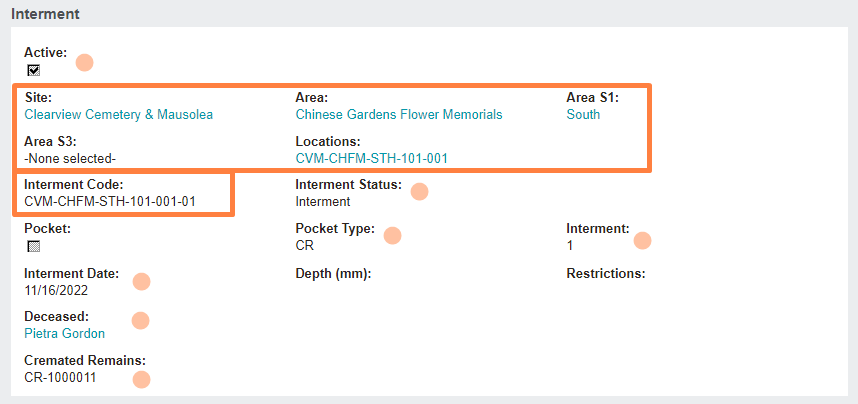
INTERMENT (OPLInter)
Set following values:
ACTIVE: Y
LOCATION links: Site, Area, Area S1/S2/S3, Location Code (matched to the location selected in New entry screen)
INTERMENT code: per Location + suffix per existing logic to increment +1 with each new interment
INTERMENT STATUS: Interment
POCKET TYPE: CR
INTERMENT: (set by CR task)
INTERMENT DATE: today
DECEASED: link to person ID, listed in New CR entry
CREMATED REMAINS: link to CR record, created on SAVE of New CR entry