byondpro
Functional Specifications
×
Menu
Index

Location Status Change

 
Location Status Change
1

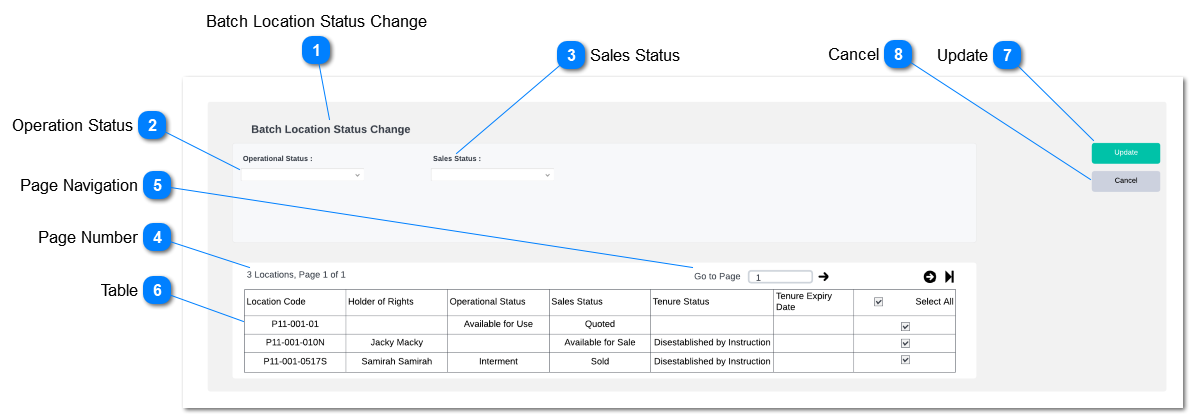
Batch Location Status Change

 
Type
Notes
Rules
Compulsory
Placeholder
Format
Edit
Size
Default
Messages
Read Only - Text
Display title of the page
1. Show title field of the screen.
-
-
-
-
-
-
-
2

Operation Status

 
Type
Notes
Rules
Compulsory
Placeholder
Format
Edit
Size
Default
Messages
Drop Down
This will update the location status in location record.
  • The same batch location revaluation rules will be applied as per existing functionality. (MyCRM> Batch Location Status Change)
     
  • Drop Down values will be as follows;
  • Available for Sale
  • Disestablished
  • Future Construction
  • Interment
  • Public Grave
  • Removed
  • Unavailable Temporarily
  • Unavailable
  • All
  • None
-
-
-
-
-
All
-
3

Sales Status

 
Type
Notes
Rules
Compulsory
Placeholder
Format
Edit
Size
Default
Messages
Drop Down
This will update the location status in location record.
  • The same batch location revaluation rules will be applied as per existing functionality. (MyCRM> Batch Location Status Change)
     
  • Drop Down values will be as follows;
  • Available for Sale
  • Disestablished
  • Future Release
  • Not Available for Sale
  • Quoted
  • Release Pending
  • Sold
  • Payment Plan
  • Per Primary
  • Temporarily Not Available
  • Reserved
  • All
  • None
-
-
-
-
-
All
-
4

Page Number

 
Type
Notes
Rules
Compulsory
Placeholder
Format
Edit
Size
Default
Messages
Read Only - Text
 
Number of results and page number out of total pages should be shown to the user.
-
-
-
-
-
-
-
5

Page Navigation

 
Type
Notes
Rules
Compulsory
Placeholder
Format
Edit
Size
Default
Messages
Text Search
 
System should allow user to navigate between result pages
-
-
-
-
-
-
-
6

Table

 
Type
Notes
Rules
Compulsory
Placeholder
Format
Edit
Size
Default
Messages
Table
 
Result Grid will include fields such as;
  • Location Code
  • Holder of Rights
  • Operation Status
  • Sales Status
  • Tenure Status
  • Tenure Expiry Date
 
Following fields will appear on the result grid based on filter criteria. Filed data will be fetched from location summary; (Location> Find> Location> Location Summary)
 
In the Select All column, Ticking select all will select all the transaction and deselecting the tick box will deselect all transactions. User will be having option to select and deselect each transaction.
-
-
-
-
-
-
-
7

Update

 
Type
Notes
Rules
Compulsory
Placeholder
Format
Edit
Size
Default
Messages
Action Button
Clicking the action button will update the location records as per the updated fields.
  • The same batch location status change rules will be applied as per existing functionality. (MyCRM> Batch Location Status Change)
     
  • Confirmation message will pop-up with fields with changed values as per the standard location update confirmation screen. Clicking "update locations" will process the location update.
     
  • If a select field field validation will be applied if the user enter invalid value. listing the list of transactions which were not updated will appear on the pop-up if the user click on the update failure notification appear on the batch location update tool.
     
  • Only updated fields will be updated to the location record.
 
Pre-Codition:
At-least one field should be selected
-
-
-
-
-
-
-
8

Cancel

 
Type
Notes
Rules
Compulsory
Placeholder
Format
Edit
Size
Default
Messages
Action Button
 
Clicking the action button will return the user to byondpro Batch Location Update Tool screen.
-
-
-
-
-
-
-
 
The online help was created with Dr.Explain