byondpro
Functional Specifications
×
Menu
Index

Interment Right Transfer

 
This feature uses a Sales & Booking type to manage changes to the Right of Interment Holder on a cemetery Location as a formalised process.
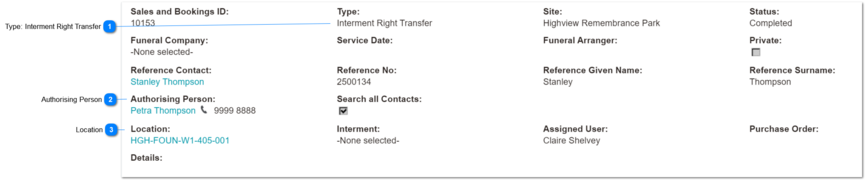
To effect the transfer, create a Sales & Booking entry and set the following values:
• Type: Interment Right Transfer.
• Reference Contact: is not required, but if you choose to enter the previous rights holder name in this field, the sales entry will be visible against this Person.
• Authorising Person: new rights holder
• Location: cemetery location record to be edited
- SAVE
 
Change S&B Status to Completed...
1. an additional HOR record is created linked to the S&B Location record
- Person: current Location HOR
- Type: original purchaser
2. the Location record HOR field is changed to equal the S&B Authorising Person
 
Interment Right Transfer
 
1

Type: Interment Right Transfer

 
This is the S&B transaction type that triggers the associated record updates when S&B status is changed to completed.
 
Type
Notes
Rules
Compulsory
Format
Edit
Size
Default
Error Message
Selection List
 
All  pre-existing rules apply


2

Authorising Person

 
This is the authorising person for the rights transfer, and to whose name the right of interment will be transferred.
 
Type
Notes
Rules
Compulsory
Format
Edit
Size
Default
Error Message
Lookup
 
All  pre-existing rules apply.


3

Location

 
This is the cemetery Location for which the rights holder (person) record is to be changed.
 
Type
Notes
Rules
Compulsory
Format
Edit
Size
Default
Error Message
Lookup
Only applies for S&B Type: Interment Right Transfer
All  pre-existing rules apply, plus:
 
1. Restrict search options to exclude Location Group component records.
That is, where Primary Location is not null.


The online help was created with Dr.Explain