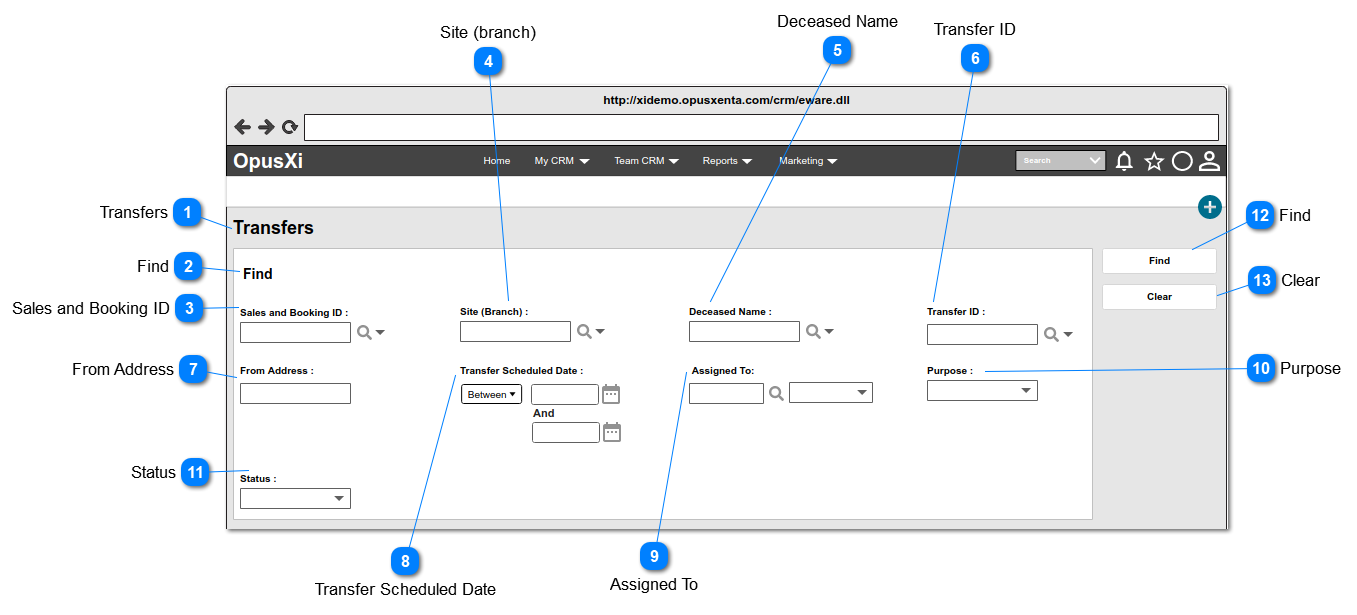
Pre-conditions: 1. There should be at least one Sales and Booking record created with Record Type = Funeral Home underneath the funeral home, in order to list down as the options.
1. List the Sales and Booking IDs of the records created with Record Type = Funeral Home and order by ASC.
2. The columns displayed as the "View Fields" in the lookup will be,
Sales and Booking ID
Type
Site (branch)
Deceased/Reference Name
3. This element conforms to standard CRM advanced search select field controls.
Pre-conditions: 1. There should be at least one deceased record created via a Sales and Booking underneath the Funeral Home, in order to list down as the options.
1. List the full names of the deceased persons created and order by ASC.
2. The columns displayed as the "View Fields" in the lookup will be,
First Name
Middle Name
Last Name
Gender
Date of Birth
Date of Death
State
City
3. This element conforms to standard CRM advanced search select field controls.
Pre-conditions: 1. There should be at least one transer record created via a Sales and Booking underneath the funeral home, in order to list down as the options.
1. Text entry field that searches the list of Transfer IDs
2. The text format of the options will be:
<<Funeral Home Code/Site>>-<<Sales and Booking ID>>-<<Transfer number>>
(ex:- RFH-00150-02)
3. This allows to enter any characters including numbers, letters and special characters.
1. Once the user clicks on the calendar icon (placed next to the date text field), it will show a Date Picker and the user will be able to select a date from it.
(Consider
Profile Menu -> Preferences -> Date/Time Preferences
Pre-conditions: 1. There should be at least one person (will be an employee of FH) created underneath the funeral home, in order to list down as the options.
1. List the full names of the persons (will be employees of FH) created underneath the funeral home and order by ASC.
2. This element conforms to standard CRM user select field controls.
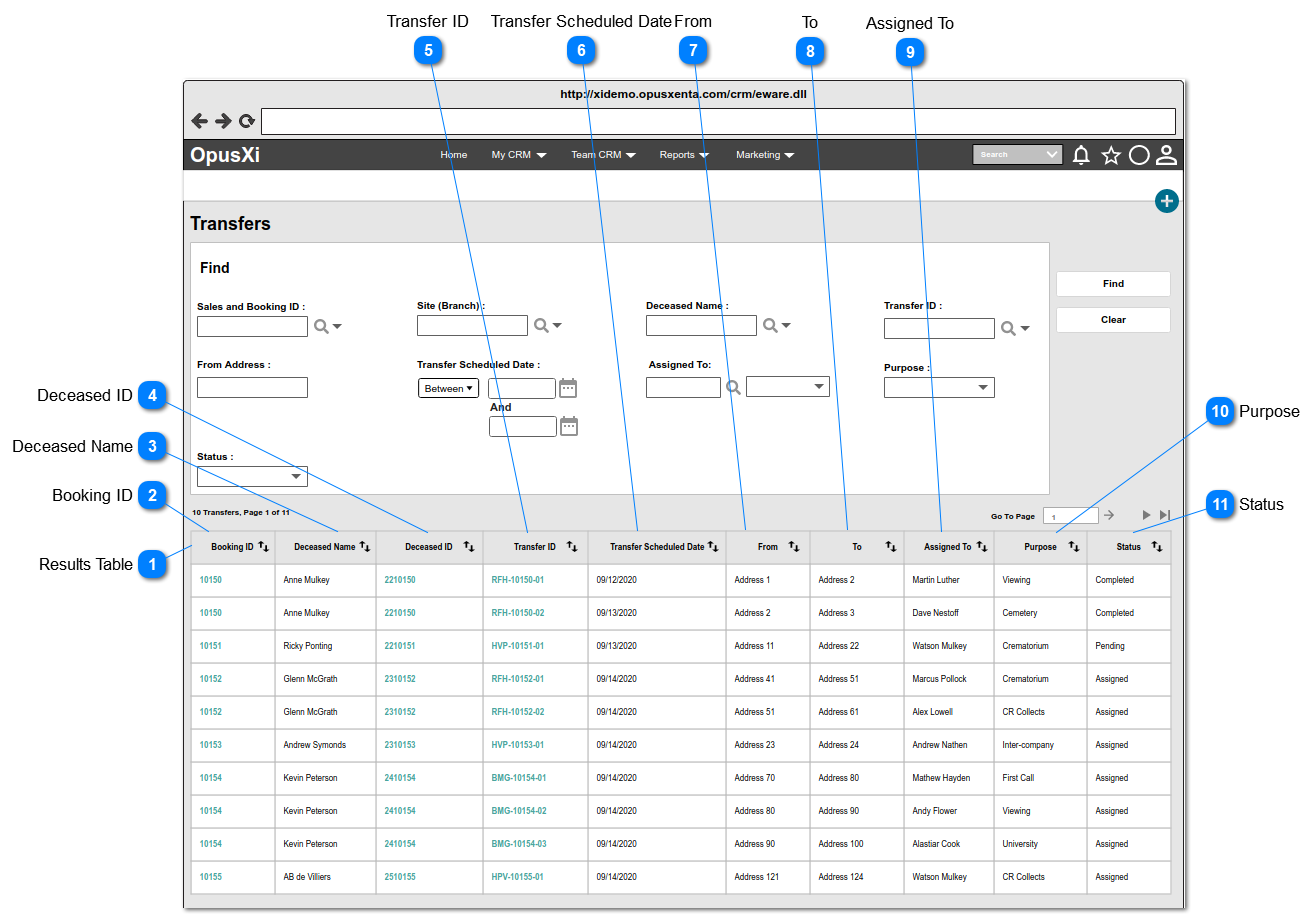
1. ALL the transfer records fetched based on the filter criteria, will be list down in this table.
2. By default, sort the table by the column "Booking ID" in ASC order.
3. This table allows the user to,
sort by all the columns in ASC or DESC order.
move between other pages by the navigator placed at the top right corner of the table.
4. If the system found records, show the text, placed at the top left corner of the table. The format of the text is <<search results count>> Transfers, Page <<current page number>> of <<total pages count>>
5. If no results found, show the text "No Transfer records", placed at the top left corner of the table.
6. IF the data/details of a record empty/null, the column will be blank.
Column in the table showing Sales and Booking ID of the Transfer records.
1. Each Booking ID will be an Anchor Text, and when the user clicks on the anchor text, the system will navigate the user to the Sales and Booking summary page.
Column in the table showing Deceased Name of the persons.
1. IF the deceased person record created; the full name of the deceased person will be displayed as an anchor text. Once the user clicks on the anchor text, the system will navigate the user to "Person" summary page.
2. IF the deceased person record NOT yet created, show the <<Deceased Given Name>> <<Deceased Surname>> which the details provided when creating the Sales and Booking record, otherwise this will be blank.
Column in the table showing Deceased ID (i.e. the "Reference No") of the persons.
1. IF a person has been attached/linked to the sales and booking records, the "Reference No" of each person will be displayed, otherwise this will be blank.
2. Each Deceased ID will be an Anchor Text, and when the user clicks on the anchor text, the system will navigate the user to Transfers List of a particular deceased person.
Column in the table showing Transfer ID of the Transfer records.
1. Each Transfer ID will be an Anchor Text, and when the user clicks on the anchor text, the system will navigate the user to the "Transfer Summary" page (the appearance of this page will be same as the New Transfer page with the prefilled data).
2. The text format of the options will be:
<<Funeral Home/Site Code>>-<<Sales and Booking ID>>-<<Transfer number>>